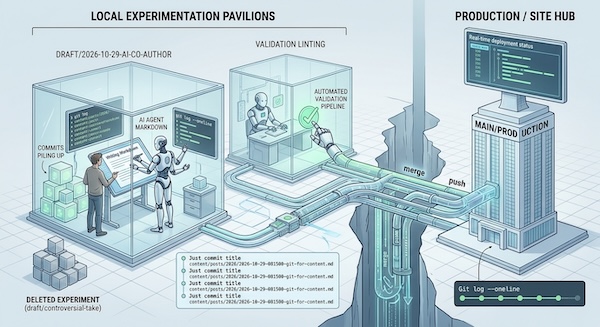
I have written many articles over the years about why using git for content is worth considering, but now in the age of LLMs and AI, there are even more reasons to move to git powered content workflows. Here are some of the main ones:
Commits as precise save points: Ditch messy file names like draft_v1_final_revised_2.docx for a clean history where every change has an explicit, readable reason attached to it.
Everything is a file: Storing content as plain text or Markdown means you aren't locked into proprietary, closed-ecosystem databases. Your content remains fully portable, future-proof, and entirely yours.
Pull Requests (PRs) as clean conceptual boundaries: Instead of editing everything live in one chaotic space, every piece of writing (a blog post, note, or resource) lives in its own isolated branch/PR. This gives you a high-level view of your project's evolution without drowning in micro-edits.
Automated pipelines and syndication: Treating content as version-controlled files lets you hook up continuous integration (CI/CD) to automatically validate formatting, trigger static site builds, or syndicate RSS content across platforms.
The Agentic Era & Ubiquitous AI: Content workflows are no longer just human-to-human. With AI and LLMs available everywhere, your Git repository acts as the ultimate workspace for human-agent collaboration—allowing autonomous tools to draft, review, lint, and refine your text seamlessly via standard PR workflows.
Another thing to consider is that fact that for content creation day to day you really only need 5% of git. You can completely skip advanced concepts like interactive rebasing, cherry-picking, submodules, or complex merge tools. You just don't need them. However they are there if you ever do for some reason need them, if you are doing something advanced, or working with programmers who do use them.
The point of this post isn't to be a tutorial on git, but just to give a sense for the terminology and the small subset of commands you actually need, here is a list of the most common commands you would be running:
git status– See what files you've changed.git branch– List your local branches so you always know where you are.git checkout -b <branch>– Open a fresh drafting workspace.git add <file> & git commit -m "..."– Save a local snapshot.git log --oneline– View a clean, single-line history of your commit titles.git push– Back up your work to your remote host.git merge– Bring your finished draft into production.
And it's worth remembering that you can setup exports, aliases and functions in your shell configuration for many of these commands, so that you literally only need to type a few keystrokes to do each task.
Git branches are your risk-free drafting spaces. The main branch of a repo is production. It holds the live published version of your blog, docs, site, configuration files, or whatever text files your project consists of. Feature/draft branches are sandboxes to test bold structural changes, alternative introductions, controversial takes. If an idea fails, delete the branch with no impact on main. You can have multiple articles or edits in progress simultaneously without cluttering up your main workspace. Once you are sure the draft branch fits correctly, you safely merge it into the main branch.
For backup, collaboration and auto-publishing you can make use of remotes. With git you always have a full copy locally, but remotes serve as a full mirror. If your hardware fails, or you accidentally delete something important, your entire writing history remains safe. You also gain automated publishing capabilities, for example pushing your main branch to a remote can automatically trigger static site generators, to build and deploy your live site. You also get asynchronous review, editors and co-authors can review pull requests and leave line-by-line feedback using standard code review-tools.
The thing that really makes git powered content workflows feasible is that modern LLM/AI tools can be used to troubleshoot any git issues you run into. In the past running into a detached HEAD state or a merge conflict meant deciphering terminal errors or searching forum threads, but modern LLMs are trained on a ridiculous amount of scenarios. They have seen it all, and any hiccup is trivial to fix. Simply paste your command and the error output into ChatGPT or Claude and ask "How do I get back to a clean state without losing my text?". The AI is your instant Git coach. You can experiment freely knowing you have an on-demand assistant to guide you out of any state.
Git branches and remotes turn writing from a risky, file-juggling process into a structured, stress-free system. With a tiny command footprint and LLMs on standby to handle edge cases, while opening the door to automated pipelines and agentic collaboration. Treating your words like code gives you maximum control with minimal friction.