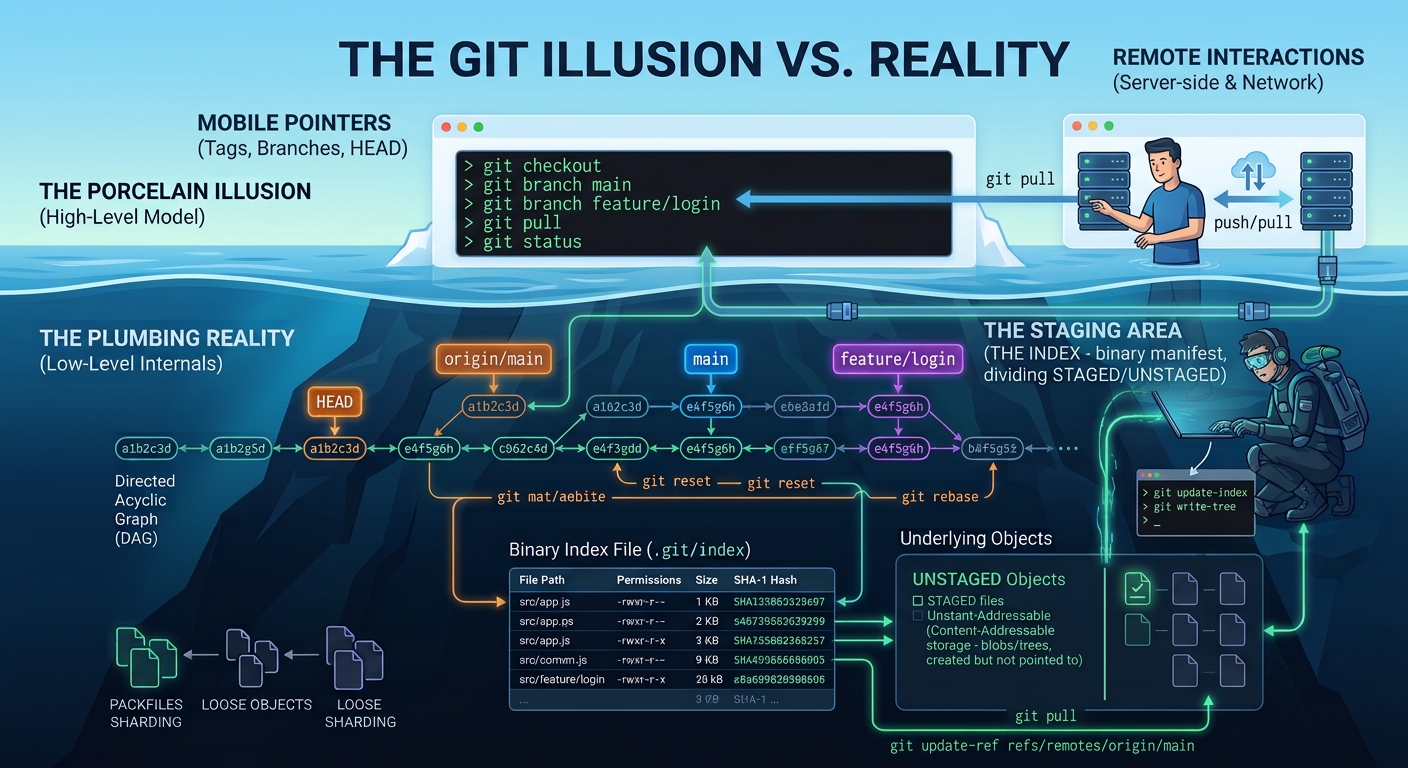
I've been having to switch a lot between git's high level and low level mental models the past few days. It's a bit jarring initially as you realise a lot of the things you rely on day to day aren't actually real. I wrote about that yesterday in my It's all an illusion post. It's not actually all that bad, but it does take a bit of getting used to. I put this cheatsheet together so I have something to refresh my memory next time I need to switch between the different models.
1. The Core Mental Model (The Chain of Commits)
At its absolute foundation, a Git repository is just one giant, continuous history of commits linked together in a chain (a Directed Acyclic Graph). Every commit explicitly points backward to its parent commit, forming an unbroken line of history all the way back to your initial root commit.
Pretty much everything else in Git—branches, tags, remotes, and HEAD—does not store code or alter this fundamental chain. They are simply lightweight, mobile pointers that sit on top of specific commits along this chain.
2. Pointers & References (The Imaginary Layers)
Tags: Lightweight tags are literally just text files in
.git/refs/tags/containing a single 40-character commit hash. (Annotated tags add a tiny metadata object pointing to a commit).Branches (and Backup Branches): A branch is just a text file in
.git/refs/heads/containing a hash that points to a specific commit. When checked out, Git automatically updates this pointer to the newest commit created. Because it isn't a special entity, creating a "backup branch" is simply placing another pointer file on a specific commit node. This guarantees you can always navigate back to those commits by traversing backward through parent references in the acyclic graph.Remotes (Remote Tracking Branches): Files in
.git/refs/remotes/containing a hash pointing to the commit your local Git thinks a remote server's branch was pointing to the last time you communicated.HEAD: A single reference file (
.git/HEAD) pointing to the active branch file (or directly to a commit hash when detached). It tells Git where to attach the next commit.
3. Objects & Storage (The Underbelly)
The Staging Area (The Index): Not a folder, but a single binary manifest file (
.git/index). Think of it like a single-file database (such as SQLite), but instead of a relational query engine, it functions like an embedded key-value store (like Redis). It maps file paths directly to blob hash keys alongside cached file system metadata.git addwrites file contents into the object database as blobs, then records their paths, hashes, and permissions into this index.Blobs (Content-Addressable Files): Git doesn't store file diffs or folder trees; it stores raw file contents as immutable blobs hashed by their content. If two files anywhere in your repo have identical content, Git stores them only once.
Trees (Directory Structures): Map filenames and permissions to specific blob hashes or sub-trees, building up your directory hierarchy.
4. Graph Operations & Commits
The 5 Components of a Commit: Every commit object is constructed from exactly 5 pieces of information:
| Component | Description |
|---|---|
| 1. Root Tree Pointer | Hash of the top-level directory snapshot. |
| 2. Parent Commit Hash(es) | Hash of preceding commit(s) (1 for standard, 2+ for merge, 0 for root). |
| 3. Author Info | Name, email, and original timestamp. |
| 4. Committer Info | Name, email, and timestamp of when the commit was applied. |
| 5. Commit Message | The text payload. |
<<<<<<< HEAD
=======
c73609cf0 (Post: Git internals essentials)
Rebase as Copying: A rebase is an automated copy operation. It takes a sequence of commits, recreates their changes as brand-new commits (with new hashes, timestamps, and parents), and chains them onto your target destination commit.
Reset (git reset):
git resetis the primary operation you use when you want to "delete" or "undo" commits. However, technically it is purely pointer manipulation rather than actual deletion: all it does is make your active branch pointer point at a different commit in the acyclic graph commit history. Optionally, it leaves changes in your working directory and staging area (--soft,--mixed) or clears them out (--hard), leaving any unreferenced commits behind in the object store.
5. Connecting High-Level to Low-Level (Plumbing vs. Porcelain)
Porcelain vs. Plumbing Commands: High-level user commands (
git checkout,git commit,git merge) are called Porcelain. Low-level internal inspection/manipulation commands (git cat-file -p <hash>,git ls-tree,git update-ref) are called Plumbing. Looking at objects via plumbing reveals that the high-level commands are just convenience wrappers over reading/writing.git/pointer files and object hashes.Orphaned (Dangling) Commits & Reflog: When references move away (via
reset,rebase, or branch deletion), old commits remain in the object store. They become "dangling" or orphaned commits simply because they are no longer reachable by walking backward from any active branch or tag reference. The Reflog (.git/logs/) acts as a safety journal recording every past position ofHEADover the last 90 days, enabling recovery of any unreferenced node by repointing a reference back to it.Three-Way Merge Engine: A merge isn't a magical comparison between two branch tips. Git finds their Common Ancestor node in the DAG, generates diffs from
Ancestor → OursandAncestor → Theirs, combines those diffs, and creates a single Merge Commit with two parent hashes.
It can seem a bit daunting at first, but this is often the way with software when you look under the surface level because the way humans think about things often isn't the most optimum from a computer architecture perspective. The cool thing about git though is you can easily look underneath the surface level when you need or want to, and it's mostly all just text files so you can open them and see exactly where the various references point to.
In fact reading this cheetsheet and then dumping this into an LLM and then having a conversation about a particular situation you are in will likely lead to good results. You can paste output from commands you run, maybe even have the LLM generate commands for you. Then ask it to analyse the output, showing you which reference points to which commit. You can even get it to generate some ASCII art diagrams representing the situation at hand, that use actual real data from your command output. Be a bit careful, follow the logic through and ask questions because it doesn't always get things right. The LLM is just a probabilistic prediction machine trained on crazy amounts of data, so there are times when it starts getting things wrong, or it suddenly tells you the complete opposite of the thing it said just a few turns before. However it's normally possible to get to the answer to the problem you are looking for eventually.