- Title: Saturday 4th September, 2021
- Issue: #42
- Overview: Template Trilogy 4/4
This week’s newsletter is out!
So why is SpaceX buying Swarm? - Interesting developments in the space race, pico satellites for the internet of things ckarchive.com #
What is Designing for Safety? with Eva PenzeyMoog - There are a lot of areas that people don’t generally consider in this topic, people don’t speak about it much, and it’s deceptively difficult to get right share.transistor.fm #
I got my device charged again, but I had to position the power cable in the weirdest and most contorted way, every moment could be my last, I hate this situation en.m.wikipedia.org #
Shop Talk Show Ep #475 - Ben Hong’s Views on Vue, VuePress, Nuxt, Petite Vue, Shopify + Netlify, and Static Hosting - Linking to this because listening to a webdev podcast cheered me up a bit shoptalkshow.com #
Apple’s Mistake - Ben Thompson on the Apple CSAM fiasco - “Apple is compromising the phone that you and I own and operate, without any of us having a say in the matter” stratechery.com #
Apple’s New ‘Child Safety’ Initiatives, and the Slippery Slope - I’m down to 2% power now, haven’t had time to read this article, I always said the internet would be shutdown by people trying to ‘protect’ children, looks like my final link is all about that, Goodbye World daringfireball.net #
It’s that weekly thing again where my power cable stops working right after I publish the newsletter, still no place open to buy power cables, just spent over an hour trying to get my device charging, down to 8% power now, looks like this is how it all ends, goodbye cruel cruel world, maybe other worlds are available, I just want to build websites, surely that’s not too much to ask en.m.wikipedia.org #
Tropical MBA Podcast Ep #609 - Is DeFi the Future of Finance? - Learnt some new stuff listening to this including CeFi vs DeFi and what stablecoins are and why they are useful tropicalmba.com #
Jamstack Radio Podcast Ep #84 - The New Web with Harrison Hines of Fleek - Most crypto stuff is focussed on finance, but this episode is concentrated on using blockchain based technologies and open protocols to build websites and apps on a stack that essentially replaces the Web 2.0 stack we have been using for the past decade - Includes quite a bit of practical advice on how to get started in this space heavybit.com #
🚀 My javascript / tech / web development newsletter for 2021-08-07 is out! blog.markjgsmith.com #
London Hard Fork on Ethereum Now Live - The changes are expected to make the crypto currency more stable decrypt.co #
FSF-funded call for white papers on philosophical and legal questions around Copilot - I think this might be interesting to watch, especially if you are a developer, because it’s a serious effort to investigate the implications of using AI in software development tools, and they outline sone really interesting questions around freedom that arise with these new tools, all selected/published papers will receive $500 fsf.org #
Can GitHub Copilot Crack a Facebook Coding Interview? - Has sone animated gifs showing Copilot in action, it certainly looks impressive, my first thought is that if everyone is using such tools, will they really know the codebase they are working on, won’t it just result in people having a very superficial understanding? medium.com #
Power cable on the blink again, down to 10% battery, still nowhere open to buy a new cable en.m.wikipedia.org #
Conversations with Tyler Podcast - David Deutsch on Multiple Worlds and Our Place in Them - I enjoyed this podcast a lot, and was struck by several things (1) the many worlds theory is quite weird to think about, it has some very unexpected and strange sounding aspects (2) I found the exploration of where philosophy meets physics enlightening, both from a historical perspective, but also how practically important it is that both these disciplines are functioning well, and (3) it’s amazing and also scary to me that it’s possible to have a mastery of subjects such as reality, evolution & freedom that is comparable to how I feel about web development, with the ability to know clearly and precisely which parts you know about, which parts you don’t, which parts require further experimentation and debugging, something which David certainly appears to have, hopefully he has some incredible refactoring tools to help with his institution and government systems building cowenconvos.libsyn.com #
Deviate with Rolf Potts Podcast Ep #169 - The Olympics started out as a travel fest - All about the ancient Greek Games - Very topical since the Tokyo Olympics games are currently happening, this is a great exploration of the ancient games that ran for 1200 years without break, looking at specific details to get a sense of the culture of the time, how it was intertwined with philosophy and life in general, and how it affected politics across the world - I was very surprised how interesting this part of history is and how much it has shaped the modern world rolfpotts.com #
The situation in HCMC Vietnam where I am is rather dire, everything everywhere I go is shut, the only cooked food I can buy is literally fried eggs and hot dogs, it’s been like this for around 2 weeks, just wanted to make a public note of that here en.m.wikipedia.org #
Ninja Tune Podcast - Mind w/ ELKKA, Percolate, Yaya Bey & Peach - Interesting conversation about mental health in the electronic music industry, I feel like the conversation was a lot more real than some of the similar efforts I’ve heard from software / web development podcasts.google.com #
The most unbelievable things about life before smartphones - Of course so much has changed over the past 20 years or so, but it has happened bit by bit, so you almost don’t realise the enormity of it all, this article does a phenomenal job of describing just how drastic that change has been, by highlighting specific details of every day life - It’s scarily accurate mattruby.substack.com #
New in Git - switch and restore banterly.net #
Tokyo’s Olympic medals made from recycled electronic devices cosmosmagazine.com #
Running CPU-Bound Tasks in Node.js - Introduction to Worker Threads - Well written article with just the right amount of explanation and detail and some clear code examples yarin.dev #
oozcitak/xmlbuilder2 - An XML builder for node.js - I haven’t used this myself but the interface looks very nice especially the ability to create an XML file from a javascript object, certainly looks like it makes working with XML files much easier github.com #
Using Google Drive as a CMS - Kind of a neat idea, especially for use cases where non technical folks are managing the content using Drive - The article has some good suggestions but is a bit light on code samples css-tricks.com #
Beachball - The Sunniest Semantic Version Bumper - It’s by the folks at Microsoft, looks very robust and useful microsoft.github.io #
Tropical MBA Podcast Ep #608 - The History of Digital Nomadism - Interview with James Clark, all about the digital nomad movement and phenomenon, really great episode listened to last night, posting it now tropicalmba.com #
🚀 My javascript / tech / web development newsletter for 2021-07-31 is out! blog.markjgsmith.com #
Conversations with Tyler Podcast - Niall Ferguson on Why We Study History - I won’t try to describe in detail the topics covered since the episode description does a far better job than I could do, but I really enjoyed this, it’s a very high-brow look at some interesting aspects of UK history, from the perspective of a Scott who has studied the relevant history in great depth and formed some controversial views - One aspect I liked and share with him is a dislike for the common practice of reviewing the past using the current world view, anyway I was really wanting to hear some stuff about the UK recently, because so much of what I listen to has a US focus, and this episode was exactly that, I’d love to hear similar stuff from english/welsh/northern-irish folks to get a more complete picture of the UK - I don’t know if the interview is live or if the questions are shared in advance, either way, it’s a real pleasure to listen to cowenconvos.libsyn.com #
I’m still having power cable issues, but it started working again, so I’m back online, not sure for how long though en.m.wikipedia.org #
The Changelog Podcast - Why we 💚 Vim - I’ve been using VIM for many years now, so I really liked this episode, the care and attention to detail in how it was put together, and I even learnt a few things - VIM is awesome :) changelog.com #
20 000 Hz Podcast Ep #72 - 808 - I browsed back through some of the old episodes and noticed I hadn’t listened to this one, it features some of the most iconic samples, loops and sounds that are now part of the international cultural soundscape, explores their origins, and the stories around how electronic sounds gradually got integrated into music - It’s a great listen 20k.org #
Resident Advisor Podcast Ep #790 Cici - 2021.07.25 - I wasn’t too keen on the description but this mix has some rather good bits, the first half is a bit patchy, but the overall progression is kind of cool, some fun bouncy acid and electronic/house/tech, then into break beat, drum & bass and jungle tracks, interesting selection of uptempo and occasionally bassey EDM - Momentarily transported me back to the late 90s - It’s nice to hear old sounds and rhythms sometimes ra.co #
This Week in Travel Podcast Ep #286 - John Argento - RVing in Europe - Nice detour from Tech into Travel, very interesting account of a recent RV trip - Also an unexpected mention at the end of a new movement called Podcast 2.0 being led by Proto-Podcaster (and RV enthusiast) Adam Curry - I think it can be summarised as Podcasting + Bitcoin + Tipping while you listen, and sounds like it could be an interesting direction thisweekintravel.libsyn.com #
Deviate Podcast Ep #168 - Japan’s Shikoku Pilgrimage - I felt a sort of kinship with the interviewee since, like on his pilgrimage, I am currently experiencing the challenges associated with walking around in small shoes rolfpotts.com #
Freakonomics Podcast Ep #470 - The pro’s and cons of America’s (extreme) individualism - I really enjoyed this episode, it was very focussed on the USA, and it would have been nice to hear about the UK a bit more, but it nonetheless paints quite a good high level picture of the cultural tides that shape the world around us - I don’t think any country got painted in particularly negative light, things are just different in different places, it’s nice to have a cultural map like this, I’d be interested to hear about similar maps created by other nations omny.fm #
Shop Talk Show Ep #473 - Brad and Ian Frost - From meteorologist to web developer - There’s a nice story of career change into web development, but the thing I found interesting is their discussion about web components, which they have been using as a way to reuse frontend functionality across apps, dropping them into different frameworks such as React and View that handle the orchestration - They have found that this way of building fits in well with larger companies that have many different frameworks across their organisation, but still want a consistent look and feel to their apps shoptalkshow.com #
Tech Dirt Podcast - Free speech, elections, vaccines, and social media - Level headed discussion about the most pressing free speech issues currently arising in the tech industry m.soundcloud.com #
The New Stack Podcast Ep #1266 - Cloud native deployments bring new complexities to the developer - Interesting discussion around how the move to cloud native infrastructure is affecting developers, how they are now having to get involved in devops activities and how a defacto architecture is emerging based around Kubernetes podcasts.google.com #
🚀 Today is the 10th anniversary of my linkblog! I don’t have much commentary to add, apart from I’m glad that I made it this far, and hope that over the next 10 years I’ll be able to share more great things from the world wide web :) links.markjgsmith.com #
20000 Hz Podcast - The Buzzer - Really well produced episode, very much in the audio documentary style that makes the 20 000 Hz podcasts really great, this episode has mystery, intrigue and old school tech in the form of short wave radio, I enjoyed this much more than I thought I would 20k.org #
🚀 My javascript / tech / web development newsletter for 2021-07-24 is out! markjgsmith.substack.com #
I’ve been surviving the past week with a really dodgy power cable, sometimes worked but had to place it carefully, all the shops are still closed, as soon as I sent out the newsletter today the power cable now totally doesn’t work at all, I’m at 10% power, once again I hope to be back online soon! en.m.wikipedia.org #
Node-Red - Version 2.0 released - There aren’t a huge amount of new features, however they are releasing the first version of a flow debugger and linter which look super interesting, it’s part of their push to improve the developer experience nodered.org #
vervet/ncc - Compile a Node.js project into a single file - Supports TypeScript, binary addons, dynamic requires github.com #
Tech.eu Podcast - Going after the world from Europe - Interview with Jean-Pierre Saad from investment firm KKR - I enjoyed this interview, some good perspective, lots of stuff happening in the european tech sector share.transistor.fm #
Virgin Galactic: Sir Richard Branson rockets to the edge of space - This happened a few weeks ago, I’m just seeing it now, I’ve listened to some great space podcasts this week, so it’s incredible to hear that he made it up there, pretty big moment for travel :) bbc.com #
Clubhouse is no longer invite-only theverge.com #
Google Maps will help you avoid crowded mass transit in way more cities - The subway carriage business tool sounds cool theverge.com #
Source Code Podcast - Netflix gaming, privacy fights and the rise of Tiger Global - Great selection of interesting and current tech topics with coverage of Netflix’s somewhat surprising move into the gaming space, the recent twists and turns in the privacy debate which has gravitated over to the W3C, and Tiger Global shaking up the VC industry, all with just the right amount of depth and analysis podcasts.google.com #
Lex Fridman Podcast Ep #198 – Sara Walker - The Origin of Life on Earth and Alien Worlds lexfridman.com #
Lex Fridman Podcast Ep #201 – Konstantin Batygin - Planet 9 and the Edge of Our Solar System lexfridman.com #
Automattic, owner of Tumblr and WordPress.com, buys podcast app Pocket Casts - Pretty big news I’d say, I used to use Pocket Casts, it’s a great app, and Wordpress is of course massive and looks to be setting sail in an interesting direction theverge.com #
🚀 My javascript / tech / web development newsletter for 2021-07-17 is out! blog.markjgsmith.com #
🚀 New project on my Portfolio - Making a Squarespace website dynamic with a serverless API, frontend page hydration and search blog.markjgsmith.com #
Earlier today I was chased down by 6 what appeared to be police officers in Vietnam HCMC in broad daylight right outside the main palace, they were on motorbikes, one of them them drove into me on purpose hitting my feet with great force, they then beat me with a truncheon, and I have sustained quite a serious injury to my left foot (probably broken), and I am having real difficulty walking and balancing now, I am very shook up by the experience - I just wanted to make a public note of that here en.m.wikipedia.org #
🚀 My javascript / tech / web development newsletter for 2021-07-10 is out! blog.markjgsmith.com #
In the ongoing saga of the universe vs Mark Smith, which has recently gotten much more intense, my main device power cable has suddenly stopped working, and because of the crazy world situation most shops are shut, so posting this in case it takes a while, hopefully I’ll be online again soon, all the best en.m.wikipedia.org #
Trump Sues CEOs of Facebook, Twitter and Google Over Social Media Bans thewrap.com #
We need a Butlerian Jihad against AI - Controversial but also quite topical because of how much development is happening in the AI space, it looks at some of the purely ethical and moral considerations that could arise because of advances in AI tech erikhoel.substack.com #
States charge Google with violating antitrust laws in Play store protocol.com #
Shop Talk Show Podcast Ep 470 - Slap a WAAPI, Explaining the Shadow DOM, LayoutNG, iFrames, the Web Animation API - Good episode this week especially if like me you have been a bit mystified by the shadow-dom, which it turns out can be more accurately described as the egg-dom shoptalkshow.com #
The Another Podcast Podcast - 'Digital transformation' - beyond the silly slogan - Some interesting historical context about what digital transformation is all about, from main frames to cloud computing, it’s all happening, all at the same time - This struck a chord with me because just the past few days I’ve been having this weird feeling that I’m somehow stuck in an alt reality designed by main frame programmers, but I just want to do things the cloud way :), no offence intended to anyone another-podcast.simplecast.com #
League of Legends’ new music gives streamers lo-fi beats to game to - I really like this idea for a themed music album, curious to hear what it sounds like polygon.com #
England beat Ukraine 4-0 to go through to the Euro semi-finals bbc.com #
Where are we going from here? Software engineering needs formal methods - I liked this because it’s well written but also because it highlights that software is used in many different areas and that formal methods are appropriate in some of those but not necessarily all those areas, and the world of software engineering is changing as we learn new approaches, things worth considering as we introduce AI dev tools ntietz.com #
🚀 My javascript / tech / web development newsletter for 2021-07-03 is out! blog.markjgsmith.com #
Your AI pair programmer - I’ve been wondering when AI based tools would start to make appearances in dev tool chains, here’s one from Github, hopefully it won’t have the annoying behaviour that some other autocompletion tools have of blocking your cursor at the exact moment you try to insert and type copilot.github.com #
Instagram spreads its wings, planning to add paying subs and more focus on video siliconangle.com #
🚀 My javascript / tech / web development newsletter for 2021-06-26 is out! blog.markjgsmith.com #
Microsoft announces Windows 11, with a new design, Start menu, and more - It’s been a long time since I was a Windows user, that was when Windows 10 was in the early days, clearly a major version bump doesn’t happen very often in Windows land, so it’s big news, and reading the feature list it looks like a lot of attention has been paid to integrations and I’m getting a sort of wholesome feeling about this release, interested to see how the rollout goes theverge.com #
Google delays Chrome's cookie-blocking privacy plan by nearly 2 years cnet.com #
Amazon is acquiring a podcast hosting and monetization platform theverge.com #
“Fantasy Hollywood” - Crypto and Community-Owned Characters - This all sounds interesting, bringing governance concepts developed in open source code communities to other types of building activities, and I don’t doubt that there’s really many people that are earnest in their endeavours, but my overall feeling towards “communities” is rapidly approaching negative infinity, and so these governance models look more and more just like ways for people to cement their power over others, and it pains me to say it because I’ve always been an optimist, but my experience is that when the rubber meets the road, these co-ordination methods just get used to crush people even more efficiently future.a16z.com #
Changelog Podcast - Funds for open source - I’m literally right in the middle of my own intolerable funding issues, so I found it difficult to concentrate during this episode, but it’s an important topic and it was a good conversation, power permitting I’ll be able to listen to the episode again soon changelog.com #
🚀 My javascript / tech / web development newsletter for 2021-06-19 is out! blog.markjgsmith.com #
The UK Crowns 100th Tech Unicorn - It’s all about “Deep Tech” at the minute, awesome to see the UK first in Europe to reach this milestone pymnts.com #
Is Facebook cornering the VR market? - “Facebook will have literally reinvented itself for a new paradigm shift in computing by the time regulation gets around to addressing it in its current state” platformer.news #
Introducing Undici@4 - Has been in development fir a while now, aims to be the next generation of the NodeJS http library nodejs.medium.com #
A Visual Guide to NodeJS Streams blog.insiderattack.net #
Oculus is getting Facebook ads in VR - Here’s what they look like slashgear.com #
Google backs Linux project to make Android, Chrome OS harder to hack - It’s a project to re-write parts if the kernel in Rust, could have a big impact not only in security but also on the culture which has until recently been dominated by the C programming language cnet.com #
Lex Fridman Podcast Ep #190 - Jordan Ellenberg - Mathematics of High-Dimensional Shapes and Geometries - I was pretty into mathematics at school, and especially geometry, and I’ve found that recently I’ve been super interested in anything related to parallel dimensions, higher order dimensions etc, whether it’s grounded in science but also of the more esoteric kind, anyway there’s some interesting problem solving techniques discussed in this episode, it’s totally trippy in places, and it’s also tangentially related to programming and AI lexfridman.com #
Another Podcast Podcast - Paying attention to Apple again - Benedict and Toni discuss all about what Apple is up to and what went down at WWDC another-podcast.simplecast.com #
TC39 Podcast - Interview with Tab Atkins-Bittner spec hacker for Google on the Chrome team - Not all podcasts need to be super well produced, and I like the lowfi production on these TC39 podcasts because you can easily concentrate on the in-depth javascript discussions, in this episode topics include similarities in how the different committees approach problem solving, writing specs, grid and flexbox, web components and the general componentisation of web development, shadow DOM, scoped styles, CSS modules, pattern matching and container queries podcasts.google.com #
Tim Berners-Lee, who gave us the web, is selling his code as an NFT - Biding ends 30th June fastcompany.com #
Websites begin to work again after major breakage - Lots of websites go offline including BBC, NYTimes, the UK government website gov.uk, Financial Times, the Guardian, PayPal, Shopify, HBO Max, Vimeo - Fastly had issues with it’s content delivery network (CDN) which all the sites use to deliver their service bbc.com #
Apple unveils iOS 15 with new FaceTime features and more - The photos, wallet, weather and maps features look to be the most interesting to me 9to5mac.com #
Apple announces iPadOS 15 with homescreen and multitasking improvements - Looking forward to seeing these iPad multi-tasking improvements, I’m wondering how feasible it might eventually use one of these devices as an ultra-portable development device theverge.com #
Chrome 92 - Web Apps as File Handlers, New JavaScript Features, and More - The files functionality could open up a lot of pretty cool app possibilities blog.chromium.org #
In Response to Oversight Board, Trump Suspended for Two Years; Will Only Be Reinstated if Conditions Permit - Linking to this because it’s relevant to some of last week’s links, but haven’t had time to read more than the title and first few paragraphs as I’m fully focussed on project work - I note that it’s written by ex-UK politician Nick Clegg, now VP of Global Affairs at Facebook about.fb.com #
🚀 My javascript / tech / web development newsletter for 2021-06-05 is out! blog.markjgsmith.com #
Introducing Twitter Blue - Twitter’s first-ever subscription offering - It’s aimed at Twitter power users, and adds several special features to enhance their experience blog.twitter.com #
Trump shuts down his personal website - Big news I suppose, it would seem that having gotten used to millions of daily reactions on Twitter, that the 150000 that he was getting from his personal website wasn’t enough, I guess if you are someone like Trump you just have to be mainstream, and personal websites are never going to be like that, it’s a different sort of readership, I still wish he ran a personal website though, maybe he could have an alter-ego website, wildly different from DJT platformer.news #
Stack Overflow sold to tech investor Prosus for $1.8 billion - Big news for developers, nope I hadn’t heard of “Tech Giant” Prosus either arstechnica.com #
Doc Searls - Apple vs (or plus) Adtech - “We need to start building a byway around the whole mess: one where demand can signal supply about exactly what it wants, rather than having demand constantly being spied on and guessed at by adtech’s creepy machinery” blogs.harvard.edu #
Apple Podcasts Subscriptions delayed with app enhancements inbound slashgear.com #
John Gruber on Doc Searls’ recent comments about Apple privacy - “I don’t think Searls’s critique here is fair” - It’s good to see a classic blogger public debate, I feel like this sort of thing used to happen more often daringfireball.net #
🚀 My javascript / tech / web development newsletter for 2021-05-29 is out! blog.markjgsmith.com #
Vendure - A headless GraphQL ecommerce framework built on Node.js with Nest & TypeScript, with a focus on developer productivity and ease of customization - Looks pretty interesting, might be worth taking it fir a spin if you are building e-commerce / store web applications github.com #
Eleventy serverless (eleventy cloud) thus far - Zach Leatherman gathers together his thoughts and notes about the serverless future of Eleventy, it’s cool to see a lot of motion here, there are exciting new architectures and patterns being built, I’m very much into Eleventy, though recently I’ve been finding that it’s starting to feels slightly more complicated than I’m comfortable with, hopefully that will get ironed out with this new direction zachleat.com #
Conversations with Tyler Podcast - Mark Carney on Central Banking and Shared Values - I usually find finance type stuff kind of boring, and in some sense this episode is a bit boring, but for one I really like Tyler’s questioning style, it really suits his personality, but also his questions are just so good, so well chosen and thought out, the more I listened the more I started to see similarities between what Mark Carney was talking about and software development, the system he had been building wasn’t something like a Facebook video encoding platform, instead it was the central bank monetary system, and many of the properties they try to optimise for like redundancy and resiliency make prominent appearances in software development, they also have similar design philosophies, like building in layers, and I found the discussion around modern finance very interesting as monetary systems integrate crypto and blockchain into their systems, there aren’t many industries where essentially there’s nothing ‘real’, it’s all just collections of abstractions, finely tuned imaginary instruments, it will be interesting to see if the introduction of crypto makes the sector a little less dull, my brain just can’t handle the dullness, anyway it’s a good interview, a Canadian that occasionally sounds english and even at times irish, presumably from his years as the Governor of the Bank of England cowenconvos.libsyn.com #
PayPal to Let Users Send Bitcoin Off PayPal - Certainly looks like crypto is going mainstream in quite a big way decrypt.co #
Amazon to buy MGM Studios for $8.45 billion - I’m very interested in this deal, and especially how Amazon is structuring its media business, it feels like it really could result in some cool stuff being made, kind of mind blowing to watch the tech giants doing a take-over of old media right in broad daylight, but it’s less like a take-over and more like when an ageing actor who’s career has faded a bit, gets cast in a really cool new film and they then hit legend status, but here it’s at a company level that it’s happening cnbc.com #
Microsoft support for Linux GUI apps on Windows 10 coming later this year zdnet.com #
App Store Arguments - Ben Thomson does a roundup of all the arguments from the Apple s Epic trial, lots of interesting angles, the one thing I kept wondering about for some reason as I was reading this piece was whether it would be fun to run a small App Store, one where I selected and vetted all the apps, it would have a very distinctive atmosphere, ambiance, and the selection would be based around what I know about and find cool, why doesn’t Apple make it possible for me todo that, in a safe and secure way? stratechery.com #
The Art of Manliness Podcast - How to Plan the Ultimate Road Trip - Ah the great outdoors, wild, wonderful and occasionally very very wet, loved this episode! omny.fm #
The race to understand the exhilarating, dangerous world of language - An international crack team of 500 AI experts is being assembled to build the future of open source trained language models, my concern here is that we’ve been training arguably the best intelligences in the known universe (ourselves! aka humans) for like a really really long time, and we still have so many issues across society, what makes us think that somehow we will be able to do a better job than evolution, with entities that can learn the game Go, which is more complicated than chess, which is itself very complicated, from first principles, in a matter of hours, and then beat all known existing entities, on the plus side maybe it will be fun and we will get to know each other better technologyreview.com #
Introducing WebContainers - Run Node.js natively in your browser - This looks interesting, uses web assembly to run an entire NodeJS dev environment locally in your web browser! blog.stackblitz.com #
🚀 My javascript / tech / web development newsletter for 2021-05-22 is out! blog.markjgsmith.com #
Native speakers are hard to understand in a lingua franca situation - As a speaker of several languages, and someone who spends most of my time immersed in other languages and cultures, I found this article really interesting, I don’t agree with all the points made but there are definitely several that feel close to my experiences, HN thread link as the discussion is super interesting too, one thing I personally love about the English language is how versatile it is, so many regional accents across the globe yet we can mostly all talk to each other, there’s such amazing variety in meaning and sound, with parts of each locality somehow infused into the conversation, one thing that’s actually kind of nice when speaking is challenging because of language differences is to just not say anything and enjoy each other’s company news.ycombinator.com #
Weapons of mass (value) destruction - Some analysis from Om Malik of the current situation in the US telecoms industry, which is going through a lot of change, you might have seen mention of AT&T, Direct TV, Time Warner and others this past week, well his article is all about that, it’s quite negative towards telecoms but it’s some good perspective as he’s been watching the industry for many years ckarchive.com #
Twitter is letting anyone apply for verification for the first time since 2017 - Looks like they will be adding categories later down the line, like scientists and academics, hopefully web developers and engineers, aka the people that build the web, will make it in there eventually :) theverge.com #
An AMA from a developer making a good living selling NodeJS boilerplates indiehackers.com #
Apple’s new iMac brings M1 goodness to the desktop - Really enjoyed this review, especially the end bit where the author describes why most regular people buy Apple products, they work well and eliminate fuss, for most people that are doing a ton of other non computer stuff, that has tremendous value theverge.com #
Software Engineering Daily Podcast - Botpress - Natural language processing with Sylvaner Perron - I’ve been mildly interested in the possibilities presented by bots, but most that I have interacted with to date have been mediocre - This interview covers a lot of topics but I started to get interested when he was describing some of the new use cases that are arising, specifically employee on-boarding, something I’ve done before, developing training programs, but I can totally see how some well designed bots could make setting up developer environments a much more pleasant, productive and perhaps even fun experience, I’m now also wondering how bots could integrate with developer tools, anyway it’s an interesting podcast that also discusses visual workflow editors, a conversation debugger, workflows, NLP algorithms, conversational AI, a shift to tools that learn to understand users, offering your services through a digital assistant, building your own Siri, voice interfaces, architecture and scaling with Redis and Postgres
and transitioning to a container based architecture softwareengineeringdaily.com #
Twitter reportedly launching its long-awaited new Verification program next week - The article is from last week, so should be in the next few days, based in the description it seems like bloggers, linkbloggers and podcasters might not meet the criteria :( 9to5mac.com #
Amazon is in talks to buy MGM for $9 billion - Would certainly be an interesting acquisition, MGM is the studio with the roaring lion at the start of movies, their biggest title is Bond, and there are many others like Rocky and Stargate, I think it’s an interesting purchase because though the studio’s star has faded somewhat recently, it still has a sort of old school coolness to it, with Amazon backing who knows what could be in store for the 20s theverge.com #
Ride Home Podcast (Bonus) Tipping as the currency for the creator economy - I initially thought this wouldn’t be all that interesting, but it turns out that the modern incarnations of tipping are having profound impacts on society, something which I hadn’t really considered at all - The discussion covers topics such as Twitter’s latest TipJar product, how creators and fans are creating much more direct relationships, Buy me a Coffee, Venmo, PayPal, OnlyFans, the historical context around tipping, the grossness in tipping, tipping in gaming, a shifting global consciousness around tipping, the impact on the advertising industry, the impact on the creator economy, platforms, the difficulty of growth for creators and of course crypto/blockchain ridehome.info #
🚀 New Repo: Edge worker page hydrate - This is a minimal example of using Cloudflare edge workers to hydrate a static page with data fetched from an API, the website and API serverless function are hosted by Netlify github.com #
Modern Javascriptt -Everything you missed over the last 10 years - Great roundup of all the new features turriate.com #
🚀 My javascript / tech / web development newsletter for 2021-05-15 is out! blog.markjgsmith.com #
Roblox rebrands as 'experience' creation platform amid Epic Games v. Apple trial appleinsider.com #
Deno 1.10 Release Notes - Lots of neat features including Web Storage API (localStorage and sessionStorage but on the server!), improvements to the built in test runner so it can run test suites in parallel deno.com #
Why I Finally Chose React over Vue.js - I’ve been seeing so many articles that favour Vue recently, so it’s nice to see one rooting for React, in a nutshell it’s JSX and it’s ability to work well with both functional programming and Typescript that ultimately have led the author to his React preference javascript.plainenglish.io #
The end of “your database” - Netlify CEO Matt Biilmann writes a piece about the modern web and how Jamstack website architectures are changing how we think about and build for the web sdtimes.com #
Using 11ty JavaScript Data files to mix Markdown and CMS content into one collection - Cool tutorial that should give you some ideas about how you can combine multiple data sources when building your Jamstack site bryanlrobinson.com #
Distributed Persistent Rendering (DPR) - Chris Coyier writes a nice explainer piece, he points out an interesting scenario I hadn’t considered where this feature might make a lot of sense. Essentially you have a very big site and you make a change to something like a header that appears on every page, well with DPR you only re-render a page if it actually gets requested css-tricks.com #
Use Netlify Functions to Send Email Notifications - Generally useful tutorial, but also uses a 3rd party service called Ethereal which is an email catching service, which is a neat idea fir a service that I never knew existed - “it catches the mail requests and lets you read them, but it doesn't actually send them” seancdavis.com #
TSMC looks to double down on U.S. chip factories as talks in Europe falter - I wonder how significant it is that there is all this worldwide expansion of chip making factories just as we get to 3nm architectures, I say that because there aren’t very many nm’s left, what happens when we get to zero? reuters.com #
Vitalik Buterin donates more than $60M to charity after selling meme tokens including Shiba Inu theblockcrypto.com #
Elon Musk’s SpaceX inks satellite connectivity deal with Google Cloud theverge.com #
The Three Things to Never Build In Your App - Authentication, Notifications, and Payments - Of the 3 mentioned I’ve always used 3rd party services for payments, but the author in this article makes quite a good case for why you might want to do the same for auth and notifications courier.com #
Tesla has stopped accepting Bitcoin for purchasing cars, citing environmental concerns mobile.twitter.com #
Microsoft is shutting down its Azure Blockchain Service - No official word yet as to why they decided to shut the service down zdnet.com #
Apple robbed the mob’s bank - All about Apple’s recent privacy crusade, the article creates an interesting framing, essentially calling out their behaviour as daylight robbery, it’s an interesting angle and it feels like it lines up with reality, the one thing I’m wondering is whether Apple really is using all the AppStore apps first party data to improve their advertising business, my understanding was that each app handled their own tracking data mobiledevmemo.com #
EBay officially opens its platform to NFT sales theblockcrypto.com #
CryptoPunks NFTs sell at Christie’s for $16.9 million theverge.com #
Latest Linux kernel introduces preliminary Apple M1 support appleinsider.com #
Babel is used by millions, so why are we running out of money? babeljs.io #
Voyager 1 hears the hush of interstellar plasma - Really liked this space science article, I didn’t know our entire solar system has a sort of ozone layer called the heliopause, that’s pretty cool, and there’s also a neat diagram of the Voyager and Pioneer space ships that are currently travelling into deep space, they’re all heading in different directions, which I guess is on purpose so we get a better aggregated view, it occurs to me that we should send out large fleets of very small devices in all directions all travelling at the same speed, to get a sort of Google Street View of interstellar space - Also it reminds me I had this idea a couple of days ago while watching a large crane moving a massive pile of dirt from a barge onto the river bank, I was really impressed by how the crane operator was able to move large amounts of dirt by swinging the claws using angular momentum to perfectly position the them to pickup the dirt, well anyway it occurred to me that if we ever find a way to create artificial gravity, then we could use the same technique to create a solar roundabout, so space ships could get slingshot in the direction they need to go in, you would probably want to have several of these orbiting of different distance from the sun, space travel is awesome astronomycommunity.nature.com #
shelljs/shelljs - Portable Unix shell commands for Node.js github.com #
V8 release v9.1 - Includes FastTemplateCache improvements, top-level await, private brand checks a.k.a. #foo in obj and short builtin calls v8.dev #
kuchin/awesome-cto - A curated and opinionated list of resources for Chief Technology Officers, with the emphasis on startups - Looks like a rather good resource github.com #
Jonah Edwards - Internet Archive Infrastructure - Looks super interesting, especially if you’ve ever had a chance to manage a large fleet of servers, careful though the file looks like it could be quite large, I’m hoping to watch this later archive.org #
Using the Switch(true) Pattern in JavaScript seanbarry.dev #
How to Send Tweets With a JavaScript GitHub Action hibbard.eu #
🚀 My javascript / tech / web development newsletter for 2021-05-08 is out! blog.markjgsmith.com #
What Serverless Computing Is and Should Become - The Next Phase of Cloud Computing - I’m most of the way through this article and it’s a great read, although it’s quite long, it makes the distinction between the first phase (sysadmin) and second phase (programmers) of serverless computing and goes on to discuss the serverless computing landscape in a lot of detail and with much clarity m-cacm.acm.org #
Twitter Introducing Tip Jar - It’s a way to support people financially via several payment methods including Bandcamp, Cash App, Patreon, PayPal and Venmo blog.twitter.com #
Hello, Modules! - Package maintainer extraordinaire, Sindre Sorhus, is going all in on ESM and he has written some migration guides to get things moving in the community now that Node 10 is no more blog.sindresorhus.com #
Build a SaaS Platform with Stripe - This tutorial series looks awesome, it’s amazing to me how much easier this is to do than even just a few years ago jonmeyers.io #
I’ve been reading Donald Trump’s microblog, he’s got a very distinctive style, however the posts feel a bit detached from reality, something which could be improved by including a timestamp on each post, there’s currently no sense of when the posts were made, the other thing that would make it immensely better is an RSS feed, and wouldn’t it be cool if Mr Trump implemented Web Mentions and became a proponent of the IndieWeb? donaldjtrump.com #
IndieWeb and Web Mentions - Chris Coyier post from a few years back but it goes through the pros and cons in quite a lot of detail, highlighting what I was thinking which is that they are very similar to pingbacks / trackbacks but more modern css-tricks.com #
Bootstrap 5 has officially landed blog.getbootstrap.com #
Are the royals going to vlog? theverge.com #
Epic CEO argues Fortnite trial is an existential fight for the future protocol.com #
Donald Trump’s ‘social media platform’ has launched, and it’s just a blog - Personally I think it looks more like a microblog theverge.com #
Donald Trump’s new social media / blog / microblog - It renders pretty well on mobile, he doesn’t seem to share many links but I’ve seen a least one so it looks like he can add anchor tags in his posts, I couldn't find an RSS feed though so the only way for automatic updates is via email and that's a bit much for me donaldjtrump.com #
Chipmaker TSMC may be planning to build more chip factories in Arizona - The Taiwanese company, the world leader in chip foundry services, looks set to build up to 6 factories in the area venturebeat.com #
Bittorrent Creator Bram Cohen has a new crypto blockchain project called Chia - It differs from Bitcoin and Etherium by using proof-of-space rather than proof-of-work news.bitcoin.com #
Twitter Opens Audio Spaces to All Users with Over 600 Followers, Announces New Spaces Features socialmediatoday.com #
Ride Home Podcast (Bonus) Bull-Bear Case For Clubhouse - Pretty great debate episode that looks at the pros and cons of Clubhouse style applications, it’s very much an episode of two halves, I was totally convinced after the first segment, but then after the second segment I was totally convinced in the other direction, now I just don’t know, I still personally like the Clubhouse style audio recordings, but there are definitely some challenges to building a business around the format ridehome.info #
Deno Thoughts - Nothing Earth shatteringly new here but it’s nice to have a summary of the main things that make Deno a nice programming runtime to work with written by a developer that has been testing it out recently des.wtf #
Will Linux Phones stay around this time? - Roundup of the past and current efforts to get Linux running on phones linmob.net #
Bill and Melinda Gates are ending their 27-year marriage sea.mashable.com #
From the spookily timely department: President of Elon Musk’s Neuralink venture tweets that he’s left the company theverge.com #
Apple Podcasts has so much potential; here are some ways it could be taken to the next level 9to5mac.com #
Lex Fridman Podcast #181 – Sergey Nazarov: Chainlink, Smart Contracts, and Oracle Netwo - Experienced crypto systems architect, specialising in smart contracts and decentralized oracle networks which are the equivalent of APIs for smart contracts - It’s a great interview because he has hands-on experience building high performant crypto systems, so his knowledge isn’t just about theoretical concepts, it’s based on real world experience, and he’s able to communicate that very effectively - My favourite quote which should give you a sense for the potential in this space, and it lines up with what I saw when listening to that Cointalk Podcast a few months back - “DeFi and NFTs aren’t even the tip of the ice berg, they are the snow coming off of the tip of the ice berg” lexfridman.com #
Re-Post: Coin Talk Podcast - Confessions of a Man Who Bought 20 Hashmasks.... w/ Ledger Status - I’ve never been super into crypto, but I like this podcast mostly because of the dynamic between the hosts and the guests they have on the show, they don’t take themselves too seriously, but they are clearly very into the crypto space, are very knowledgeable about it and their enthusiasm is entertaining - This episode sort of blew my mind a bit, if you are at all into building digital media production workflows and automation you might find this interesting too, there are a lot of very crypto and fintech nerdy concepts thrown about but they also interject every now and then to summarise at a high level what is going on, essentially you can do basically anything with etherium, which is kind of awesome, but on the other hand, you can do basically anything with etherium, which could be kind of risky, but maybe it’s just hilarious, or not, hard to tell, either way it’s the first time I’ve listened into a crypto deep dive discussion where my web developer spidey-sense got activated, no idea if it’s good or bad but there’s something interesting there for sure links.markjgsmith.com #
Progress Delayed Is Progress Denied - Do App Store policies harm developers? Is the web a credible alternative? A look at the data infrequently.org #
osmoscraft/osmosfeed - A web-based RSS reader running entirely from your GitHub repo. github.com #
The EU is cracking down on Apple’s App Store. Is Congress next? fastcompany.com #
All four of the U.S. big tech companies now have antitrust charges against them mobile.twitter.com #
How a university got itself banned from the linux kernel - Good writeup of the situation from a couple of weeks ago theverge.com #
Apple takes on the internet - the Big Tech battle over privacy - I’d like to hear from the big tech companies what a future with no/less privacy, user tracking and especially AI, AR/VR, crypto, smart contracts and brain implants looks like, because that’s what is on the horizon, I think it’s quite understandable that many are worried about possible bad scenarios, it’s not something we can just wonder into hoping that it will all be fine, but also we need to imagine a great future for all, we just can’t destroy humanity in the process ft.com #
🚀 My javascript / tech / web development newsletter for 2021-05-01 is out! blog.markjgsmith.com #
Muse Group formed to support MuseScore, Ultimate Guitar; acquires Audacity - Another interesting development in the audio space, Audacity has been used for many years by podcasters and music producers because it’s open source, it looks like Muse Group has some experience developing open source audio products, so hopefully it’s a net positive for Audacity and its users scoringnotes.com #
Intel’s CEO seeks $10 billion to develop chip manufacturing in continental Europe venturebeat.com #
Netlify has a new solution to slow build times and it’s called Distributed Persistent Rendering or as I like to call it “Fancy Caching” thenewstack.io #
What Should Static Site Generators Be Called? - The author isn’t too into the term Jamstack and so does a little exploration of other possible ways to name the architectural style, I think some of what he is saying is worth considering, the current name doesn’t really highlight the best features peakzebra.com #
How to Use ECMAScript Modules in Node.js - It’s definitely worth familiarising yourself with how ES Modules work in NodeJS because they are likely going to start getting popular soon, most of the articles I’ve read have left me a bit confused but this article actually does a very good job of summarising the usage and pitfalls, it’s still a bit complicated but it’s not that bad dmitripavlutin.com #
What's Next, The Future of Node.js - Joe Sepi, Michael Dawson and Bethany Griggs - A short video presentation of the general structure of the NodeJS community, the current and future state of NodeJS and the best and easiest places to get involved m.youtube.com #
Node Todo will guide you through your first contribution to Node.js core nodetodo.org #
Reading Waves - Issue #1 - Newsletter that focusses on publicly traded tech companies, with weekly roundups of the best performers - “Your weekly guide to find stocks that have hit 52-week high” reading-waves.ghost.io #
FSF board frequently asked questions (FAQ) - The FSF sent this out earlier today to their mailing list, they are trying to strengthen their governance, and I suppose because of the recent events around the re-appointment of Richard Stallman to the board of directors, it’s an attempt to increase transparency, it’s a good move, I enjoyed reading their FAQ and also the page about the board member responsibilities, they are very well thought out and well written documents, I’m not very familiar with how governance type mandates are defined, and theirs looks like a good example for anyone in similar territory, but it’s also good timing IMO, one thing to note is that Richard’s role has changed considerably, he no longer has the board breathing down his neck, and no longer has to manage staff, it will be interesting to see how things will be in a year fsf.org #
Epic Games lawsuit - Academics from Harvard, Stanford, UCL, and more testify against Apple - It’s nice to see UCL part of a list of prestigious universities (rightly so, it’s a fantastic university), some good quotes and opinions, though the piece includes an economics department giving advice about computer security, which seems a bit dubious 9to5mac.com #
Mighty wants to ‘make Chrome faster’ by streaming a browser from the cloud, starting on macOS 9to5google.com #
Ingenuity Mars Helicopter’s Fourth Flight planned for April 29th slashgear.com #
Spotify unveils subscription platform for podcasts - Looks like it will be cheaper for creators than Apple’s recently announced paid podcast subscriptions, but the features offered are somewhat different axios.com #
Zuckerberg launches new Instagram features for creators to generate revenue -They include creator shops for selling merchandise and a marketplace for matching up brands with influencers thehill.com #
Changelog Podcast Ep #438 - Let's mint some NFTs - The guys interview Mikeal Rogers of Protocol Labs, I decided not to take notes while listening, so I don’t have a summary, but the bottom line is that if you’re a developer and are into crypto even a bit, then this is a must listen episode, it’s the first proper developer centric NFT discussion I’ve listened to and they cover all the relevant tech at a good depth and throw around some fun development experience and ideas, by the end of it you’ll be wanting to get right into some crypto and blockchain projects changelog.com #
My current HTML boilerplate - Everything these days is focussed on javascript and to a lesser extent CSS, but there’s hardly ever interesting articles about HTML, so I found this an interesting read matuzo.at #
Facebook v Apple: The ad tracking row heats up - Well written piece that summarises what’s happening in AdTech, good read if you are looking to catchup on the main issues and the move towards privacy online bbc.com #
As Linux 5.12 released, Linus Torvalds warns next version will probably be rather large theregister.com #
How Facebook encodes your videos - Very detailed engineering write-up of the video encoding pipeline from the Video Infra Team, it’s an impressive system operating at tremendous scale that automatically decides how to encode videos based on benefit-cost analysis, then uses an AI ML model which uses multiple decision points to prioritise encoding based on predicted watch time engineering.fb.com #
Marscopter - Successful 3rd flight - “On Sunday, the little chopper rose to a height of 5m before speeding off laterally for 50m - half the length of a football field.” bbc.com #
Web Performance Recipes With Puppeteer - Programatically load your site using puppeteer and extract various performance statistics addyosmani.com #
John Gruber - “Apple’s M1 positioning mocks the entire x86 business model” daringfireball.net #
Ubuntu 21.04 Shrinks Kubernetes Footprint for Raspberry Pis, GPUs - Great for dev environments thenewstack.io #
tc39/proposal-js-module-blocks - Interesting proposal which would introduce the ability to create modules inline, which could then be passed directly into workers and worklets github.com #
TC39 Podcast interview with Guy Bedford - I enjoyed hearing about Guy’s journey as an independent open source developer, being a digital nomad, creating the jspm & SystemJS projects (among others), and how he became a TC39 delegate, also glad to hear the podcast now has a sponsor :) tc39er.us #
Indie Hackers Podcast Ep #203 – What You Need to Know About Bitclout with Mubashar Iqbal - Quite a thorough discussion about the pros and cons of this new crypto people trading website, I admit the idea sounds interesting but it still feels scammy to me, like some sort of strange protection racket, and the best excuse for it seems to be “well this is probably happening anyway”, which might be the case but doesn’t justify it, maybe there’s a different way to do something similar that doesn’t feel so fundamentally wrong share.transistor.fm #
Open letter from researchers involved in the “hypocrite commit” debacle (HN Thread) news.ycombinator.com #
Disadvantages of Pull Requests - Probably quite controversial, though the author does make a few good points that I hadn’t considered until reading this post blog.arkency.com #
FFmpeg cheat sheet - A list of useful commands for the ffmpeg command line tool, so you can script lots of cool things with video gist.github.com #
CSS Container Queries - Soon to be implemented in browsers, useful for sites that use components in the frontend dev.to #
Spotify to launch rival podcast subscriptions to Apple - It looks as if Spotify’s pricing model will be better than Apple’s with no charge to creators appleinsider.com #
🚀 My javascript / tech / web development newsletter for 2021-04-24 is out! blog.markjgsmith.com #
GCHQ Chief - West faces ‘moment of reckoning’ over cybersecurity theguardian.com #
A Complete Guide To Incremental Static Regeneration (ISR) With Next.js - Uses caching cleverly to only build changed pages rather than rebuild an entire site, I like the functionality but it still seems overly complex to me, personally I’d like a solution that doesn’t use caching, that has a way to run a build via cli but specify which pages to build smashingmagazine.com #
Mongoose Internals - Schemas, Schema Options, and Models - First part in a tutorial series that looks at Mongoose intervals aimed at getting contributors up to speed in the codebase, I’ve used Mongoose in many projects, it’s good to read docs like this, I think there are many large open source codebases that would benefit from such articles, it’s not always obvious where to find such material thecodebarbarian.com #
sindresorhus/terminal-link - Create clickable links in the terminal - Useful for when building Bash/Shell CLI tools github.com #
Apple antitrust hearing - Tile likens Find My network to a ‘hostage’ program, App Store scam apps, more 9to5mac.com #
This has just become a big week for AI regulation - Laws being considered by the EU Commission and the FTC technologyreview.com #
Podcast Subscriptions vs. the App Store - Some excellent analysis of Apple’s paid Podcast subscriptions announcement yesterday, looking back at how difficult it was to listen to podcasts in the early days (I remember it well!), the introduction of the iPod, iPhone and Podcast support in iTunes, the current podcast landscape, how paid subscriptions fit in for users and creators, it’s a really great piece worth reading if you are at all interested in audio on the web stratechery.com #
Duncan Trussell Family Hour Podcast - Interview with Nick Hinton - Word of warning this podcast is way way out there, but I think they have an interesting discussion about AR/VR, and the reality is that we live in a world with religion and conspiracy theories, the things we build get consumed and remixed at this level too, so perhaps it’s worth being aware of that? I don’t have the resources and increasingly autonomy at the minute to spend weaving this into a narrative, it’s unlikely to make it into the newsletter, maybe someone else can have a go? Mostly linking just so I can get it out if my thought process, just to note that it exists and worthy of consideration duncantrussell.com #
Conversations with Tyler Podcast - Shadi Bartsch on the Classics and China - I found this super interesting, though it’s not directly tech related it looks at the relationship between the west and China in the context of classic literature, and I think it could be valuable context as we navigate through rapid tech evolution on the planet cowenconvos.libsyn.com #
Google’s main page logo today is pretty cool - Earth Day 2021 Doodle m.youtube.com #
How to navigate directories faster with bash - Some useful tips including dot aliases for quickly going up, pushd/popd, and CDPATH mhoffman.github.io #
Tiny Container Challenge - Building a 6kB Containerized HTTP Server! devopsdirective.com #
Mozilla reacts to publication of EU’s draft regulation on AI - It isn’t much of a reaction, but it’s good to see that it’s on their radar blog.mozilla.org #
Apple announces new iPad Pro with M1 chip, Thunderbolt, 5G, XDR display 9to5mac.com #
Apple Launches New Colorful iMac With Powerful M1 Chip And 24-Inch 4.5K Display hothardware.com #
Apple announces new Apple TV 4K theverge.com #
Apple introduces Podcasts Subscriptions to pay creators for content in redesigned app 9to5mac.com #
Node.js 16 Available Now - The biggest new features is probably the Promises based timer API, which works nicely with top level async/await, I’m linking to the HN which includes a discussion of the possibility of the Node team releasing a set of optional core standard libraries which I found interesting to think about, also lots of commenters working for big tech companies reporting that they use NodeJS in production mission critical applications and are very happy with the performance and developer experience news.ycombinator.com #
How I Built My Blog - Awesome write-up from Josh Commeau about how he’s built his blog, I’ve always been impressed by the clarity and readability of his blog, in this post he covers the stack, which is Next.js hosted on Vercel, uses both static and dynamic page rendering, with API integrations and interestingly makes use of mdx to embed React components directly in posts, which then can be unique and have cool functionality joshwcomeau.com #
kentcdodds/mdx-bundler - 🦤 Give me MDX/TSX strings and I'll give you back a component you can render - Supports imports! github.com #
Linux bans University of Minnesota for sending buggy patches in name of research (HN Thread) - I’d quite like to hear what Linus Torvalds thinks about this matter news.ycombinator.com #
Reddit Talk is the latest to jump on the Clubhouse train - Hopefully it will be better than their support department slashgear.com #
PiDP-11 is a modern replica of Digital Equipment Corporation’s influential PDP-11 minicomputer - I remember reading much about these ancient and very large pieces of kit in Steven Levy’s classic book Hackers: Heroes of the Computer Revolution, which goes into details about the culture and ethics of the hacker community from the 1970s onwards, it’s awesome that you can now have your own PDP-11 on a Raspberry Pi, what a great accompaniment to the book retroviator.com #
minimaxir/hacker-news-undocumented
The Endless Acid Banger - Algorithmic self-composing acid techno music vitling.xyz #
Treat FLoC as a security concern make.wordpress.org #
Facebook plans to go after Clubhouse and podcasts with a suite of new audio products - Several products are apparently in the pipeline including an audio only version of Rooms, a Clubhouse-style product where users can interact on a virtual stage, a short audio message product for posting to your timeline, and a podcast discovery product that integrates with Spotify vox.com #
Show HN: hackernews.roundtable.audio turns HN posts into live audio discussions - Not sure how practical this is for discussions but it’s an Interesting experiment, I’m liking all the developments in the audio space at the minute news.ycombinator.com #
Edward Snowden NFT Sells for $5.4 Million in Ethereum - I’m slowly cooling to the crypto space given that Coinbase is excluding me from their service, I’ve noticed that I’ve started to skip over crypto stories, anyway this one looks newsworthy though I didn’t manage to read through the whole thing decrypt.co #
Linus Torvalds reluctantly issues one more release candidate for Linux kernel 5.12 - “The new version of the kernel will add the ability to run Linux as root partition under Hyper-V, support for the Snapdragon 888, mainlining support for RISC-V boards from SiFive, plus more of Intel’s IOT-centric ACRN hypervisor.” theregister.com #
A look back at the era when netbooks were introduced in the late 2000s which led to the iPad and Chromebooks - The article makes the claim that all laptops these days are netbooks, that might be the case, I hadn’t realised, I still thought netbooks and laptops were distinct, but I don’t follow that scene so closely, I remember that time though, they were really popular, I never did get one at the time, I’d really like to have one now though, portability is a massive plus theverge.com #
Sonantic - Audio editing software for creating scripted dialogue using AI, impressive demo video, and has an API and CLI tool so you can create edits programmatically, very fine grained control of generated voice emotion and tone, I wonder where in the production pipeline production teams are using this software, lots of cool audio tools being developed at the minute sonantic.io #
Why a Chinese invasion of Taiwan would be a catastrophe for China and the world - Pretty good writeup of a worse case scenario for tech, seems like it would be a good idea to have a software development plan for a scenario where there will be no new chips for say 10 years, we’d have to go on a very serious software diet, minimalist apps would become very fashionable doxa.substack.com #
HTTP SEARCH is a new HTTP method, for safe requests that include a request body - Additions to the HTTP methods is super rare, but as outlined in this write-up, search could be really useful, though there are still a few details to get right httptoolkit.tech #
Why some developers are avoiding app store headaches by going web-only fastcompany.com #
The Media Treadmill - Great write-up from Jeff Mayerson the host of Software Engineering Daily, where he reflects on the past few years building projects while also running a media business, lessons learnt, and a description of the grind of producing quality media on a daily basis softwaredaily.substack.com #
🚀 My javascript / tech / web development newsletter for 2021-04-17 is out! blog.markjgsmith.com #
Thoughtworks Technology Radar 24 (Latest issue) - I haven’t had a chance to fully read through this yet but skimming through it, I really like how it’s structured, listing trends, technologies, techniques, languages and more in software development assets.thoughtworks.com #
Introducing OpenSearch - a community-driven, open source fork of Elasticsearch and Kibana aws.amazon.com #
I have been a reader of Reddit for many years but hadn’t until late last year posted anything.
I created my Reddit account sometime back in November 2020. 153 days ago according to my profile page. In my first post, I shared a link to a blog post I wrote about Robust NodeJS architectures. 138 days ago I posted a link to my newsletter in r/javascript and received a private message that it had been removed because it didn’t follow the subreddit guidelines.
Some time went by and I noticed that my account page appeared strangely when I was logged out. At times it showed a 404 page but other times it rendered a page where my username was replaced with the string ‘undefined’. I figured it was a bug in the rendering of the page, and kept using the account, everything else seemed fine. I could log in, read threads and post to subreddits.
I continued to occasionally post links to my newsletter, and mostly it was fine though I did receive one other take down notice. I eventually emailed Reddit support several times to ask them about the account, but only ever received automated replies that didn’t solve the problem. It really felt like I was being disappeared, because at this point I started to suspect that none of my posts were being seen by other users.
I posted on Indie Hackers to ask for advice. I also posted to some help subreddits. It was a landslide diagnosis: I had been shadow banned for posting too many links to my own content. In the process received quite a lot of criticism about how I was posting on Reddit, but also on other sites like Indie Hackers and Hacker News.
It was quite a blow, I had been sharing my newsletter that I spend many hours every week preparing, and just received criticism in return.
This wasn’t helped by the fact that the support team wouldn’t answer my emails aside from auto replies. I tried posting to a special subreddit that tells you if your account is banned, but it just didn’t reply anything. People seemed to think this was because I was banned.
In a separate Indue Hackers thread I had received some advice that Reddit was a good place to look for jobs, but I still couldn’t post. Eventually I decided to post publicly on Twitter and try to get the attention of the Reddit support team. The post never showed up in my timeline, and the only way I found to get it to show-up was to pin it to my Twitter main page. I ended up creating a Twitter thread to chronicle the things I had tried.
I never received any replies from the support team. Meanwhile my Twitter profile now had a strange Twitter thread attached to it that every job prospect was now reading. Not the best kind of look when you are looking for work.
Looking at the timeline of events, it still wasn’t obvious to me that my account was banned, because it would have had to be banned since before I ever posted anything, which doesn’t make any sense.
At some stage I found another Reddit page where you can request that your banned account is re-instated, so I went ahead and filled out the form. After submitting it, the page showed a popup saying that the account was NOT banned.
I emailed support yet again and this time got a human reply. A few emails later they informed me that my account had been caught in a spam filter, and that the issue had been fixed. I never received any notice from them that this had happened. The account finally started working many months after the issue first appeared.
Shortly after I posted to a jobs subreddit, my post was immediately removed and I was given conflicting information. I posted again on Indie Hackers to ask for advice. Basically one message said ask the mods, and another said that if I asked the mods I could be banned. I opted to just not use Reddit for job search, and I’ve mostly stopped posting to other subreddits.
It was a really horrible and drawn out situation that affected my life in many ways, where I was tried, judged, convicted and hung out to dry by the community, where there was no recourse, no procedures to restore my account. It’s really tarnished how I view community and the web. I’ve since had account issues with several other sites, including Freelancer.com, Coinbase.com, big named sites where you would expect account issues not to happen.
There were a few folks on Indie Hackers that helped and talked to me, interacted on some of my other posts, giving me good advice about my blog, and I’m great-full for their support during very difficult times.
I’m not out of the woods yet, but I will at least be removing the pinned thread from my Twitter main page later today.
Here’s hoping 2021 starts to get a bit better, even though the rainy season started a few days ago! There’s nothing better than rain thunder and lightning to remind yourself that you are still alive :)
Europe seeks to limit use of AI in society - The new rules will affect AI systems that manipulate human behaviour, perform indiscriminate surveillance, are used in social scoring and for targeting the vulnerable bbc.com #
Google Earth’s historical 3D time lapses show the ravages of climate change theverge.com #
Docker Desktop now available for Apple Silicon appleinsider.com #
GitHub CLI 1.9 enables you to work with GitHub Actions from your terminal github.blog #
electron-boilerplate - Minimalistic, very easy to understand boilerplate for Electron runtime - Electron is a framework for building cross-platform desktop apps with JavaScript, HTML, and CSS github.com #
🚀 Added frontend technology to web development technologies bucketlist for 2021: Electron - In the context of web development it’s a frontend technology because it would be communicating with a NodeJS backend, but it doesn’t necessarily need to connect to a backend, it would be awesome to be able to create Desktop apps blog.markjgsmith.com #
Recode Media Podcast - Substack’s next target: Local news - Peter Kafka interviews Chris and Hamish from Substack, they discuss their latest effort in local news, how they compare to traditional media organisations, what in their view platforms should be like, and how the ability to leave is core to their model where they provide great tools for writers, and better value podcasts.google.com #
🚀 New Post: The Reddit Account Saga - A write-up of some of the difficulties I’ve faced on the Reddit platform over the past few months blog.markjgsmith.com #
Coinbase closes at $328.28 per share in Nasdaq debut, valuing crypto exchange at $85.8 billion - great business, absolutely appalling support, and that in my opinion is a massive red flag, would you trust your money to a company that only sends you automated emails messages? (That’s been my experience with Coinbase so far) cnbc.com #
Our plans for PeerTube v4 - Glad to see this project is still going strong, it’s an open source decentralised video platform, so similar to YouTube but federated, would be such an awesome addition to the ecosystem if it gets popular, it's based in France, a place that has other great video projects like VLC joinpeertube.org #
Framasoft - These are that folks the develop PeerTube, they have a very interesting portfolio of apps and services, it’s got a very “french” vibe to the way it’s organised, focussed on open source but also on the wider area of “culture”, the other thing that stands out to me is that they have distribution of software via internet but also via DVD and USB key, which might seem old fashioned, but that’s quite a robust setup, using the network but not dependent on the network en.m.wikipedia.org #
The engineering task force has been looking at renaming ‘offensive’ terms in software - Ordinarily I would say it’s important to fully understand the problem for the long term, but with this there’s the danger that the solution gets turned into a stick to hit people on the head with, and then where will we be? Proceed with caution, but proceed none the less nytimes.com #
Should You Use GitOps? - I’ve been very bullish on Github cantered workflows, for example CI/CD but also for content workflows, so I find the evolution of DevOps to include the GitOps specialisation very interesting, the article is sort of an overview but also includes some links to other relevant resources dzone.com #
BitClout - Everything you need to know as an indie hacker - Another crypto related site that’s been making some waves recently, but it feels a bit scammy indiehackers.com #
Big Corporations Now Deploying Woke Ideology the Way Intelligence Agencies Do: As a Disguise - Glen Greenwald piece about the strangeness of government secret agencies supporting social justice causes, his article has a very Greenwaldesque slant, so bear that in mind, but whether you like his political views or not, I think he does highlight some very complex areas that societies will need to deal with at some stage greenwald.substack.com #
Introducing Surface Laptop 4 and new accessories for enhanced meeting experiences - These new windows laptops look pretty nice, the touch screen is interesting and the fact that they come in 4 different colours blogs.windows.com #
FSF doubles down on restoring Richard Stallman to the board after non-apology apology - It’s quite the spectacle, I think the board are probably right about the value in having Stallman on the board, from what I’ve seen in person and via videos and writing, he is unrivalled when it comes to his domain knowledge, the thing that seems weird to me is how this announcement was made, the whole thing feels rushed and improvised, and also there's something else that feels off IMO, perhaps it's that the apology is very un-Stallman-like, I mean for instance why aren't Stallmans actions part of so called 'social queues', it doesn't sound like something he would say, the apology is the sort of thing you'd say followed by '...and they are treating me really well' zdnet.com #
Microsoft buys speech recognition company Nuance for nearly $20 billion - It’s almost triple what they payed for Github, Though undoubtedly useful, I didn’t realise that speech recognition was such an important area axios.com #
Everything You Need To Know About The Coinbase Direct Listing protocol.com #
4 Change Management Strategies for Digital Transformation - There’s a lot of movement in this space as companies move to the cloud, the truth is that digital transformation has been happening since we invented computers, but the scale is on a different level these days, and there’s a big effect both in the enterprise and across society at large, it’s great that companies are sharing their experiences hackernoon.com #
🚀 Re-Post: Moving BBC Online to the cloud - I’ve re-posted several write-ups from the BBC recently, there are for sure others doing great work too, I’d like to read their write-ups, anyway this article is a great piece that describes their audit / cloud strategy, a good read if you are involved in any digital transformation projects links.markjgsmith.com #
Got an email from Coinbase support earlier, they closed my ticket saying it was solved (automated email), when it clearly isn’t solved, I emailed them and their automated email reply said I couldn’t re-open the ticket and would have to open a new support ticket, so I did that, and received the same automated response as last time, with the same instructions, immediately followed by the ‘how did we do email’, same exact email funnel as last time, I tried the instructions again in case they had fixed their website, but it’s the same issue - Coinbase support is terrible, how can this company be worth $100 billion dollars when they can’t even help their customers to setup their accounts? My account is unusable - it appears to me this service is not fit for purpose, the only thing that does work is the captcha challenge I have to fill out on practically every request, honestly Coinbase currently feels very scammy to me at the minute duckduckgo.com #
The Ponzi Career -Looks at some of the latest crypto funding methods people are experimenting with, I think there is still some way to go before we figure out a way to do this that people will be comfortable with, buying ownership of people is going to be a tough sell given human history, and probably not a wise way to go IMO, but I still think there’s a lot of possibility in the crypto space drorpoleg.com #
Anxiety Is in Your Body, Not Your Mind elemental.medium.com #
Evaluating Modest SaaS Business Ideas (HN Thread) - Good list of questions to answer when evaluating projects, has some overlap with questions VCs ask in funding rounds news.ycombinator.com #
Ink 1.0 – Open-source scripting language for interactive narrative - Interesting category of software that I wasn’t aware of, as games get more complex it totally makes sense to have software tools to build the narrative news.ycombinator.com #
Serverless Playbook For Enterprises - Some high level tips about serverless deployments hackernoon.com #
Don’t pick up! The rise and fall of a massive industry based on missed calls - It’s so interesting to read about markets and software companies developing in places where the dynamics are totally different, by the sounds of it that would have been a very fun place to work during that time restofworld.org #
suryamodulus/pm2-webui - PM2 WebUI, Opensource Alternative to PM2 Plus, Minimalistic App Manager and Logs Viewer - worth checking out this project even just for the ability to view the logs via a web UI github.com #
Make your own online radio server in pure Node.js - Tutorial that takes you through creating a CLI based interface to a server that presents a simple webpage which can stream audio files to connected clients blog.logrocket.com #
Obituary: HRH The Prince Philip, Duke of Edinburgh - It’s a strong obituary, and although he was somewhat in the background, when you look at his achievements, 70 years married, 4 children, grand children, great grand children, WWII, British Navy, Duke of Edinburgh Award, World Wildlife Fund, Industrial Society, International Equestrian Federation, over 22000 solo engagements, helping to navigate the Royal Family through very complex times, there’s a lot there that had considerable impact to people, that’s quite a life, RIP bbc.com #
A lingua franca 'Frankish tongue'; also known as a bridge language, common language, trade language, auxiliary language, vehicular language, or link language, is a language or dialect systematically used to make communication possible between groups of people who do not share a native language or dialect, particularly when it is a third language that is distinct from both of the speakers' native languages en.m.wikipedia.org #
🚀 My javascript / tech / web development newsletter for 2021-04-10 is out! blog.markjgsmith.com #
Initial M1 support merged into Linux SoC tree news.ycombinator.com #
I started the newsletter back in November 2020, and I’ve published an edition every week since. That’s 21 editions so far!
In the beginning, I would extract the best links from the linkblog, prepend them with a short single paragraph intro section, usually a bit about what I had been up to that week, and that was it.
However It was apparent to me that 20-30 links in an email was quite a lot to parse through, so to draw attention to some of the links that had made an impression on me that week, I started to link to them from the intro. This worked well, though over time, the collection of links grew in size, and so did the intro section.
Eventually, though the content remained high quality, the intro section became a bit unwieldy in length and had a ‘wall of text’ problem. Readers commented that it was difficult to parse and find the content they were interested in. Since the intro was turning into a sort of meta index to the links, I added some subheadings, a few re-occurring ones and a news section that changes based on the latest trends.
Ideally I would link internally from the intro section to the relevant link further down the page, but Substack doesn’t yet have a way to do internal linking. I contacted their support to ask if it was possible, they have passed on the suggestion to the product team.
In the interim all the intro links are to the relevant post on the linkblog, which contains any comments I made when I posted it, and the link to the article. By looking at the surrounding links you can also get a sense for the ‘context’ when that link was posted.
It’s a work in progress, I’d love to hear your thoughts and suggestions via email or in social media comments.
In the last few newsletters I have been experimenting with the structure and content quite a bit. The result is a much better newsletter that is easier to parse, where it’s easier to find interesting content, and where it’s possible to see the context around individual links.
My newsletter is evolving, slowly but surely, things are starting to take shape.
The current newsletter structure:
The last 2 editions have been particularly strong, with a focus on the news section, which is further subdivided into the latest trends, and changes week to week based on what I’ve been seeing.
Last week for example the trends were Congressional Hearing, Social Media Features, Chips, NFT and crypto currencies getting real, Other Bits and Pieces. These were different to the week before, but there is some similarity, because the topics developed and evolved.
The other sections are re-occurring and a way to more quickly find content you might be interested in. These categories seem to cover most things, but they might change a bit in the future. There’s structure but I’m not going to be militant about it and will add / remove sections as needed.
Navigating through a massive link dump is tedious, so the intro section aims to be a sort of meta index, to make it a more pleasant experience finding articles to read. It vaguely mirrors what was going on in my head when I found and posted the link, though that evolves throughout the week, culminating in a synthesising of the topics and trends.
Generally I’ve been very happy with the news narratives that emerged and also with the sprinkling of interesting javascript, technology and web development articles. I’m still working on getting the balance right, but I’m into the new format.
The other thing I’ve been experimenting with is to use linkblog hash links in the intro section. The idea here is that I want to somehow make accessible the context around a linkblog link, hopefully over time you’ll get a better sense for how the narratives emerged.
Since I choose all the links and write the copy, I have a lot of editorial control, but you can see the reasoning and source material behind a particular narrative and so you can more easily judge for yourself what to think on a particular topic.
Something that has been mentioned is the ‘double jump’, i.e. you have to click twice to get to the article: once to get to the linkblog link and then again to get to the actual article. It’s a little unusual, and there might be a better way to make the context available and have a way to get to the article more quickly. Who knows, it might even become ‘the thing’ that sets it apart from other newsletters.
Another aspect I experimented with in February was a Javascript Core Special Edition. That was a fun edition to put together.
As for the future, I’ve really been enjoying Twitter Tweet Threads recently, IMO it’s one of the platforms best features. I want a similar feature! :)
I’ve been pondering how to update the linkblog to create something similar, a way to group a collection of linkblog links on a timeline. I’ve got some ideas of how this could enhance the newsletter. There are a couple of wrinkles still to iron out, but that might be happening sometime in the future.
The newsletter is a work in progress, I’d love to hear your thoughts and suggestions via email or in social media comments.
Wix and Their Dirty Tricks - Matt Mullenweg of Wordpress and Automattic takes aim at Wix for their tasteless ad campaign and shady business model ma.tt #
The Architecture Behind A One-Person Tech Startup - Great writeup of a Tony Stark level solo developer setup, very impressive, lots of similarity with my NodeJS architecture but since it uses Kubernetes it’s next level, includes diagrams and snippets of the various configs so you get a really good idea how everything is connected, and some good commentary describing architectural decisions, pro & cons, ultimately it’s a mostly self-hosted setup that supports multiple apps, load balancing, caching, logging, deploys, provisioning and a whole lot more anthonynsimon.com #
🚀 New Post: The evolution of my javascript, technology and web development newsletter - I look back at the past 21 editions and tracing the evolution to the present day blog.markjgsmith.com #
🚀 New Post: Experiments with the newsletter structure and content - A look at the most recent things I’ve been experimenting with in my javascript, technology and web development newsletter blog.markjgsmith.com #
Hackers are trying to sell stolen data from 500 million LinkedIn users - Another massive user data mess-up to go with the very similar Facebook user data mess-up - Aside from the fact that these are serious breaches, I’m struck by how these numbers are almost too big to even conceptualise, imagine being in 1950 telling someone that your company had 1/2 a billion customers, it just would not compute in that reality onmsft.com #
TikTok adds automatic captions to videos in accessibility push - Cool new feature, this potentially opens up the possibility of some interesting translation workflows theverge.com #
Screw it, I’ll host it myself - Great developer writeup of his personal self hosted setup, including network diagrams and a fantastic list of apps that enable him to be fully self hosted and fully backed up markozivanovic.com #
HN Thread - Screw it, I’ll host it myself - I’m adding the HN thread because there are some useful comments there, it’s definitely not super easy to self host infrastructure yet, but I think in a few years these setups will be made a lot easier, especially when Kubernetes becomes for streamlined news.ycombinator.com #
Make is crap - Imagine a world where all software feedback was this good m.youtube.com #
7-Figure Small Podcast - The Rise of the Personal Enterprise - A look at one of the latest trends for self employed individuals, often something that freelancers move towards as they grow, includes some useful insight based on real world experience spreaker.com #
First Public Working Draft of WebCodecs today - “The specification defines interfaces to codecs for encoding and decoding of audio and video. It does not specify or require any particular codec or method of encoding or decoding but provides JavaScript interfaces to implementations of existing codec technology developed elsewhere” w3.org #
Coinbase Posts Blowout Q1 Profit of $730-$800 Million, Days Before Public Listing - I still haven’t heard back from their support team, it’s been 10 days now decrypt.co #
Clubhouse Discusses Funding at About $4 Billion Value bloombergquint.com #
Short discussion thread I had with author from yesterday’s link to the Web Browser Engineering book, centred around the possibility of a version of the book with the browser written in NodeJS, how awesome would that be? Hint: Very awesome :) news.ycombinator.com #
fselect - Find files with SQL-like queries github.com #
Google vs. Oracle: The ruling at the US Supreme Court - Quite a good summary of the case and what it means for software development and the software industry in general zdnet.com #
Make your own Smarthome Server with NodeJS - Now I’m thinking what awesome homemade NodeJS clients could be built :) dev.to #
It’s been 10 days since I opened a ticket with Coinbase support, I only so far received an automated email with my ticket number, I sent them an email today asking if they had read my support ticket, about an hour later I received a “How did we do email”, not so good, also I read in a recent article about their direct listing that they had a public conference call before the listing (unusual apparently) because things were quiet, yet on their support site there is a popup that says they are experiencing “an increase in inquiries” and “there may be a delay in responses from Coinbase Support”, that’s quite a lot of mixed messages, looked on the website but there is no way to find out the status of the ticket, emailed them again but no reply so far help.coinbase.com #
Why does so much news about the European Union still come out of London, even post-Brexit? - It’s a difficult situation for sure, and as the article points out it’s awkward, but from a technical point of view it’s a tremendous opportunity to build some really ground breaking media production workflows, there is already lots happening in this space notably from the BBC, and much of it is written up publically and open source niemanlab.org #
🚀 Re-post: How the BBC World Service migrated 31 million weekly readers to an isomorphic react app - Pretty great writeup from the engineering team about their migration from a PHP monolith, it’s cool that they are running server rendered React now, they do a lot of great work when it comes to accessibility since their sites are published in so many different languages and are optimised to run in a huge variety of network connectivity conditions, I’d like to know more about the backend the new system is using, something the article doesn’t cover, did they change backend language? They mention it’s running on cloud infra, but where? And are they using serverless? links.markjgsmith.com #
🚀 Re-post: bbc/simorgh - Github repository for the BBC's open source ReactJS single page application - Used across the BBC World Service News websites, with tens of millions of users, these are some of their biggest websites - It's written in javascript and runs in NodeJS! links.markjgsmith.com #
🚀 Re-post: GitHub Actions for custom content workflows blog.markjgsmith.com #
🚀 Re-post: Mozilla MDN Docs are going full Jamstack blog.markjgsmith.com #
Why there really aren’t 2 million podcast series - The whole way through this article I was wondering about a specific statistic, then right at the end it mentions said statistic, then pulls a “you’ll have to wait for our next article”, needless to say that was a bit annoying, but there’s also some good info in there if you are into podcasts amplifimedia.com #
Apple to unveil new AR/VR headset later this year - There are a variety of approaches that companies are using in their AR/VR, the Apple approach: “Pass video of the real world through the visor and display it to the user, offering a ‘mixed-reality effect.’” theapplepost.com #
Supreme Court rules that Android Java usage is fair use in win for Google over Oracle 9to5google.com #
Yahoo Answers will be shut down forever on May 4th - The end of a long and storied internet era (of bad questions and even worse answers) theverge.com #
HN Thread on the Google vs Oracle Java APIs case, lots of interesting points raised in the comments news.ycombinator.com #
Blogrolls - Making Writer Discovery Seamless - Medium is going retro and re-introducing a feature that was popular in the early blogosphere, I think it’s a cool idea, especially since they have re-imagined it somewhat, adding some automation so it’s easier to manage, I don’t really remember whether it was a feature I used very much back in the day, I had a blogroll on my blog but that’s something you generally just setup once and rarely make changes, and I suppose I clicked around a bit on other people’s blogrolls though I don’t remember it being ‘second-nature’, it will be interesting to see how it changes the flow of things blog.medium.com #
Software Innovation Prevails in Landmark Supreme Court Ruling in Google v. Oracle - “An important victory for software developers” blog.mozilla.org #
Introducing Clubhouse Payments - The have implemented a very generic Stripe integration so users can pay creators directly, it will be interesting to see how people use the feature joinclubhouse.com #
Web Browser Engineering - Web browsers are ubiquitous, but how do they work? This book explains, building a basic but complete web browser, from networking to JavaScript, in a thousand lines of Python. browser.engineering #
NASA Startup Studio - “The NASA Startup Studio offers entrepreneurs an opportunity to launch the next big NASA spinoff. It is a unique program that pairs entrepreneurs (and those who want to be) with NASA technologies that are prime for commercialization.” fedtech.io #
🚀 New recommendation from Ian Hamilton - I worked with Ian while at Signiant where he is Chief Technical Officer blog.markjgsmith.com #
Trump wishes happy Easter to radical left crazies - Say what you like, it’s remarkably “on brand” theguardian.com #
Ingenuity helicopter is officially sitting on the surface of Mars - First non-Earth helicopter flight scheduled for 11th April, we will have the data back on Earth on the 12th, I didn’t know that the Perseverance rover had a nuclear power system slashgear.com #
Facebook, Inc / Giphy, Inc merger inquiry, by the Competition and Markets Authority (CMA) - “The CMA has referred the completed acquisition by Facebook, Inc. of GIPHY, Inc. for an in-depth investigation, on the basis that, on the information currently available to it, it is or may be the case that this merger has resulted or may be expected to result in a substantial lessening of competition within a market or markets in the United Kingdom. Facebook was given the opportunity to offer undertakings to the CMA to address these concerns. Facebook informed the CMA on 25 March 2021 that it would not be offering any such undertakings.” gov.uk #
@antirez (Author of Redis) - “I look at the web today. Not as a programmer, but as a user of broken sites that are unable to obey the most basic rules of navigation and usability, terribly slow despite the hardware progresses. And I can only think that modern frontend development has failed.” mobile.twitter.com #
LG confirms it’s getting out of the smartphone business - I don’t know that much about mobile development aside from as a user, but I guess the disappearance of a manufacturer is somewhat similar to the disappearance of a browser, but probably worse because you also loose all the hardware possibilities, and I always thought that LG had some interesting phone designs, especially the dual screen devices, a bit experimental, but it seemed though at some stage one of them would lead to something really novel theverge.com #
NASA Confirmation: Earth is Safe From Asteroid for 100 Years - Well that’s nice to know goodnewsnetwork.org #
42 - the wildly improbable ideas of Douglas Adams - This looks amazing, a crowd funding campaign for a book that pulls together all the best bits and pieces from Adams’ notes, scrap books, hard drives etc, reading HHGTTG for the first time was a bit like if the philharmonic orchestra was smashed together with everyone of your all time favourite dinners you have ever eaten, I just devoured each book back to back in a reading mega binge, it was still to this day my best ever book reading experience kickstarter.com #
Microsoft is supplying 120,000 HoloLens-based headsets to the US Army - The AR/VR space has been making steady progress in recent years but such a big government contract, ~$20 billion over 10 years, is probably an indication that the pace is about to increase, there are many companies making consumer products too, lots of applications such as training, heads up displays, and many sectors especially industrial and manufacturing, I’m interested to see what software tools and workflows will get built in these environments theverge.com #
What really is the difference between AR / MR / VR / XR ? medium.com #
The NFT Canon is a go-to resource for artists and creators, developers, corporations and institutions, communities and other organizations seeking to understand or do more with non-fungible tokens a16z.com #
GitHub investigating crypto-mining campaign abusing its server infrastructure - Looks like it’s possible to get a repo to run a new action just by creating a PR, it’s not even necessary to have the PR merged, they don’t mention any way to stop it happening, and it sounds like it’s been happening for many months, surprising that’s it’s only surfacing now, looks like crypto based attacks are on the rise therecord.media #
Ride Home Podcast - (Bonus) Friday 04.02 Twitter Space - Special experimental live talk radio style episode, a bit rough around the edges but generally a very interesting discussion about the AR/VR space, with an unexpected appearance from AR/VR connoisseur Robert Scoble, I like this format quite a bit, it’s a nice complement to the main show, reminds me of some of the earlier days of podcasting when things were more informal and unprepared, it’s also fun to listen in to the show as it evolves ridehome.info #
533 Million Facebook Users' Phone Numbers and Personal Data Leaked Online - That’s a lot of user data thehackernews.com #
🚀 My javascript / tech / web development newsletter for 2021-04-03 is out! blog.markjgsmith.com #
Class static initializer blocks - For all the OO lovers out there, this feature gives you the ability to have some code in a class definition execute exactly once v8.dev #
Using media queries with JavaScript - Could be useful for example to only load a specific library on larger devices dev.to #
Chris Coyier writes his thoughts about The Deno Company - Looks like people are mostly interested in the native Typescript support, but for me that’s the least interesting part, the security part is much more interesting, but also there seems to be a very strong tooling set, and being able to import via urls is cool css-tricks.com #
Coinbase To Go Public on April 14, Announce Q1 Earnings Beforehand - They are opting for a direct listing rather than an IPO, by the sounds of this article there are several other factors that make this transition non-typical, anecdotally I have been waiting for a reply from their support team for over a week now, hasn’t been the best on-boarding experience decrypt.co #
Casio G-Shock GSW-H1000 smartwatch rocks Wear OS - It’s priced at $700, I’m curious about what the display looks like and what type of apps it has slashgear.com #
TSMC Unveils $100 Billion 3-Year Plan To Fuel R&D, Chip Fab Expansion - Looks like it might be a response to Intel’s plans announced recently, their investment will be 5x that of Intel’s, that’s a lot of investment hothardware.com #
Lex Fridman Podcast Ep #173 - Nic Carter - Bitcoin Core Values, Layered Scaling, and Blocksize Debates - I decided to not take notes on this one so I could really concentrate on the content, so I don’t have a summary, I can say though that it’s a great episode, very different pace and style to other recent crypto / blockchain podcasts I’ve been posting recently, it’s got a nice balance of the history, economics, politics and software development topics at play, and concentrates on the hear and now of Bitcoin, very pragmatic and practical with good explanations, you’ll be left with a clear view of the landscape and a good sense for what shape the near term Bitcoin future will have lexfridman.com #
From Express to Fastify in Node.js pawelgrzybek.com #
Apple rejecting apps that collect data for 'device fingerprinting' - The purge begins appleinsider.com #
Facebook is making it easier to turn off algorithmic ranking in your News Feed - You’re in control again, wow such features! theverge.com #
Incremental Static Regeneration - Its Benefits and Its Flaws - Good to know what this is since you hear people talking about optimising static sites a lot, article does a good job describing it, tldr some rather big disadvantages - “A pretty big footgun that ultimately is confusing for users, and frustrating for developers” netlify.com #
Almost a fifth of Facebook employees are now working on VR and AR theverge.com #
How to Develop Your Talent Stack - I like the mental model the author describes in this article, it’s simple, makes a lot of sense, and is achievable elmghari.com #
Node.js Certifications and Training Sale + New Preview of Testing Environment nodejs.medium.com #
Enjin raises nearly $19 million to build Polkadot-based blockchain for NFTs theblockcrypto.com #
Redefining what a map can be with new information and AI - The indoor navigation called LiveView looks pretty cool blog.google #
Here's How I'm Fighting Cryptojacking and Doing Good Things with Content Security Policies - Great writeup from a security researcher that looks at an old domain that was previously used for cryptojacking, the author buys the domain, does some analysis of the traffic still hitting the site and shows why it’s a really good idea to set a CSP policy on your website, including adding a report-uri troyhunt.com #
The Deck We Used to Raise Our Seed - Great to see a real world example preparation needed for raising funding airbyte.io #
Source Code Podcast - Fixing the internet one browser at a time - Interview with Mozilla CEO Mitchell Baker that I found really interesting because she has a wealth of experience in open source communities, has seen things develop from the early utopian web to today, and leads an organisation that is unique in its approach, and is adapting to the modern realities of the world wide web sourcecode.simplecast.com #
How We Enable Airbnb Team Members to Code Like a Mobile Engineer - The two things that struck me from this great writeup, is how important mobile is becoming in modern development, but also, based on how amazingly well thought out the training program appears, how different working at a startup and a medium sized company is compared to working for a large established tech giant, it’s literally two different worlds medium.com #
Apple supplier Foxconn says chip shortage will curb shipments asia.nikkei.com #
Arm Announces Armv9 Architecture With Major Performance, ML And Security Enhancements - Securitywise they are introducing the concept of realms, which need to be supported in software, but offer the possibility of hardware level separation between trusted and untrusted data for running applications hothardware.com #
Dapper Labs announced a $305 million funding round Tuesday from another batch of National Basketball Association stars and a venture capital firm backing its runaway hit, NBA Top Shot - The NFT run picks up more steam coindesk.com #
Google collects 20 times more telemetry from Android devices than Apple from iOS therecord.media #
YouTube is experimenting with hiding dislikes to protect creators’ well-being - “It’s experimenting with hiding dislikes to discourage ‘dislike mobs’ from deliberately downvoting videos from creators and channels” theverge.com #
Very off topic - London’s Top Hairstylists Predict The Biggest Trends For Spring refinery29.com #
Unsplash is being acquired by Getty Images unsplash.com #
Compare cities on quality of life, cost of living, salaries and more - Explore where to move based on your personal preferences - Looks like an interesting site to do research, here’s an example city page for London teleport.org #
Substack is raising $65 million amid newsletter boom axios.com #
Tim Ferris Podcast Ep #506 - “The Episode of Everything” - Interview with Balaji Srinivasan former CTO of Coinbase and General Partner at Andersen Horowitz - Seriously good in depth discussion on the future of crypto, super long range local and global implications, likely new applications, societal impact, there is so much in this episode, starts off with journalism and it’s perverse incentives, a better way with citizen journalists, and then goes off on a wonderfully colourful, insightful and mind expanding journey into crypto, just a pleasure to listen to Balaji talk at length about crypto because, presumably because of his time at Coinbase and Stanford, he has so fully internalised the crypto abstractions and dynamics and is able to paint such a vivid picture, past, present and especially future, that it all seems so obvious, inevitable and exciting - It wouldn’t surprise me one bit to discover that he is actually a time travelling alien from outer space tim.blog #
A16z Podcast Ep #630 - All about NFTs - Lots of good NFT related info, including a general discussion of crypto and NFTs, what is an NFT and what is not an NFT, NFTs for digital and physical goods, social tokens, converting a non-fungible token to a fungible tokens by fractualinizing it, owning parts of tv shows, social value correlated with the amount of times digital item is shared / replicated, the ability to prove that you were an early adopter / supporter a16z.simplecast.com #
Jack Dorsey is just trolling Congress with Twitter polls now - The inner web developer in me is trying to imagine the wow-that-poll-feature-sure-was-a-good-idea feeling that no doubt ensued theverge.com #
Linus Torvalds worries kernel 5.12 might be ‘one of those releases’ that lands a tad late - “io_uring continues to have noise in it, this time mainly due to some signal handling fixes, that removed a fair amount of problematic special casing, but the timing certainly isn't great.” theregister.com #
Nigel Farage joins advisory board of green firm to act as a lobbyist and spokesman inews.co.uk #
This Microsoft Flight Simulator mod features the cargo ship stuck in the Suez Canal theverge.com #
Intel 2. 0’s customer dilemma - Some analysis and predictions about the Intel Foundry Service strategy, there are lots of internal communication issues to overcome digitstodollars.com #
Amazon's private labels - Everyone is totally up in arms about Amazon private labels, what’s going on? ben-evans.com #
The Boat in the Suez Canal Is Still Stuck, But You Can Now Stick It Anywhere You Want With This App gizmodo.com #
PHP repository moved to GitHub after malicious code inserted under creator Rasmus Lerdorf's name - The http backdoor was inserted twice at a seven hour interval between both attacks theregister.com #
Announcing the Deno Company - “We have raised 4.9 million dollars of seed capital”, “Deno will remain MIT licensed [...] We don’t believe the open core business model is right for a programming platform like Deno”, “Our business will build on the open source project, not attempt to monetize it directly” deno.com #
Some artists found a lifeline selling NFTs - Others worry it’s a trap technologyreview.com #
Gorillaz turn 20, release celebration merch, including NFTs, not everyone is happy theverge.com #
🚀 My javascript / tech / web development newsletter for 2021-03-27 is out! blog.markjgsmith.com #
Glen Greenwald reviews the congressional hearings, the government wants more censorship, it all sounds very bad, I like that Dorsey took the call from his kitchen, and that he pushed back against the interrogation, the description of Zuckerberg’s testimony is kind of classic and amusing, but weirdly I don’t think it makes him look bad, maybe robot Zuck is his way of pushing back, strange to see the generational gap so evident and in public, I’m interested to read some other angles on these hearings greenwald.substack.com #
John Gruber - “Jack Rusher explains NFT’s in a way that actually makes sense” daringfireball.net #
MDN localization in March - Tier 1 locales unfrozen, and future plans - They are retiring a bunch of incomplete locales, which will still be available for download, but separate from the main site hacks.mozilla.org #
What does it mean to buy a gif? - Quite a solid explanation of why NFTs make sense in the art world, tldr it’s really very similar to how the art world already handles limited edition numbered and signed prints jackrusher.com #
Hic et nunc - public smart contract infrastructure on Tezos Blockchain, considerably more environmentally friendly than Bitcoin and Etherium, can be used to mint NFTs, still in alpha stage hicetnunc.xyz #
Indie Hackers Podcast Ep #197 Inside Zapier’s first acquisition with Ben Tossell of Makerpad - I enjoyed this episode because both Courtland and Ben have had very similar entrepreneurial journeys, having both had their community based businesses acquired by a large technology company, there are lots of great insights into what the process of building and selling a company is actually like, it’s also interesting because Makerpad is in the No-code space share.transistor.fm #
How we approach moderation decisions - More and more companies are having to create moderation policies and teams, I guess it’s necessary these days, I’d like to know how these teams are going to avoid all the pitfalls the police forces of the world have fallen against, again and again, corruption, entrapment and even harassment have been common place, and there is no reason these new teams will not fall on the very same sword, but this time with algorithms blog.substack.com #
Cryptocurrencies - Last Week Tonight with John Oliver (HBO) - Though I do quite like John Oliver, I had to stop watching his show because deep down somewhere in my psyche I don’t believe his head is actually attached to his body, and honestly it freaks me out, in any case it’s a pretty good roundup of crypto, how about NFTs John? m.youtube.com #
Téléchat - Saison 1 - Episode complet (4:41) - I wasn’t able to watch this all the way through m.youtube.com #
Lex Fridman Podcast Ep #174 Anthony Pompliano - Bitcoin -
I’m not very into war or the military so I didn’t expect to get into this episode as it started out with a discussion about the military and being at war, kind of heavy stuff, but the discussion turned to an informative and general in depth conversation about Bitcoin, some light hearted and fun banter about Elon Musk, NFTs and the possibility of the digital art market becoming bigger than the physical art market; and actually it was good to know a bit about his background after all lexfridman.com #
Signiant Acquires Lesspain Software to Enhance SDCX SaaS Platform - It’s cool to see my old employer doing some acquisitions, and also interesting to see it is building out a media focussed platform strategy - “Signiant is executing a true platform strategy by targeting software companies with complementary functionality that can be transformed into cloud-native SaaS” signiant.com #
How to Create a Hybrid NPM Module for ESM and CommonJS sensedeep.com #
Vercel Serverless Functions vs Cloudflare Workers moiva.io #
Intel Unleashed, Gelsinger on Intel, IDM 2.0 - Reviewing the recent Intel announcements, it’s a strong roadmap and re-organisation, it reminds me a bit of when Amazon created Amazon Web Services, but what’s interesting is that it’s for hardware rather than software, it might very well be setting them up for a very large growth trajectory in the coming years stratechery.com #
Zuckerberg suggests how to tweak tech's liability shield - He’s proposing that platforms should be required to demonstrate they can remove content at scale, great if you have already built your fortress, not so great for the rest of us axios.com #
Quite a lot of people are not happy about RMS returning to the FSF’s board, based on this article it’s hard to tell who is hated more Trump or Stallman theregister.com #
Linus Torvalds on where Rust will fit into Linux zdnet.com #
Douglas Adams found writing torture - I can relate, also I am reminded that he died at 49, I can practically see that number when I stare into the distance, maybe by 49 I will be happily working on exciting web development jobs theguardian.com #
Sovereign Writers and Substack - Ben Thompson analysis piece on the changing publishing industry, lots of great insight, the part that stands out to me is how the new system will be sustainable, especially because writers that do analysis, very often rely on regular journalists to report the news, but if they all become independent writers, then that is going to be problematic, which is probably why advertising is so prevalent - In the past many independent writers would have started their own media businesses, but it’s not clear that will happen if all the technology is outsourced to cloud software companies stratechery.com #
Venus Could Have Been Habitable for Billions of Years smithsonianmag.com #
Medium is moving to a Substack style model, citing the fact that total readership has increased, but readership for it’s publications has not, so it is offering current editorial team voluntary exists via buyouts and plans to hire individual writers going forward ev.medium.com #
Understanding JSON Schema - eBook that “aims to be the friendly driving instructor for JSON Schema” json-schema.org #
Intel announces that it is opening some new factories and a ‘Foundry Service’ where it will manufacture chips for 3rd parties, supporting both x86 and arm architectures, they might even manufacture some of the new M1 chips for Apple - Interesting pivot given the state of the industry, if you can’t beat ‘em... businesswire.com #
Techdirt Podcast - The State of Trust and Safety - Interview with Alex Feerst, former Head of Trust & Safety at Medium - Platforms have evolved a lot in recent years and have exposed the human side of our interactions online, teams have formed to moderate, it’s a difficult and tiring job where many very difficult decisions have to be taken per day, and someone will be unhappy 100% of the time, other topics covered include consistency, unit economics of justice, the marching band beating up the football team, the mindset of being able to think about all the ways things could go wrong, problems turning inside out, the snake eating it’s tail, human subjectivity, the surprising frequency of things being described as ‘self evident’, social platform design, trolls being like fans but reverse polarity, blockchain and distributed technologies, the horsemen of the content moderation apocalypse, most content moderation issues eventually boiling down to a storage or payment issue, and a lot more - It’s a surprisingly casual conversation given the often difficult subject matter m.soundcloud.com #
Samsung bets big on foldable smartphones amid chip crunch - I’m interested to learn about web development efforts aimed at these new foldables, also they have mentioned that they are working on a double foldable phone, what is that going to look like? asia.nikkei.com #
YouTube experiment will auto-detect products in videos and provide related content links - Good to see some actual innovation in Ad Tech rather than all the surveillance tracking, hyper linking video is pretty cool 9to5google.com #
Jack Dorsey’s first tweet sold as an NFT for an oddly specific $2,915,835.47 theverge.com #
Richard M. Stallman returns to the Free Software Foundation Board of Directors - I once attended a lecture given by RMS in the UK at a university just outside London around 2004-ish, it was very good, very inspiring, he didn’t interact much with anyone before or after the lecture, he was very busy typing away on his laptop zdnet.com #
Daily Overview - Dutch Tulips - It’s the beginning of spring in the Northern Hemisphere, flowers will be in bloom soon getrevue.co #
OVH writes off another data centre – SBG1 – and reveals new smoking battery incident - More details about the big OVH fire, interesting if you are a sysadmin or live in the EU theregister.com #
Building my own yahoo! pipes - Awesome writeup of using Node-RED to build some cool RSS feed scrapers and processors, includes some excellent screenshots of the workflow canvas so you get a really good idea of what is possible - I really would like to do some work with Node-RED, it looks like it could be a really useful tool to use in creating modern news workflows taoofmac.com #
LXD is a next generation system container manager - Someone in an HN thread I was in earlier recommended this as an alternative to Docker linuxcontainers.org #
Messaging platform provider Discord reportedly exploring sale at $10B siliconangle.com #
Please don't upgrade Docker without asking first (HN Thread) - There is a bit of a discussion going on around the latest Docker releases which do forced automatic upgrades, that in some cases break the installation, and there is some concern about how the Docker team has handled the situation, very relevant since many modern developer environments rely on Docker news.ycombinator.com #
Trump returning to social media with 'his own platform' in 2-3 months - However you feel about Trump it’s certainly interesting to see that the only way to be stable online is to have your own platform, fine if you are a millionaire, but what about regular people? Trump does SaaS will be super interesting to watch foxnews.com #
Time is running out to bid on an NFT version of Jack Dorsey’s first tweet - Current highest bid is $2.5 million by @sinaEstavi, all proceeds will be donated to. Give Directly, a charity that gives money directly to people living in poverty theverge.com #
Google and the Age of Privacy Theater - Great article that looks at the Ad Tech privacy and tracking story, the new technologies being developed look likely to be discriminatory, enable scammers and liars, maximise engagement at all costs, lead to the creation of dubious recommendation algorithms, and might actually make tracking worse by linking activity to your email address - In addition there is this fact worth considering: “Even if you, personally, avoid being tracked, you still live with the consequences of an economy built on monitoring people’s behavior” wired.com #
🚀 Some really useful comments about the latest edition of the newsletter on Indie Hackers, next week I’m going to try adding some subheadings in the intro section, hopefully it will make it easier to parse and navigate - Thanks @alexanderg :) indiehackers.com #
John Cleese (Verified) - “Hello! It is time you meet my alter ego "Unnamed Artist" I'm delighted to offer you the opportunity of a lifetime. I'm selling my 1st NFT. Though bidding starts at 100.00, you can “BUY IT NOW” for 69,346,250.50!” mobile.twitter.com #
Richard Stallman is Coming Back to the Board of the Free Software Foundation, Founded by Himself 35 Years Ago techrights.org #
Comparing Tailwinds CSS and Bootstrap implementations of the same website - Article goes into some of the reasons for using Tailwinds CSS (I haven’t tried it) over Bootstrap (I’ve used it a lot), the most persuasive being, in my opinion, getting used to not relying on the framework’s components, and better handling of responsive design and dark mode dev.to #
The infinite drum machine - Create beats using sounds from the everyday world - Pretty fun audio project experiments.withgoogle.com #
The Blob Opera - I wasn’t quite sure what I was doing when I recorded this but I think it turned out quite well all things considered artsandculture.google.com #
How the Irish became white - The mythologies of our societies are the software of the past, for all their inconsistencies, they have much much better longevity than any of the bits and bytes we write as software developers, that’s worth remembering; I once watched the queen of England be shown the book of Kells, she was visiting Ireland, I was watching the television in the reception waiting to go and do a software demo for some media execs, I wondered what it must be like to do a demo for a monarch unherd.com #
Ride Home Podcast - Are NFTs bad for artists? - Brian and art circle connoisseur Ti Zhang discuss the many ways NFTs are actually disenfranchising artists rather than helping them, I had foreseen some of these issues and mentioned them last week, but there are a load more that I was unaware of, there are a few high profile artists where it's working great, but for average artists, there are scams, it takes away their ability to choose to participate, and there are even problems with the robustness of the NFTs, lots of problems that need fixing in this space, if you are into NFTs then this episode is a must listen ridehome.info #
Recode Media Podcast - How Christina “Tinx” Najjar became a TikTok star overnight - I’m quite interested in finding out more about the so called “creator economy” because it seems that tech companies are making moves to grow this segment, so I found this an interesting episode, it’s not super technical but you get a very good picture of the major trends and forces at work, the interview with Tinx is followed by a general discussion about how creators are making money, the question I’m asking myself is if there is a place for freelance web developers in this new world or are the big platforms hoovering everything up for themselves? podcasts.google.com #
The #1 tip to familiarize with new JavaScript Codebases - If you are a programmer and are going to read one article today, read this one - It’s full of super practical advice and techniques to quickly analyse an unfamiliar codebase so you can get a rough idea of where all the hot parts are, and which places might need refactoring - Many of the techniques work in other languages or have equivalent tools kevinpeters.net #
🚀 My javascript / tech / web development newsletter for 2021-03-20 is out! blog.markjgsmith.com #
YouTube Shorts arrives in the US to take on TikTok - Big news considering YouTube’s position in the video space, the article gives a good rundown of the major forces at play, good news for creators even if the initial version is lacking some features theverge.com #
Are you using promises and async / await safely in Node.js? - Though async/await is now the preferred way to execute asynchronous code, there are still some gotchas in a few situations that are worth knowing about simonplend.com #
WP Engine Goes ‘Headless,’ Jumps into the Jamstack - Interesting to see managed Wordpress providers building jamstack friendly products, there is clearly value in combining static and database backed sites, I think the tricky part is that both solutions want to store the content in different ways, which makes collaborating on content a challenge thenewstack.io #
John Gruber on the latest Intel ad campaign - “Intel is in trouble. For Intel to be Intel they need to be leading the industry. The best fabs, the fastest chips. Right now they can’t credibly argue that they’re the best at anything” - I’ve been enjoying reading his exploration and trips down various memory lanes on his blog, great content, though a bit difficult to follow, feels very much like a blog version of a Twitter thread, only there isn’t an actual ‘thread’ to link to daringfireball.net #
Justin Colaninno from the Github Policy team weighs in on the recent trend of open source projects changing their license because of new realities of cloud infrastructure - “the Open source-licensed projects with a non-profit home, neutral trademark ownership, and multiple significant contributors are less likely to face pressures to relicense” - It’s a good observation, but how many non-profit style open source projects actually exist and how do we create more of those? github.blog #
Apple warns Chinese apps not to dodge its new privacy rules ft.com #
Issues are being raised about how the meta data in NFTs are being stored, looks like the URLs of the artworks that get included aren’t very robust and could break quite easily if any of the provider / hosting / gateway companies go out of business mobile.twitter.com #
The Ultimate Ethereum Dapp Tutorial - How to Build a Full Stack Decentralized Application Step-By-Step - It’s relatively straight forward, the app actually is very similar to a web application, the main difference is that the handling code, called the smart contract, is executed when an etherium transaction is made rather than when a web http request is received, it’s still a bit unclear to me how all the pieces of such an app are deployed in a production scenario, but I can see how to build a basic proof of concept test app dappuniversity.com #
Set operations are coming to Javascript! Currently stage 2 proposal - Pretty cool, reminds me of high school and university maths classes - A Union B, A Intersection B etc mobile.twitter.com #
Moore's Law for Everything - San Altman essay outlining some possible futures if we assume that AI will massively increase growth and plan accordingly moores.samaltman.com #
Audacity 3.0.0 Released - Of interest to anybody that edits audio, the latest version has quite a major architectural change, projects are now stored in one file rather than a bunch of files, the new implementation uses the open source database SQLite3 audacityteam.org #
Migrating Millions of Concurrent Websockets to Envoy - Great writeup from the Slack engineering team of their migration from HAProxy to Envoy Proxy, web sockets are amazing for anything real-time but there is added complexity because of the constant data moving in both directions, that makes debugging more difficult than REST APIs, their migration took several months but it was transparent to users, which is quite an achievement, especially because of the scale of their operation slack.engineering #
V8 release v9.0 - The most interesting additions being RegExp match indices, faster super property access, and faster JS-to-Wasm calls in Web Assembly v8.dev #
Zora is a marketplace to buy, sell and trade limited-edition goods - These new NFT websites have some pretty weird (but interesting) ways of selling goods store.zora.co #
Ghost 4.0 - The popular NodeJS blogging platform has a new release with lots of new features centred around subscriptions and newsletters ghost.org #
Wikipedia Is Finally Asking Big Tech to Pay Up - It is starting an commercial Enterprise version of Wikipedia, I have mixed feelings, I worry that such an amazing resource could be splintered in two, couldn’t Big Tech just contribute meaningfully to the original project?, how will they make sure the original Wikipedia doesn’t wither, but there are arguments on both sides, maybe the separation is a good way to shield the original project, anyway it will be interesting to watch how it goes, let’s hope they are transparent about the operation and willing to keep an open mind, the reality is that commercial organisations are a big part of society, good luck Wikipedia! wired.com #
Re-post (2020-03-21): Wikimedia has decided to move ahead adopting Vue.js as their frontend framework - These are the folks behind internet giant Wikipedia, so it's a pretty big deal as far as web development goes, firstly because as great as Wikipedia is, they use quite an antiquated tech stack, so moving their website towards something more modern is going to be interesting to watch, but also because they chose Vue over React with some pretty good reasoning in my opinion links.markjgsmith.com #
Intel’s 11th Gen desktop chips are here with faster speeds but fewer cores - I don’t claim to be super knowledgeable about chips, but the chip space is pretty hot at the minute with Apple shaking things up with the M1, so new Intel products are of interest, it’s the old chip crossed with the new chip, it’s a downgrade, but actually it’s an upgrade, it’s a totally new chip design, it’s for Desktop; no doubt it will be popular with the gaming bods that understand this better, but for the rest of us this transition looks kind of complicated theverge.com #
eToro to go public via merger with blank check company at $10.4bn valuation - They are into trading crypto, commodities, stocks etc, relevant because of the recent GameStop situation, but I’m mostly linking to this article because I think their name looks quite cool theblockcrypto.com #
Re-post (2021-01-29): GameStop and the Real Market Manipulators - Has a pretty good explanation of the happenings in the markets the past few days, in short, lots of new participants have been trading via web tools such as Robinhood, which give access to trade to regular people, and it has exposed double standards, and raised serious questions about what constitutes market manipulation, and fundamentally every single trade is a form of manipulation - I see lots of parallels in many industries, this type of thing is happening all across the economy links.markjgsmith.com #
Buildroot is a simple, efficient and easy-to-use tool to generate embedded Linux systems through cross-compilation - Appears to be popular for creating hardware products that run embedded Linux buildroot.org #
Unikraft - Build tools for creating specialised unikernels, could be used to run a very streamlined NodeJS runtime using QuickJS, for fast startup times and added security, which might be useful on some simple network based IoT projects unikraft.org #
Changelog Podcast - Leading a non-profit unicorn - Interview with Quincy Larson of freeCodeCamp, wide ranging discussion starting with their philosophy of access to all, no matter sociology-economic status, or access to the financial system, with free as a core value, then the specifics of the platform that offers web development and now data science courses, and also covering their relationship with competing paid for online training, the move to a platform that is like a game but for adult learning, a recent push to create multi-language courses, with interesting git workflows enabling international collaboration, their organisation through facilitation rather than control, being wary of unrealistic deadlines and rushing which creates unnecessary compromises, working in parallel without blocking each other, and fund raising to build a robust, grassroots and impactful business model for the long term - It’s a refreshing take on building online resources, with a focus on access rather than profit, there’s a healthy amount of early web optimism in their approach which I like a lot changelog.com #
🚀 I had an interesting discussion on IH around backend languages, I think the difficulties with the NodeJS implementation of ESM might start to become a thorn, and to think that package management was one of NodeJS’s greatest features when I started on the platform back in 2014, it’s tough to have to support both client and server module systems, I hope we can find a way through indiehackers.com #
Shop Talk Podcast Ep #454 - All About Vite with Evan You - A conversation around the latest developments in frontend tooling trends, there has been a shift in the past year or so to use ES modules in development and only bundle for production, it’s generally a very informative episode as Evan is super knowledgeable in this space because of both the Vite and Vue projects - One thing that really stood out for me was their discussion of the recent community and development issues in NodeJS supporting ES Modules (22:48), it’s not a problem facing most developers but I get the sense it could be a bigger deal than some are anticipating, the entire episode is a good listen shoptalkshow.com #
Sister with Transistors - Electronic musics unsung heroines - Look’s like it could be an interesting documentary sisterswithtransistors.com #
How tech workers feel about China, AI and Big Tech’s tremendous power protocol.com #
🚀 Housekeeping Note: I have removed the newsletter signup form from newsletter blog posts github.com #
NBA stars like Kevin Durant and Kyle Lowry are increasingly pouring money into startups for the thrill of investing and a chance to break down barriers for people of color businessinsider.com #
The Best Portable Keyboards of 2021 toomanyadapters.com #
The Gear I Use to Create My Perfect Portable Office - Dear santa... toomanyadapters.com #
Here’s Why the New USPS Mail Trucks Look So Weird - I think it looks futuristic and pretty cool, sure it’s a utility vehicle, but it would look totally fine in a movie set in 2041, maybe I am weird thedrive.com #
Why we Decided for and Against Ubuntu Core - Interesting if you are at all curious about building hardware (IoT, Raspberry Pi), there are clearly a lot of unsolved problems in the space, quite a lot of potholes, dead ends, and perhaps even snake oil nitrokey.com #
TikTok wants to keep tracking iPhone users with state-backed workaround - Apple will be introducing it’s new privacy feature in the next few weeks which will stop IDFA based tracking, there is a lot at stake since many companies rely on the tracking feature for targeted advertising, feels like it could be quite a major shift in the web with many unexpected consequences arstechnica.com #
Another Podcast Podcast - Trying to understand Ad Tech - “Two people that don’t know much about Ad Tech, talking about Ad Tech” - Though they don’t have direct experience working in that sector, Benedict and Toni do actually know quite a lot about Ad Tech, mostly from an end user perspective, and that’s what makes their conversation interesting - Their backgrounds in politics and other areas of tech make for an insightful episode that covers the complexity of the current system, the relative obscurity of the tech that is used, the move towards privacy and removing 3rd party cookies, the moral issues worth considering, tracking on-device vs on servers, what is likely to happen when the new technologies are introduced and how they will impact many of the online services we all rely on - Worth listening to if your work is touched in any way by online advertising, or if you are an end user interested in becoming aware of some of the major forces that influence the world wide web another-podcast.simplecast.com #
Shipping Node.js at Netlify - Great writeup of the developer environments and automation in place at Netlify, they make extensive use of GitHub Actions, project/issues/PR templates, labels, commit message prefixes, and tools to handle dependency management, code coverage, testing, formatting, linting, and release netlify.com #
Source Code Podcast - Hackers, trustbusters, and internet librarians - Particularly good episode this week covering the recent hacking of many small businesses, political appointments in the US and their effects in Tech, and a piece about the relevance of the Internet Archive in the modern web sourcecode.simplecast.com #
The Advantages of Using Node.js - Caching, Scalability, and a Rich Ecosystem - Does a good job of highlighting some of the too reasons to use Node.js hackernoon.com #
🚀 Re-post: Reasons to use NodeJS for developing your backend systems blog.markjgsmith.com #
The Evolving Landscape of Prediction Markets - I’ve heard the term prediction markets mentioned quite a lot recently in conversations about NFTs, it’s another area where the Etherium blockchain is being used extensively, but the core idea is much older, there isn’t a huge amount of detail in this article but it’s a good intro to the space hackernoon.com #
ECMAScript 2021 - the final feature set 2ality.com #
Why we pay writers - Hamish McKenzie of Substack outlines the thinking behind Substack Pro, they are betting that writers are going to be creating the media businesses of the future blog.substack.com #
Vitalik escalates ETH 2.0 merge as miners plan a 51% attack - I guess etherium isn’t a democracy, does it even make sense to think of it in that way? our.status.im #
Chris Messina originator of the Twitter hashtag concept, had an interesting thread about NFTs and ownership mobile.twitter.com #
The NFT Craze Offers Easy Money - And Hard Copyright Questions - There are already examples occurring where 3rd parties are minting NFTs from artists content without their knowledge, I’m surprised that these NFTs are even valuable, I would have thought the artist would have to at least publicly mention creating the NFTs, like on their blog for example, before they would be sellable decrypt.co #
🚀 Some YouTubers are building their own infrastructure, is this the path of the future? indiehackers.com #
Mystery buyer of $69 mn digital artwork known only as 'Metakovan' techxplore.com #
🚀 My javascript / tech / web development newsletter for 2021-03-13 is out! blog.markjgsmith.com #
🚀 Housekeeping Note: I’ve updated the blog RSS feed to not include newsletter posts, and I’ve also updated all newsletter posts to include the signup form so it’s easy to subscribe to the newsletter blog.markjgsmith.com #
Microsoft’s Edge browser will match Chrome’s upcoming four-week release cycle theverge.com #
Beeple sold an NFT for $69 million - The piece is a collage called “the first 5000 days” theverge.com #
Australian government investigates whether Apple and Google default browser settings, it is concerned about the range of options available zdnet.com #
NetApp Astra Brings a Data-First Approach to Kubernetes Deployments - I’ve worked with large NetApos storage clusters in the past and found them to be very reliable, so it’s interesting to see they now have Kubernetes specific products, with a DR and migration focus, it’s the first time I’ve seen storage vendors releasing Kubernetes-based products thenewstack.io #
Scripting with GitHub CLI - Some interesting tricks including viewing a git diff of a PR in your terminal, searching and selecting an issue, auto merge completed PRs, automatically creating releases based on tags, easily authenticate against and use the regular Github REST and Graphql APIs github.blog #
List of named generations - I have been wanting to familiarise myself with all the generation names for ages, and so today I spent a few hours reading their Wikipedia pages, it’s utterly fascinating, there are loads more than I thought there were, there’s also a lot of interesting variations worldwide, it’s a bit like discovering where in the galaxy our solar system is located for the first time, but a zillion times better :) en.m.wikipedia.org #
The Guide To Ethical Scraping Of Dynamic Websites With Node.js And Puppeteer - Neat tutorial, one of the first web tools I built was a Perl web scraper that built a colour coded list of classified ads matching search terms and meta data, I would run the scraper a few times a day and it would find the most relevant posts, removing duplicates, it saved me a lot of time, so it’s cool to read about how to do it in node smashingmagazine.com #
Amazon EKS - Deploying a NodeJS app using Docker and K8s on AWS - Still a bit complicated but it’s definitely not as complex as it used to be, but you gain a lot of flexibility techblog.geekyants.com #
Fire destroys OVHcloud data centre - I’ve read several news reports about this story, it’s interesting on many levels, OVH is one of the biggest hosting providers worldwide (#3), EU based, but we hardly hear about it in the tech press, they host a big variety of sites, from government cyber squads to criminal networks to gaming sites, and just regular websites, in total about 3.5 million sites have gone offline, each news report is reporting the event from a different angles depending on what segment they serve, an event like this has a very big blast radius itnews.com.au #
Russia slowing Twitter over content standoff - It’s the start of internet russian roulette, that’s a game that is best not to play thehill.com #
Tim Ferris Podcast Ep #504 - Vitalik Buterin, Creator of Ethereum, on Understanding Ethereum, ETH vs. BTC, ETH2, Scaling Plans and Timelines, NFTs, Future Considerations, Life Extension, and More (Featuring Naval Ravikant) - I enjoyed this episode, I’m definitely not an expert in this domain, so it was very informative, though there were a few places where the argument reasoning seemed a bit off in the details, even if the conclusions were probably correct, which sort of breaks the flow of ideas making it harder to understand, but worth listening to if you are at all interested in the crypto space tim.blog #
Updates from the 81st meeting of TC39 - Feature proposals including temporal (stage 3), error cause (stage 3), array find from last (stage 2), module fragments (stage 1) dev.to #
Twitter plans to let anyone start hosting Twitter Spaces in April theverge.com #
More npm woes with new supply chain attacks - there’s a similarity with the notion of ‘tragedy of the commons’, which I was aware of, but heard again yesterday in a podcast, communities are difficult blog.sonatype.com #
☹️ Reddit admins finally fixed my broken account, now they are giving me conflicting info, could result in a ban, what should I do? indiehackers.com #
We’re quite close to a time when build processes and frameworks aren’t as necessary for many types of web development because we have ES6 modules, Module CDNs and custom HTML elements - “Stackless websites” css-tricks.com #
Apple Podcasts to stop using 'subscribe', they will use ‘follow’ instead podnews.net #
The Perl Debugger Can Be Your Superpower - I’m a big fan of using debuggers, setting up a dev environment where I can easily run my code in a debugger is pretty close to the top of the list of priorities on any serious project, I currently favour debuggers in IDEs because though I like using the command line, when debugging I find having better visual tools makes it much easier to explore the code, but it’s good to be aware of the cli option especially for languages like Perl where using the debugger is not part of the culture and consequently the tooling is a bit lacking dzone.com #
GitHub Discussions now available for private repositories github.blog #
Kubernetes Infrastructure - Know the Inner Dev Loop - Article outlines a useful mental model to understand development environments, then explores the landscape of tooling available to Kubernetes based software development, I want to try these dev environments out! thenewstack.io #
Why popular YouTubers are building their own sites - some of these YouTubers get to the stage where they are small studios, creating digital effects and quite complex workflows, and so it makes sense for them to start wanting backup plans in place, I’m not sure that creating competing platforms is the best way forward, but I think the trend to want to build your own infrastructure is healthy, and it will be interesting to see what shape these new ventures take because they are building from a different angle than the old school studios and effects facilities bbc.com #
Releasing Docusaurus 2 support for i18n - It’s a static site generator tool that has become popular for creating documentation websites, and this latest update makes it possible to easily generate versions of your website in multiple languages, including right-to-left languages v2.docusaurus.io #
Apple loses $2 trillion market capitalization for the first time in 2021 appleinsider.com #
Les Rita Mitsouko - C'est comme ça m.youtube.com #
Linus Torvalds warns - Watch out for this unusually nasty bug in Linux 5.12 rc1 - This will most likely only affect developers that like to try out the latest release candidate builds, it’s quite unusual to have a warning like this, but necessary because possible disk corruption in some situations zdnet.com #
Microsoft starts testing Edge Chromium browser on Xbox theverge.com #
John Gruber on FloC - “Google is turning Chrome into an anti-privacy browser. It’s that simple.” daringfireball.net #
How I earn a living selling my open source software indiehackers.com #
Jack Dorsey - Bids reach $2.5m for Twitter co-founder's first post bbc.com #
Jack Dorsey is so money - What Tidal and banking do for Square - I’m wondering how platformey they are going to take this, wouldn’t it be kind of neat if they had a menu of web services like AWS and GCP but centred around building infra for creator businesses? protocol.com #
Coinbase is going public - They are the biggest crypto exchange worldwide, valued at $100 billion, could be the largest market entrance since Facebook in 2012 - Until reading this article it hadn’t clicked for me that the whole purpose of going public is to raise capital, similar to raising seed funding, shows how much I know about building companies, but also it’s a sign that the information available about how the process of building companies is scattered and confusing indiehackers.com #
initial Public Offering (IPO) - “Initial public offerings can be used to raise new equity capital for companies, to monetize the investments of private shareholders such as company founders or private equity investors, and to enable easy trading of existing holdings or future capital raising by becoming publicly traded” en.m.wikipedia.org #
Another day lookibg for projects on freelancer.com - شركة الجبل انترناشيونال للاستيراد والتصدير والتصنيع وتجارة المعدات الثقيلة والاستثمارات
$500.00 – 1,000,000,000.00 USD /hr
BIDDING ENDS IN 6 DAYS, 23 HOURS freelancer.com #
🚀 New Recommendation from Mike Nash - I worked with Mike while at Signiant where he was Solutions Architect, and Product Manager / Product Owner blog.markjgsmith.com #
Daily Overview - Skyscrapers peeking through the clouds over Dubai, United Arab Emirates - Looks like it’s another synchronicity day for me...flying into a desert city is quite an experience, the views from the plane are simply amazing, I flew into Abu Dhabi a number of years ago for a project setting up some file ingest infra and workflows for the new Media City broadcast centre there, really enjoyed it, lovely people, music, food and culture, completely different in so many ways to what I had experienced until then, I remember watching a space shuttle launch on the TV, not sure it might have been a SpaceX mission, and we had just started working on a product called Media Shuttle, it was insanely hot, lots of folks wearing aviator sun glasses, lots of pickup trucks getrevue.co #
Seth Godin isn’t so into NFTs - “The trap, then, is that creators can get hooked on creating these. Buyers with a sunk cost get hooked on making the prices go up, unable to walk away. And so creators and buyers are then hooked in a cycle, with all of us up paying the lifetime of costs associated with an unregulated system that consumes vast amounts of precious energy for no other purpose than to create some scarce digital tokens” - I think the being hooked in a cycle part is going to be the same for any type of collectible, and maybe any type of value based system, but the energy consumption is definitely an issue seths.blog #
OrbitDB - “OrbitDB is a serverless, distributed, peer-to-peer database. OrbitDB uses IPFS as its data storage and IPFS Pubsub to automatically sync databases with peers. It’s an eventually consistent database that uses CRDTs for conflict-free database merges making OrbitDB an excellent choice for decentralized apps (dApps), blockchain applications and offline-first web applications” orbitdb.org #
Getting Started with OrbitDB - The thing that I quite like about this is that it reminds me of git, in the way that every user has a complete copy of the data, so it makes working offline possible, and having a local copy of the data just makes sense, I’m still a bit unfamiliar with how IPFS works, but reading this guide makes me want to try it out github.com #
jQuery 3.6.0 Released! - There isn’t a huge amount in this release apart from security fixes, but they mention that v4.0 is on the horizon, great to see that this very well used library is still going strong blog.jquery.com #
At Least 30,000 U.S. Organizations Newly Hacked Via Holes in Microsoft’s Email Software - I don’t often link to security hacking/cracking stories but this one feels different to usual because it has targeted small businesses, and there are a massive amount of organisations affected, it’s difficult enough running a small business in normal times, add to that the current world climate, and this sort of attack is very shocking, commentators are saying that such an indiscriminate attack is very out of character for these state hackers/crackers, I wonder if small businesses in countries outside the US were also targeted, it will result in a big push to get people away from using their own infra and into the cloud, which might not be the most robust setup long term krebsonsecurity.com #
Jack Dorsey is selling his original Tweet as an NFT, current highest bid is $110000 theverge.com #
Kings Of Leon to release new album ‘When You See Yourself’ as an NFT nme.com #
What do you think about NFTs? - Lots of confusion still about this NFT alternate dimension we appear to have entered, as is evident in this thread indiehackers.com #
Antivirus Software Trailblazer John McAfee Accused of $13 Million ‘Scalping’ Fraud and Money Laundering Scheme - For those that do hold crypto and NFTs, probably worth noting that talking about it on social media could land you in trouble lawandcrime.com #
🚀 My javascript / tech / web development newsletter for 2021-03-06 is out! blog.markjgsmith.com #
Who Really Writes Twitter’s ‘Trending’ Summaries - Interview with Joanna Geary who leads Twitter’s curation team, I find this interesting because I write a lot of summaries, especially for podcast episodes, that I post to the linkblog, many of which end up in the newsletter, I have developed several different approaches depending on the content but also the mood I’m in, it hadn’t occurred to me until recently that this activity is an actual job, it’s cool that they work along side algorithms, and it’s supper cool that it’s a human team rather than all algorithms, I’m really curious about the UIs and tools they use to get their job done onezero.medium.com #
Beats in Space Ep #1084 - Dima Pantyushin & Sasha Lipsky - Quite an unusual mix for Beats in Space, but really enjoyed this one, it’s a mix of like american and russian musicals style music mixed in with recorded sounds of someone taking the metro beatsinspace.net #
Google Chrome moves their release cycle from 6 to 4 weeks blog.chromium.org #
Ethereum now an option on Amazon’s managed blockchain service theblockcrypto.com #
Trump Can Return to YouTube Once ‘Risk of Violence’ Decreases, CEO Susan Wojcicki Says thewrap.com #
Is Substack the panacea local news is looking for? - Does a nice job of describing the changes happening in the news industry as journalists realise they can start their own hyper local digital publications, I think it’s healthy for people to be able to start their own businesses irrespective of the industry poynter.org #
Turntable.fm is back from the dead - and now there are two - I hadn’t heard about them until now, seems like it could be an interesting and unconventional story theverge.com #
HTTPWTF - The article covers some of the interesting, cool and occasionally weird corners of the HTTP protocol, also the httptoolkit web development tool hosted on the website looks to be quite useful, enabling you to view, intercept and modify requests, open-source with several paid for extended functionality httptoolkit.tech #
Jack Dorsey's Square is buying a majority stake in Jay-Z's music-streaming platform Tidal for nearly $300 million - This is hitting the headlines in a big way, lots of rumours about a possible play in the NFT space businessinsider.com #
Om Malik on Square acquiring Tidal - “The official argument is that musicians, as entrepreneurs that are essentially operating small businesses, need a newer (and digital) way to monetize their work and audiences” om.co #
Browser maker Brave acquires privacy focussed search engine Tailcat - Much of the reporting is focussed on the fact that it’s in direct competition with Google, which is the case, but I think the interesting thing is the set of products that Brave is putting in place, the search will apparently allow customisation of the algorithms to avoid algorithmic bias, also interested to see how they will integrate with crypto technologies, it’s good to have some movement in this area slashgear.com #
Google Cloud products in 4 words or less (2021 edition) - It’s great to see a list like this because it creates a lot of clarity in a sometimes confusing space, the GCP platform has really come a long way, one thing that stands out to me from this and looking at the AWS product set is just how far ahead these large platforms are of everyone else, it’s worth noting that the level of difficulty to get just one of these services working in a robust customer facing way is mind boggling, let alone hundreds cloud.google.com #
Microsoft Mesh feels like the virtual future of Microsoft Teams meetings - They have hired filmmaker James Cameron, Pokémon Go developer Niantic, and the co-founder of Cirque du Soleil to demonstrate what could be possible, I like the idea of using immersive 3D tools, not so keen on wearing these headsets theverge.com #
Spotify podcast listener numbers will surpass Apple’s this year emarketer.com #
Split Testing With Netlify - I’ve been wondering what the best way to do split testing was for a while, this tutorial shows how to do it using Netlify tools, but the techniques could be implemented on other platforms too, essentially it involves using sub domains and setting a special HTTP header in requests which is used to direct traffic to your beta site, the cool part about the tutorial is it explains how to do opt-in testing where a user can try out the beta site by clicking a button in the UI dzone.com #
Soundcloud is about to revolutionize streaming payouts, launching user-centric royalties for 100,000 indie artists - Super interesting to see movement in this area especially since given that NFTs are becoming so trendy, so I suppose this is in part the centralised platforms competing against that, one thing that I think is worth mentioning is that basing payouts on listening time might not necessarily be the best / fairest way, I have listened to a enormous amount of indie music over the years, and though I love so much of it, because many artists are making ground breaking contributions, some of it isn’t exactly the sort of music you would want to listen to at length, yet is very influential none the less musicbusinessworldwide.com #
Linux Foundation and RISC-V International launch free RISC-V training classes zdnet.com #
For The First Time, Physicists Have Filmed The Oscillation of a Time Crystal - Sounds like something out of a Dr Who / Star Trek episode, in time crystals, also known as space-time crystals, there is a repeating pattern not only in the spacial dimension (same as regular crystals) but also in the time dimension because the atoms oscillate, spinning first in one direction, and then the other, and it happens at a constant frequency, they predict lots of uses in communication and radar/imaging technology - Electronic materials science is awesome sometimes, break throughs at this level in the stack could have huge impact, it’s also interesting that they call the oscillations ‘ticking’, oh yeah and the other thing that is totally insane crazy is that the video was filmed at up to 40 billion frames per second using an X-ray microscope! sciencealert.com #
dearMoon project - MZ & Elon Musk are looking for 8 crew members for a trip to the moon in 2023 dearmoon.earth #
Grimes sold $6 million worth of digital art as NFTs - It’s clear NFTs are hot at the minute, but how do we know Grimes really minted these NFTs and not some rando trying to make a quick profit? theverge.com #
John Gruber on email tracking pixels - Accordibg to the BBC 2/3 of non spam emails that are sent to users have tracking pixels daringfireball.net #
State Of GDPR In 2021 - Cookie Consent For Designers And Developers - Quite a thorough writeup, looks like it’s not so obvious how to implement something compliant that doesn’t loose all your analytics data, and there’s a big chance you might need to change analytics solution, but there isn’t a lot of good explainer info online yet on the topic smashingmagazine.com #
I’ve been asking some questions about NFTs on Indie Hackers, mostly around ownership and copyright to try and figure out the mechanics behind these trendy financial instruments indiehackers.com #
The Mars Helicopter is Online and Getting Ready to Fly - It’s wild that we’re about to get a sort of Google street view of the surface of the planet Mars, it will be taken by an small autonomous helicopter that we landed a few days ago, consider that the Martian atmosphere is 1% of that of Earth’s, the blades reportedly rotate at 40 revs / second! universetoday.com #
Will being a 'curator' become a job title to aspire to? indiehackers.com #
A dev that is a year into learning web development was asking for some advice on what project to tackle next - I’m not sure if it’s the best advice in the world but it’s what came to mind dev.to #
☹️ Reddit: Organized Lightning - Hoping to read this later, too exhausted at the minute, I have mixed feelings about Reddit as some of you know, they were very central for most of my early web years, and I really gravitated towards their approach, I never had an account, only reading threads, so it’s made me really sad that when I finally created an account, that it’s broken, but it’s worse than broken, because everyone thinks I’ve been shadow banned, even though I haven’t, and the support team just don’t answer my emails, so much for “one of us”, turns out I never was, so seeing them valued at $6 billion, I’m happy for them because it’s Reddit! But it’s not the Reddit I thought it was, and maybe it never was that Reddit all along - I opened yet another support ticket with their support team earlier today, got the customary auto-reply, just waiting for the next email from them, hopefully from an actual human, just wanted to make a note of that here readthegeneralist.com #
NFTs and a Thousand True Fans - “NFTs contain highly trustworthy documentation of their history and origin, and can have code attached to do almost anything programmers dream up (one popular feature is code that ensures that the original creator receives royalties from secondary sales)” a16z.com #
NFT License 2.0 - Why a NFT can do what no other creative IP can do - All this NFT stuff sounds cool but if you create some digital things, mint an NFT from those assets and sell that NFT, what happens as far as copyright? I find it quite confusing personally, anyway there is a special NFT license you can use, but I’m still kind of unclear on how it works in practice medium.com #
Steve Jobs Stories on Clubhouse - The Computer History Museum organised this virtual event to celebrate what would have been Steve’s 66th birthday, several thousand attendees including Steven Levy and Ester Dyson, some fun stories m.youtube.com #
VIM for Beginners - I found this tutorial for the intermediate and advanced articles but the beginner article looks pretty good too thevaluable.dev #
VIM for intermediate users - The thing that makes this tutorial worth the read is that it clearly describes the main abstractions, it’s the best round up of windows, tabs, buffers and arg lists that I’ve read, plus lots of other useful tips thevaluable.dev #
VIM for advanced users - the final article in the series, great continuation of the previous two articles, covers advanced topics thevaluable.dev #
Twitter pulls a Patreon - Casey Newton does some analysis of the new Super Follow feature Twitter has announced, he raises a lot of angles I hadn’t considered, looking at how it is likely to affect various professions of people in the public eye such as journalisms and WWE wrestlers, the feature has the potential to change a lot of dynamics in the work place platformer.news #
Facebook Drops BARS, a Video-Sharing Platform for Rappers - Lots of new and interesting social media apps being released at the minute, that’s pretty cool, I still remember when Yo! MTV Raps launched back in the late 80s, niche video apps are hot makeuseof.com #
Looks Good To Me - Making code reviews better for remote-first teams - Great writeup from one of the BBC News developers medium.com #
🚀 My javascript / tech / web development newsletter for 2021-02-27 is out! It’s the Javascript Core Special Edition 💯 blog.markjgsmith.com #
Complete Guide to NFTs - How to Create & Collect the Next Wave of Digital Assets blockonomi.com #
How to create and sell NFTs the easy way! publish0x.com #
Twitter announces paid Super Follows to let you charge for tweets - Also announced it’s planning a groups feature theverge.com #
Biden Orders Broad Supply-Chain Review Amid Chip Shortages wsj.com #
The Another Podcast Podcast - Shopify and digital transformation - Benedict and Toni get into talking about digital transformation, a topic which has become very en vogue recently, I’ve been enjoying their podcasts because it’s nice to hear some brits talking tech, they have interesting angles because of much experience in the industry and their dynamic works well together another-podcast.simplecast.com #
Lex Fridman Podcast Ep #162 – Jim Keller: The Future of Computing, AI, Life, and Consciousness - The slight awkwardness present during their first podcast episode together is mostly gone, replaced by a great rapport which makes for excellent listening, lots of really interesting topics covered but the highlight for me was listening to a world expert in computer chip design talking about human consciousness lexfridman.com #
Understanding V8’s Bytecode - Rather technical but short article that starts with a description of the compiling pipeline, then goes on to cover register / stack machines with an accumulator register, the v8 javascript bytecode instruction set and how to list it using node - It’s pretty weird to read assembly when you are used to higher level languages, but it’s useful to have at least a vague idea how that level of the stack operates because it can help in understanding how and why some of the lower level optimisations are implemented medium.com #
Teaching Web Dev for Free is Good Business - I’m slightly envious of Chris Coyiers’ effortless sales and self promotion style, somehow he manages to combine useful and promotional material into blog posts that hardly ever feel more than some bloke on the internet giving a few tips css-tricks.com #
Google Cloud vs AWS Onboarding Comparison - A personal (and self-admittedly probably quite biased) writeup of the onboarding process of both providers kevinslin.com #
Australia passes law forcing Google and Facebook to pay news publications - I’ve read a dozen of these types of articles and none of them describe what the amendments are clearly, when they do mention it, it’s tacked on right at the end like some sort of scribbled post-it note, accompanied by hand waving, it’s like they are all deliberately avoiding talking about it, the whole thing stinks IMO cnet.com #
Grow the IndieWeb with Webmentions - I like the idea of aggregating mentions on my site but finding an implementation that has both live data, is secure and mostly works without javascript isn’t so obvious amberwilson.co.uk #
Android is now even safer, and 5 other new features - A lot of these features sound very cool, being able to schedule texts, maps dark mode, and I’d love to try the linkblog in TalkBack the new screenreader blog.google #
Firefox release includes Multiple Picture-in-Picture and Total Cookie Protection - Watch several videos at once and enable separate cookie jars for each site blog.mozilla.org #
Square announces purchase of $170m Bitcoin - It had previously purchased $50m Bitcoin - This is Jack Dorsey’s other public company, he also is CEO of Twitter, it occurred to me how strange it is that all these companies are buying up Bitcoin in huge amounts (Tesla did similar recently), it’s like if companies were buying large amounts of gold bars, with some US state bills being passed allowing companies to create governments, I’m wondering if there isn’t a higher level trend starting to appear investors.squareup.com #
Re-post: Nevada bill would allow tech companies to create governments links.markjgsmith.com #
JavaScript engine fundamentals: optimizing prototypes - Javascript objects are structured around prototypes, and as such lookups that walk to prototype chain happen very often, so it’s an important area of optimisation - The article does a quick refresh of the various javascript engine implementations, discussing the trade-offs inherent in each, looks at some examples of bytecode vs machine code in the context of optimising execution, and then covers the core part of the article on optimising prototype property access, including a great overview of classes, prototype based programming and the prototype chain; how the prototype link is stored on the Shape class rather than the instance, how ValidityCells are used to invalidate the inline cache, and why modifying Object.prototype during runtime destroys performance mathiasbynens.be #
BBC Micro at 40 - How it inspired a generation of coders bbc.com #
Facebook got everything it wanted out of Australia by being willing to do what the other guy wouldn’t - Article that uses a film analogy to repaint the Facebook-Google-Australia situation as a gruesome hostage situation, it’s quite a good read and certainly entertaining with a bit of worthwhile analysis, the reality though is that Facebook just made the move that made the most business sense - It’s still unclear to me what the amendments the government is going to make are, based on the description in the article it sounds like a law that doesn’t actually do anything apart from add beaurocracy - “Facebook can now decide to offer different publishers whatever amount it wants, including nothing at all, without risk of penalty” - Whatever happens I sure hope aussie journalism industry survives niemanlab.org #
Spotify debuts new tools for creators to make interactive podcasts - Including tools to turn written content directly into podcasts, adding videos to podcasts, performing polls and Q&As axios.com #
Huawei Mate X2 - First Official Images - The latest foldable device, looks pretty cool voice.com #
NFT Marketplace ‘NBA Top Shot’ Volume Has Exploded Over the Past Month - Digital collectibles appears to be on fire at the minute, I still have little idea why people would pay money for such things, but I thought the same about Bitcoin and now that’s at a mind boggling 50 000 cryptoglobe.com #
Booting the IBM 1401: How a 1959 punch-card computer loads a program - Worth a read for the historical perspective, and to realise how far the industry has progressed, also for the origins of the computing term ‘bootstrapping’ - I imagine that back in those days there were people as excited about punch card programming as I am about writing javascript in 2021 righto.com #
Ethereum isn't fun anymore - Well shit, looks like I’ve missed another ‘internet thing’, from what I’ve seen recently this thing actually looked kind of fun timdaub.github.io #
Mistakes I’ve Made as an Engineering Manager - Sarah Drasner shares some tips, well thought out and insightful, some are a bit counter-intuative, like the one about how people like to recieve feedback, I reckon it's a good article to read whether you are a manager or a worker bee css-tricks.com #
Mysterious macOS malware discovered with M1 optimization, threat remains unclear - “Uses the macOS Installer JavaScript API to execute commands“ - It would be great to know more details about why how javascript is implicated 9to5mac.com #
How can you not be romantic about programming? - Great essay, well written, just the right length, distills an aspect of programming computers that I’d say all programmers will be able to appreciate thorstenball.com #
Nyan cat, NFTs, $600k, everyone is Banksy now mashable.com #
🚀 Housekeeping Note: I’ve updated the recommendation page so that each recommendation has a title so it’s possible to link directly to a specific recommendation using the title in a url hash fragment blog.markjgsmith.com #
🚀 New Recommendation from Tony Vasile - I worked with Tony while at Signiant where he was Cloud Solutions Architect, Software Development Manager blog.markjgsmith.com #
20 years of orange cones - The history of VLC - I still remember how amazed I was when I first installed it, not only was there no cost, it played literally all the video files I had without needing to install any codecs, and it was cross platform, later I would find out it was open source, the’s a comparison to be had with Mozilla, though their funding from custom services and consulting, great project and I like their ethos of doing things because they are fun rather than concentrating solely on financial gains protocol.com #
While there isn’t a single approach that works for all projects, doing some planning and estimation goes a long way to increasing the chances of a successful project. I wanted to give my general approach and share some useful resources on the subject.
Here’s the general approach I'm going to take in this blog post:
For smaller projects, a high level overview and a few diagrams might suffice, but for longer projects with more unknowns, it’s important to take more time, filling out a more detailed plan before commencing. At the same time you want to avoid getting stuck in endless details or a plan that isn’t flexible to changing conditions.
Identifying problematic areas, and finding an appropriate balance between planning and implementation is key, with good communication between the people involved in the project.
See the Facebook architecture planning videos for some good examples of high level system design:
General approach is agile scrum methodology. Break down the project parts into subtasks (called stories), add time to each, gather all these into a backlog. These will be completed during time blocks called sprints, which last a set amount of time (typically 1 or 2 weeks).
During sprint planning assign stories to be completed in each sprint:
In pseudocode:
Take each project part

- Create stories
- Add story estimates
    - amount
    - confidence
    - measured
    - accuracy
- Add stories to backlog
- Total all the estimate amounts
- Update measured & accuracy throughout project
The following project planning article goes into a lot more depth on the subject:
There are lots of great agile development tools available, many of which have excellent collaboration features. You should probably use the best available at the time your project is happening.
Planning is such an important aspect of web development that I have build an agile blog tool that you can use just in case there’s nothing else available.
It’s open source, uses text files as storage, very unlikely to break, and will enable you to manage a backlog of tasks.
🚀 New Post: My approach to software planning and estimation - A brief description of how I approach project planning and estimation, with some useful articles and resources blog.markjgsmith.com #
Australia’s ABC News shot to the top of the App Store charts following Facebook’s news ban - It would be cool if there were publicly available signup stats from independent media sources, as much as this is bad, there’s a lot of opportunity for media startups to build something new and exciting theverge.com #
How to redirect URLs on Jekyll site hosted on GitHub Pages - Handy if you publish a page using the incorrect date and later need to update that page, setup a redirect so the page continues to load for people who click the old link superdevresources.com #
🚀 My javascript / tech / web development newsletter for 2021-02-20 is out! blog.markjgsmith.com #
What Peter Jackson’s original two-movie Lord of the Rings almost looked like - Hard to believe it is already 20 years ago that the legendary film trilogy was released, this article looks at the business and creative process that led up to the production, it’s an interesting read, the sheer size of this production is mind boggling, the amount of people, effort, money, coordination all to create some bits and bytes, I know a lot about the VFX tools and workflows, but I’m wondering what futuristic tools will evolve to help directors and producers with the pre-production process, I think that would be an exciting place to be polygon.com #
JavaScript engine fundamentals - Shapes and Inline Caches - Deep dive into javascript optimisation covering general javascript compiling concepts, overview and comparison of the compiling pipelines in the various javascript runtimes (Google/v8, Firefox/SpiderMonkey, Microsoft/Chakra, Apple/JavaScriptCore), then looks at the data structures used to optimise property access and storage, gets progressively more difficult and requires you to hold quite a bit in your head, but if you go through it at a steady pace it’s very understandable, there’s a lot going on right below the visible surface where most developers spend their time, loads of very excellent diagrams peppered throughout - It’s amazing to me that we don’t have to spend our days worrying about anything at this level anymore, but good to be aware of the dynamics to avoid optimisation issues - I recommend a cup of tea to help you get through this one, perhaps some biscuits mathiasbynens.be #
The Bizarre Reaction To Facebook's Decision To Get Out Of The News Business In Australia - Really high quality analysis of the Australia-Facebook-Google situation, it’s a must read techdirt.com #
Interview with Ryan Dahl, Creator of Node.js - Lots of stuff about Deno of course but also reasons for his preference for VIm, Python vs Javascript as a introductory language for learning to program, why he loves Rust and doesn’t expect to ever start another C++ project, and more... evrone.com #
Node v15.9.0 Released - Some updates in crypto, fs, streams, perf_hooks, timers and tls libraries as well as an upgrade to libuv v1.41.0 nodejs.org #
Facebook calls Australia's bluff - Some more analysis of the Australia-Facebook-Google situation, this time from popular social media newsletter writer Casey Newton platformer.news #
Changelog Podcast - Community perspectives on Elastic vs AWS - Handful of interviews with business owners, lawyers and developers that are in the open source community, really worth a listen if you are at all affected or concerned about the recent movement of several high profile Open Source projects including MongoDB and Elastic changing their license - Some great discussion about the dynamics at play, it’s a complicated situation with a lot of angles to consider, even if it seems clear cut initially, it really isn’t that clear cut changelog.com #
MonolithFirst - Advocates for an approach to web development where you first build a monolith, learn the patterns and boundary contexts of your application, then either peel off parts into microservices or replace the monolith entirely with a microservices implementation martinfowler.com #
🚀 New Post: Hash links for individual linkblog items - The linkblog main page has a new feature, enabling linking to individual linkblog items blog.markjgsmith.com #
Changes to Sharing and Viewing News on Facebook in Australia - Announcement from Facebook about how, because of new government legislation they have chosen to add restrictions to their service in Australia, they make a pretty strong case for their actions in the article - “People and news organisations in Australia are now restricted from posting news links and sharing or viewing Australian and international news content on Facebook. Globally, posting and sharing news links from Australian publishers is also restricted” - It will be interesting to see how this affects Australians, sort of a large scale social experiment about.fb.com #
Epic Games files EU antitrust complaint against Apple ft.com #
YouTube Shorts beta will launch in the United States in March - They have been testing the feature out in India recently and have had good results, it looks to be a response to TikTok’s similar product theverge.com #
If you read the linkblog you might have noticed a change today.
The linkblog, by the way is where I share links I find online, it’s published every day at midnight.
Sometimes I add a bit of commentary, other times it’s just the link and page title. It’s mostly links to javascript, technology and web development content, but there’s often other stuff in there too. There’s an RSS feed.
At the end of the week I do a roundup of the best links and send it out in the newsletter.
One of the features that I lost when migrating from the old linkblog SaaS (which is sadly no more) to the statically generated serverless linkblog, was the ability to link directly to an item in a day. I’ve added this feature back, so you should see hash links next to each item in the linkblog. The day hash links remain unchanged.
The item hash links point to the archives rather than on the main page, because the main page only shows the previous 50 days, so it makes more sense to link to the archives, so that the link continues to point to something even after the item drops out of the most recent 50 days.
The feature is a little different to the SaaS version, it’s less fancy, but since it just uses a standard url hash fragment it works without javascript, which makes it arguably more robust.
It’s definitely useful, I’ve been experimenting with inserting linkblog items into blog posts as quotes, and having a direct link to an item will make that a lot easier.
Hash links are standard these days, quite well understood by users, people are used to seeing them on blogs and social media sites. I’ve also chosen a font size, weight and color that blends quite well with the page without getting in the way of the reading experience.
Though they add quite a lot of extra characters to the UI, I think on balance the page still has the minimalist aesthetic.
That’s the change, it’s nothing earth shattering, but the main linkblog page doesn’t change very often so I wanted to describe the change. I think you’ll find it a useful feature.
Trello is redesigning its project management platform for a remote work future - This looks like a pretty major overhaul of the UI look and feel together with the introduction of several new ways to visualise the data theverge.com #
GitHub - Pull request auto-merge is now generally available github.blog #
Front of the Front / Back of the Front - Chris Coyier comments on Brad Frost’s re-framing of frontend development - I think there’s an interesting discussion to be had in this area, but I’m not super into the tongue twister brain freeze naming they are using, I’d say clientside-frontend and clientside-backend might be better, but that’s still confusing, better just to have totally different names in the way that plasterer and brick layer are totally different roles, we just need to figure out where the walls are css-tricks.com #
What I Worked On - Paul Graham essay that takes you on a journey through all the stuff he’s worked on in his career, a interesting mix of programming, art and business, all taking place between the original dot com boom up until the present day, and it’s a pleasant read too paulgraham.com #
Emoji Version 13.1 - The latest set of emojis that will arrive in iOS 14.5 - I’m digging the beard gender equivalence, and face-with-spiral-eyes which I’m going to be calling ‘frazzled face’ emojipedia.org #
Here’s a first look at Microsoft’s xCloud for the web theverge.com #
Show HN - Jam, an Open Source Clubhouse (w/ WebRTC) news.ycombinator.com #
Debates continue at Facebook whether to allow Trump to return to the platform theguardian.com #
France pushes for big changes to proposed EU tech regulation ft.com #
What is the Difference Between MVP and POC? hackernoon.com #
Tesla founder Elon Musk asks Vladimir Putin to join him for ‘Clubhouse’ chat - Wow that’s some serious social media buzz rt.com #
Can anyone moderate podcasts? - It’s a bit unclear from the article what the general sentiment is regarding moderation in podcasting, one thing to remember is that if you have mechanisms to deplatform the ‘bad guys’, you can be pretty sure that the ‘good guys’ will get deplatformed too, ultimately deplatforming is just a very inadequate band aid, but my impression is that a lot of folks see it as a solution theverge.com #
Apache Kafka - How Does It Work? - High level overview of the main functionality, quite a pleasant read, not too long hackernoon.com #
🚀 My javascript / tech / web development newsletter for 2021-02-13 is out! blog.markjgsmith.com #
Interview with Brian Blessed, it’s brief yet somehow paints a very vivid picture of what it’s like being him, covers a lot of ground, reading Beano as a kid, his father the coal miner, listening to classics on the radio, when Hitler died, asian Dr Who, being an adventurer, being loud when he wants to be, being quiet, space training, being friends with Kenneth Branagh - “Life is very colourful” theguardian.com #
Generate a presigned URL in modular AWS SDK for JavaScript - Tutorial demonstrating how to enable users to upload and download files directly to / from an S3 bucket, without needing their own AWS credentials aws.amazon.com #
Jack Dorsey and Jay-Z to Launch Bitcoin Trust in India and Africa - The fund is worth 500 BTC ($23.6M) coinspeaker.com #
Microsoft, Google, and Qualcomm are reportedly nervous about Nvidia acquiring Arm theverge.com #
Lex Fridman Podcast Ep #160 – Brendan Eich: JavaScript, Firefox, Mozilla, and Brave - Each time I’ve listened to Brendan Eich (creator of javascript, co-founder of Mozilla and Brave) on a podcast I’ve been super impressed, not only was he present at pivotal moments in the evolution of technology and the web, so his historical knowledge and insight is second to none, he’s just so good at structuring his thoughts and at talking, he hardly ever misses a beat, every single answer is thorough and he goes into just the right amount of technical detail without getting caught in the weeds, after listening to any of his interviews I feel a profound sense of clarity about technology and the web - Lots of great topics covered all listed with timestamps in the shownotes lexfridman.com #
Morning group exercises in the park to some seriously good trance tunes.
Generate thumbnails using Lambda from videos uploaded to S3 - Great tutorial that uses the AWS web UI rather than a framework, has detailed configurations, screenshots and explanations of the code used for each step - Very cool workflow norrapscm.com #
Apple iOS 14.5 will hide Safari users' IP addresses from Google's Safe Browsing theregister.com #
Node.js Apache Kafka – Getting Started with KafkaJS - Modern cloud applications are based around event driven architectures, this neat tutorial posts in Slack each time an npm package is published -It uses Apache Kafka event streams and webhooks to create a scalable solution with decouple system parts confluent.io #
npm - Catching Up with Package Lockfile Changes in v7 - In a nutshell better performance as-well as deterministic and reproducible builds nitayneeman.com #
Facebook Is Said to Be Building a Product to Compete With Clubhouse nytimes.com #
Tesla’s $1.5 billion bitcoin purchase clashes with its environmental aspirations theverge.com #
Google News Showcase launches in the UK - More than 120 local, national and independent publishers have signed up so far mobile.twitter.com #
Laws being introduced in Australia aim to force big tech companies to pay for linking to local media outlets - “When an individual shares a link on their news feed, it’s “paid for” through all of their friends clicking on it” onezero.medium.com #
Source Code Podcast - Inside Vimeo’s reinvention - I found this interview with CEO Anjali Sud really interesting because though I was aware that Vimeo was still around, I had no idea what the company has been doing the past 10 years, they were one of the first companies to have an online video product, and initially targeted film makers and videographers, but YouTube ended up dominating online video - Vimeo has pivoted sharply to being an enterprise tools company building SaaS products for businesses that need to create videos, and they are making tools for meetings, events, streaming, training and want to help bring video story telling to businesses all over the world - I liked Vimeo back in the day, they were always doing cool stuff, and I’m glad they are still around as a company sourcecode.simplecast.com #
Shopify Expands Its Checkout System to Facebook and Instagram wsj.com #
Follow the CAPEX - Cloud Table Stakes 2020 Retrospective - I had seen some of these figures last week and noticed the staggering amount of money Amazon has to spend to actually make all the money it makes, so it’s nice to read an article that confirms what I was thinking, and even does a comparison with regular non-tech companies, also the article uses the term hypercloud to describe the big cloud tech companies, that’s the first time I’ve heard that nomenclature - How long can hypercloud companies’ CAPEX keep increasing? What happens to pricing when it stops increasing? platformonomics.com #
Twitter’s Jack Dorsey wants to build an app store for social media algorithms - There’s a reason Jack Dorsey runs 2 public companies, he’s got exceptional vision - I’ve been thinking for a while that social media companies would eventually host user algorithms, it just makes sense, but Jack’s vision of this future is so much more vivid and thought out than I had pictured, and he’s putting all the necessary pieces in place - A decentralised network with an algorithms marketplace, that sounds to me like an interesting future for social media tech theverge.com #
The New Stack Makers Podcast: Ravi Lachhman and Frank Moley - How to Fight the Kubernetes Complexity-Fatigue Monster - Open table discussion covering the move away from Java in cloud native applications, core vs edge code, the shift in developer and infrastructure roles, emerging team dynamics, making mistakes, abstractions, helm for managing deploys and upgrades, managing software versions, and rolling your own vs vendor tooling m.soundcloud.com #
Lex Friedman Podcast #159 – Richard Craib: WallStreetBets, Numerai, and the Future of Stock Trading - Looks at the recent WalkStreetBets and Gamestop Saga that caused such a stir in the trading markets, then moves on to talk about hedge funds, shorting, new ways crypto and AI could change the world of finance, aswell as more esoteric topics like running a startup and the meaning of life lexfridman.com #
Is Apple Banning Free Analytics SDKs? - Quite a lot of confusion about what the latest changes will affect, there is a possibility that lots of apps will need to update their analytics solution or risk facing a ban steamclock.com #
Disney Shutting Down Ice Age Animation Studio Blue Sky screenrant.com #
Horizontal scaling WebSockets on Kubernetes and Node.js - Pretty neat auto scaling solution that uses Prometheus to expose the total number of websocket connections on each node, then scales pods based on this value, thus guarantying the system will be able to handle increases in load gracefully dev.to #
Foodtech startup Hoxton Farms raises £2.7 million to develop animal fat – without the animals tech.eu #
Indie Hackers Podcast Ep. #189 – Making $1.5M/Year Reimagining Local News with Chris and Bruce of WhereBy.Us - The guys describe their journey, from in depth local news research, to experimenting with events, press conferences, memberships and newsletters; balancing editorial, sales and events; having a diverse set of revenue tools, creating a repeatable process and turning it into a business that is the Shopify of newsletters - I really enjoyed this interview, it’s amazing to hear success stories like this in building and growing unique local communities share.transistor.fm #
Twitter considering subscription fees to ensure 'revenue durability' thehill.com #
Blog with Markdown + Git, and degrade gracefully through time - Nice title, but also the topic covered is something people don’t often consider, but it’s very true, having your personal website accessible in a format that is robust for the long haul is super important brandur.org #
Mark Cuban is co-founding a podcast app where hosts can talk to fans live and monetize their conversations - This story has it all, including podcasting, Cuban, Clubhouse, controversy, AI, stealth mode, billion, Twitter Spaces, Elon Musk, Spotify, Obama, Rogan and much more; in fact as far as I can tell, about the only thing that it appears not to have is crypto/bitcoin/blockchain theverge.com #
☹️ Reddit’s Valuation Doubles to $6 Billion After Funding Round - Reddit is a bot infested dumpster maskerading as a social media website, my account is still foobared, Reddit admins still won’t acknowledge that I even exist wsj.com #
A beginner’s guide to NFTs - Non fungible tokens are used in the crypto blockchain world as an ownership proof for digital assets, and they can be traded in a Myriad of different ways including as part of automated transactions, they are the basis for a lot of the crazy discussions on the most recent Coin Talk Podcast that I included in last week’s newsletter - This article is a good intro and has some interesting examples that use NFTs to trade digital art pieces linda.mirror.xyz #
DVD-Drive based Laser Scanning Microscope - Cool maker project, and perhaps could enable the ability to inspect chips to spot signs tampering loetlabor-jena.de #
A visual guide to SSH tunnels robotmoon.com #
The man who produced Steve Jobs’ keynotes for 20 years cake.co #
The After Open Source Era Has Started - The article makes the case that the progression has broadly been Proprietary (pre-1980) -> Free Software (1980) -> Open Source Software (2000) -> Shared Source Software (2020) - Article then lists the details of each era and makes some predictions about the future monetize.substack.com #
Making Sense of The Audio Stack On Unix venam.nixers.net #
HN Thread - Making Sense of the Audio Stack on Unix news.ycombinator.com #
The year ahead - DevOps and Agile, bring on the automation, bring on the business involvement - Looks at the challenges facing most companies as they transition to digital, one of the biggest is implementing the CD part of CI/CD zdnet.com #
From the election lie to GameStop - How to stop social media algorithms from hurting us - Looks at algorithmic amplification and suggests some ways we could create more balance by treating everything as transactions, and imposing existing financial instruments such as taxation and cap and trade venturebeat.com #
Coin Talk Podcast - Confessions of a Man Who Bought 20 Hashmasks.... w/ Ledger Status - I’ve never been super into crypto, but I like this podcast mostly because of the dynamic between the hosts and the guests they have on the show, they don’t take themselves too seriously, but they are clearly very into the crypto space, are very knowledgeable about it and their enthusiasm is entertaining - This episode sort of blew my mind a bit, if you are at all into building digital media production workflows and automation you might find this interesting too, there are a lot of very crypto and fintech nerdy concepts thrown about but they also interject every now and then to summarise at a high level what is going on, essentially you can do basically anything with etherium, which is kind of awesome, but on the other hand, you can do basically anything with etherium, which could be kind of risky, but maybe it’s just hilarious, or not, hard to tell, either way it’s the first time I’ve listened into a crypto deep dive discussion where my web developer spidey-sense got activated, no idea if it’s good or bad but there’s something interesting there for sure cointalk.simplecast.com #
ARCHITECTURE.md - The author recommends that all medium sized projects should include an architecture page to help devs quickly develop a mental model of the code base, which makes them better able to contribute matklad.github.io #
Clubhouse Is the Anti-Twitter - I haven’t tried Clubhouse, it sounds like it could be interesting, it’s much more based around hierarchies and private rooms than Twitter, and Twitter has recently announced it’s Spaces feature which looks to be a response to Clubhouse, it will be interesting to see how things pan out, it’s cool to have some new movement in the social media environment onezero.medium.com #
Nevada bill would allow tech companies to create governments apnews.com #
🚀 My javascript / tech / web development newsletter for 2021-02-06 is out! blog.markjgsmith.com #
Homebrew 3.0 Released - Official Apple Silicon support and a new bottle format in formulae brew.sh #
Google wants new rules for ‘critical’ open source packages - These would make supply chain attacks more difficult and generally improve security throughout the ecosystem, but the rules are onerous on the package maintainers - The article notes that open source should be more secure, but that assumes that people are actually looking at the code, something that occurs to me now is that it also assumes the people looking at the code are the ‘good’ guys, but isn’t it much more likely that the people looking at the code in a lot of detail are mostly going to be the so called ‘bad’ guys, where’s the incentive for the ‘good’ guys to be thoroughly examining the code? zdnet.com #
Cloud Native Series - The Cloud Native Landscape: The Orchestration and Management Layer thenewstack.io #
Cloud Native Series - The Cloud Native Landscape: The Application Definition and Development Layer thenewstack.io #
What WebRTC means for you - Two weeks ago IETF and W3C finally published the standards for WebRTC, a protocol that’s most well known use case is video conferencing, this article reviews what it is, why it’s important, and looks at other possible areas it could be used blog.mozilla.org #
Docker donates Docker Distribution to the CNCF - “Distribution is the open source code that is the basis of the container registry that is part of Docker Hub, and also many other container registries. It is the reference implementation of a container registry and is extremely widely used, so it is a foundational part of the container ecosystem. This makes its new home in the CNCF highly appropriate” docker.com #
Welcome, Facebook and Twitter - Seriously - Substack co-founder Hamish McKenzie looks back at how he reacted to the announcement that Facebook and Twitter are getting into newsletters - I like that he’s writing publicly about it, still feels a bit awkward, especially finishing with the “we’re looking at you too” bit, but real life is awkward sometimes, I guess it’s genuine, as a Substack user my hope is that they announce some form of API soon, later today I’ll be preparing tomorrow’s newsletter, which will take several hours of copy paste, when with a bit of automation I could concentrate just on the writing part, anyhow I still like Substack blog.substack.com #
Software Engineering Podcast - Cilium: Programmable Linux Networking with Dan Wendlant and Thomas Graf - Super nerdy conversation about the cloud native security solution, covering the historical context, decoupling your security configuration from your infrastructure, new tools emerging that are based on standard network protocols such as HTTP, REST APIs, JSON, gRPC and Kafka; the eBPF low level programming language that makes it possible to safely and efficiently reprogram the behaviour of the kernel, ways of extracting visibility and some forms of control from the kernel, adding extra functionality like encryption and authentication transparently between services, latency benefits as compared to existing ‘side-car’ proxy solutions, implementation details of the eBPF security solution, relevant use cases and a future where visibility, debugging and security can be implemented using application level concepts, across on-prem, vm, serverless, clusters, regions, service providers and legacy systems - the “universal connectivity plane” softwareengineeringdaily.com #
People playing foot badminton in the park in the early morning sun.
The difference between the Node.textContent and Element.innerText properties in vanilla JS - Chris Ferdinandi’s bytesize vanilla JS emails are really great, super useful gomakethings.com #
The Relentless Jeff Bezos - Some great analysis and commentary on the Bezos transition, high level view of how Amazon impacted the world of retail and technology, it really is a very impressive company stratechery.com #
Kia will reportedly lead Apple Car project work under Hyundai Motor gizmochina.com #
Hyundai executives reportedly ‘divided’ over potential Apple car partnership mobilesyrup.com #
Apple’s first VR headset reportedly includes a fabric design, a fan, and expensive price tag - This looks like an area that’s going to get a lot of attention in the near future, they have a 1000 person team working on the tech, it also could be a focus because Apple is looking to partner with companies such as Hyundai/Kia to work on the long rumoured Apple Car, at least these are the conversations happening at the tech rumour mill theverge.com #
Why I Still Use RSS - Though not as popular as years past, RSS is still used by lots of people, and lots of sites still publish feeds, it’s definitely a different experience to consuming information than social media, but it’s generic enough to be very versatile and is especially useful for remote / home working since many software tools also publish feeds, so you can consume news but also use it in collaboration workflows atthis.link #
pipes.digital is a spiritual successor to Yahoo Pipes, a graphical interface to get data from the web and to manipulate it by connecting block - Looks like a very useful RSS feed processing tool, with a nice no-code UI editor, has a FOSS version so you can self-host, I’d really like to try this tool out, I can image lots of neat workflows that teams of journalists / writers could use to collaborate github.com #
Sriram Krishnan is named as the latest general partner at renouned Silicon Valley VC firm Andreessen Horowitz - I’ve been getting into the a16z podcast recently, so this is relevant to me, it’s also interesting because Sriram has held product roles at Microsoft, Facebook, Snap, and Twitter - a16z recently announced they will start to publish a technology news section on their website a16z.com #
A musician does a sound check in the park for his morning performance, as people play badmington, jog, exercise and chat.
🚀 Description of my freelance services - If you have some projects consider hiring me blog.markjgsmith.com #
Email from Jeff Bezos to employees - Jeff Bezos announces he will step down as CEO and transition to executive chair, it’s quite upbeat as far as memos go, he details many of the things the company has pioneered over the years, and it’s an impressive list, it will be interesting to see how the transition goes, he’ll still be involved but focussing on other moonshot type projects, my hope for Amazon is that they help incubate and grow other internet hosting providers so that we can build out a healthy and robust ecosystem, best wishes to Jeff in his new role aboutamazon.com #
Uber buying booze delivery company Drizly for $1.1 billion - Of all the Uber delivery style companies that never even occurred to me, alcohol delivery has got to be the most obvious, wish I’d thought of that axios.com #
Google Cloud vs Amazon AWS - Two vastly different profit pictures zdnet.com #
Prisma Cloud Reinvents the Firewall for Cloud Native Security - I’m seeing more cloud native security solutions on my radar recently, I read the marketing copy and it sort of makes sense but there’s clearly a disconnect between the features described and how the technology is implemented, these new security softwares are implemented at the application level instead of the more conventional IP and port based firewalls, so they operate on higher level constructs like Kubernetes pods and clusters, it’s interesting technology but it still feels a little bit wishy washy thenewstack.io #
Product Manager vs Product Marketing Manager vs Product Owner damilolaa.xyz #
A memo to myself - Om Malik took a couple of weeks out to reflect on last year, and he describes in this post his writing plan for 2021, he’s such a great blogger, from what I think of vaguely as traditional blogging, reading and sharing links and writing thoughtful blog posts with analysis of current trends, each one of his posts from his most recent newsletter were just the right balance of information density and length, and the topics he plans to cover next year look super interesting, I’m really looking forward to reading his writings om.co #
CAP Theorem - when designing computer architectures it’s a well known theorem - “It is impossible for a distributed computer system to simultaneously provide more than two out of three of the following guarantees: Consistency, Availability, Partition tolerance” raghumb.gitbooks.io #
A16z Podcast Ep. #620 - Developers as Creatives - Interview with Jeff Lawson the CEO of Twillio, who shares his perspective on what he is refering to as the 3rd era of software development called The API Economy, and how it is fundamentally changing many aspects of the industry and economy at large - Wide ranging conversation covering the observation that after 50 years a supply chain is finally emerging in the software industry, the huge progress that has been achieved in software development in general, the challenges of building at internet scale, the need for all companies to build software for differentiation, picking vendors and partners to help you build as quickly as possible, documentation as the ultimate marketing copy, how enterprise go-to-market strategy is radically changing, why developers are creatives to be treated as customers rather than just a strategy, the democratisation of developer tools, the shifting role of the product manager, and hackathons as a sort of dress rehearsal and process for discovering the best way for people to organise and behave a16z.simplecast.com #
Definite guide to estimating software projects - This blog post has a basic outline of how to plan and estimate software projects that is pretty much how I approach projects, it goes into a lot of detail, and worth reading through if you are at that stage, also consider getting in touch with me, I could help move your project forward with my software development, consultancy and project management services, see the blog for details maximzubarev.com #
UK’s Riverlane raises €16.4M; here’s how it transforms quantum computers from experimental tech to commercial products - Worth noting as it’s the first time I’ve seen an article about quantum operating systems, though there isn’t much written about the technology in the article siliconcanals.com #
Application Architecture - Best Practices for Future-Proofing Your Apps - Describes the Architecture Canvas which is a way to structure your code into foundation, core and end-user layers, then looks at some common anti-patterns and how to avoid them - Quite a lot of similarity with Domain Driven Design techniques, the scenarios are well explained using clear diagrams, enabling you to understand the high level approach without getting bogged down in the detail dzone.com #
Cory Doctorow - IP - A detailed look at the current state of intellectual property, onboards by looking at the history of free software and the GPL, then looks at the importance of interoperability as it enables self-determination, citing modern examples such as Facebook and Google, and broadens the picture to talk more generally about copyrights, trademarks and patents (all of which fall under the IP umbrella), in the context of author and entertainment monopolies - Overall, paints a generally coherent picture of a very complicated area, and is clearly the product of many years of being immersed in the field, I feel like I will need to re-read this piece a few times for the core dynamics to settle in my mind - The standout quote which is a good pillar to explore from: “IP is any law that I can invoke that allows me to control the conduct of my competitors, critics, and customers” locusmag.com #
A Look at the Top Questions for a System Design Interview at Facebook hackernoon.com #
Top Facebook System Design Interview Questions (Part 2) - Interesting design challenges, I’m hoping to find time to watch these videos later indiehackers.com #
Where should I run my stuff? - A neat diagram that explains when to use each Google Cloud Platform (GCP) product, it’s a great diagram but it sort of feels like things are getting quite complex these days thecloudgirl.dev #
Practical Aspect Oriented Programming in JavaScript - I’m always interested in learning a bit about different coding paradigms, this one caught my attention because it has lots of similarity with how the Express middleware (IMO one of the best features) are implemented thecodebarbarian.com #
List of newsletter directories - These are directories where people discover newsletters, so if like me, you have a newsletter, it’s worth adding it to these indiehackers.com #
pforret/progressbar - Easy, clever progress bar for (bash) scripts - This could be really useful for making install scripts that have nicely formatted progress bars, just add the command at the end of a pipeline github.com #
How to Host a Static Website on AWS with HTTPS and CI/CD - Amazon can seem a bit complex now that there are so many services, so it’s good to read a tutorial focusing on the basics, one feature that would be great to add would be branch previews similar to Netlify dev.to #
Docusaurus 2020 Recap - Very popular framework for building statically generated documentation sites, this article looks at the latest features in v2, recent relevant published media, the community and future plans v2.docusaurus.io #
Netlify Edge Handlers - Short tutorial on how to use Netlify’s new edge handlers, which enable you to fetch dynamic data right before returning the static page to the user, and add that data to the page, the great thing is that because it happens at the CDN edge, if it’s done right, it can be very efficient since it’s using the very fast CDN internet connection and servers to get and process the data, rather than the users connection and machine which is likely to be much slower css-tricks.com #
3 Ways to Render Server-Side Components with Eleventy seancdavis.com #
Accessing Eleventy Data on the Client Side - Shows how to pre-render some JSON during the build which you can then fetch from the client raymondcamden.com #
Facebook reportedly plans newsletter tools after explosion in popularity theverge.com #
🚀 Latest Newsletter: Mark Smith’s Newsletter - Saturday 30th January, 2021 markjgsmith.substack.com #
GameStop and the Real Market Manipulators - Has a pretty good explanation of the happenings in the markets the past few days, in short, lots of new participants have been trading via web tools such as Robinhood, which give access to trade to regular people, and it has exposed double standards, and raised serious questions about what constitutes market manipulation, and fundamentally every single trade is a form of manipulation - I see lots of parallels in many industries, this type of thing is happening all across the economy coindesk.com #
Tim Cook condemns Facebook business model, says valuing engagement over privacy leads to ‘polarization’ and ‘violence’ - I really like Apple's vision, it sounds like the sort of world that would be pleasant to live in, the one thing that would make it even better, and I know this is very unlikely, is if they had that vision AND the software was open source, as we continue to integrate these softwares into our lives and especially when we begin integrating them into our bodies, this is going to become very important, what better time for Apple to transition to open source when it is flush with cash? 9to5mac.com #
Cloud Native Series - The Cloud Native Landscape: The Runtime Layer Explained thenewstack.io #
Why does it take so long to build software? - Focusses on essential complexity and accidental complexity, then puts it into context by looking at the past, current and likely future of technology, well written and paints a clear picture simplethread.com #
Newsletters are growing up and leaving the coop - Looks at Every a newsletter that has been built on Substack is breaking out into its own entity, I think it’s great that the Substack team is fully behind them, this feels like the way things should work more often online, hosting providers should be helping others to become hosting providers, so the ecosystem becomes more robust for all axios.com #
Capturing Hacker News Mentions with Node.js and MongoDB - Really neat tutorial on how to setup a data extraction pipeline using Node.js and the HN streaming API, the technique could be used in many different scenarios, the use of real-time streams is particularly cool thepolyglotdeveloper.com #
middyjs/middy - The stylish Node.js middleware engine for AWS Lambda - I think I’ve already posted a link to this library previously, it’s got a great interface which makes a lot of sense, middleware are one of the express primitives I really miss when I’m writing Lambdas, however I personally found the description of the promises in the interface a bit confusing, I’d like to try the library out on a real project github.com #
The unreasonable effectiveness of simple HTML - Looks at a specific example where having a simple HTML website that rendered well in any browser made all the difference, progressive enhancement is really important, more than we realise shkspr.mobi #
Hawk expansion will accelerate research combining simulation and artificial intelligence - There are some really interesting high performance computing use cases where combining AI reinforcement learning with classic simulation can speed up discovery, I’d like to learn more about the workflows they are building, this article looks at sheet metal production in manufacturing, explosion simulation in astronomy, and fluid dynamics simulation in aerodynamics and combustion hlrs.de #
Cloud Native Series - The Cloud Native Landscape: The Provisioning Layer Explained thenewstack.io #
Twitter acquiring newsletter publishing company Revue - Interesting to see Twitter get into long form content and especially newsletters, I’m looking forward to see their product, it would be very cool if they had an API, Markdown support and automation tools axios.com #
leahneukirchen/nq
The Teeniest Tiniest Laptop In The West - “The GPD P2 Max is a hyper-powered cross between a palm pilot and an ultrabook” thecrow.uk #
Monorepo - Chris Coyier explains why his small team have moved back towards a monorepo from lots of smaller repos deployed as serverless functions, personally I’ve tended to have one repo for the website and one for the api in the past which has worked pretty well, I really like one of his monorepo advantages he’s called “growing old together”, there’s something kind of magical about that description css-tricks.com #
How to Setup Your M1 MacBook for Web Development - Has a script to install a basic dev environment, for something a bit more comprehensive check out my dotfiles Github repo dev.to #
Optimising serverless for BBC Online - Interesting writeup of a serverless architecture that is clearly offering many advantages at the BBC, including cost benefits, massive scaling capacity, very detailed request tracing for improved debugging, developer workflows that enable separate testing environments per pull request, and easy rollback in case of failure medium.com #
Shipping Jamstack like a hero - beware, it's cool - Run-through of how to setup a self-hosted Meli environment, it’s based on the Caddy server, that gets you a very similar environment to Netlify, with Github integration and deploy previews, the only major thing missing is simple serverless functions dev.to #
SpaceX’s Elon Musk and Amazon’s Project Kuiper stir up a war of words over satellites geekwire.com #
Matt Mullenweg on Twitter buying Revue - “I’m a huge fan of the idea of better newsletters and Automattic was the largest investor in Revue” ma.tt #
Substack vs. Revue - Comprehensive feature comparison from a group that know a lot about newsletters newslettercrew.com #
Hank Aaron tribute - Interactive timeline of the Top-10 Career Home Run leaders since the beginning of the Modern Era - I heard about Hank Aaron’s passing a few days ago, but I don’t watch baseball anymore, so it was like watching a ship very far out at sea, but this timeline really reminds me of all my years playing baseball in my youth, collecting baseball cards, chewing 6ft rolls of gum, eating hamburgers, hot dogs and pizza, drinking Mountain Dew, and playing baseball console games, those were fun times - and wow Babe Ruth really was way ahead of his time mobile.twitter.com #
Cloud Native Series - An Introduction to the Cloud Native Landscape thenewstack.io #
Reddit’s GameStop traders turn their attention to AMC stock - I’m mostly posting this because of the film industry connection, not sure what to make of it currently, seems like it’s going to be quite a big story, I don’t currently have an opinion aside from trepidation because of my recent ☹️ Reddit experiences with my account, feels a bit mobish theverge.com #
Notes on Da Lat – The cool mountain city in the Central Highlands of Vietnam - Great photowalk by James Clark of a wonderful place I’ve been to before, he has one of those popups on his website, the RSS feed version doesn’t, lots of nice photos, and James’ classic laid back travel writing style nomadicnotes.com #
Apache OpenWhisk is an open source, distributed Serverless platform that executes functions (fx) in response to events at any scale. OpenWhisk manages the infrastructure, servers and scaling using Docker containers so you can focus on building amazing and efficient applications openwhisk.apache.org #
Introducing Birdwatch, a community-based approach to misinformation - I don’t know how I feel about this, I like that they will have transparency of the data and that there seems to be a genuine wish to ‘do it right’ even if it’s messy at times, but I’m also cautious because when the community gets it wrong it can be spectacularly wrong, just ask the Star Wars Kid how he feels about community, I’m also still, after many months, trying to find out why my ☹️ Reddit account is corrupted/blocked, and they simply don’t acknowledge that I even exist, it looks like I have been banned yet I demonstrably have not been banned, so Twitter becoming like Reddit would be in my opinion very bad for everyone blog.twitter.com #
Introducing Open Web Docs - With initial backing from Coil, Google and Microsoft and Igalia, this project is to support existing web documentation efforts like MDN Docs, they appear to have raised $500k already, so definitely an important project to watch, it’s good to see investment in places where it really matters like super high quality web platform documentation opencollective.com #
Open Web Docs opencollective.com #
OWD 2021 goals - Outlines high-level objectives for Open Web Docs in 2021 github.com #
Welcoming Open Web Docs to the MDN family hacks.mozilla.org #
Instagram's New Professional Dashboard - A push to help businesses and creators monetise their content makeuseof.com #
Our Journey to PostgreSQL 12 - Great writeup from the Coffee meets Bagel engineering team, just the right amount of detail with some illustrative architecture diagrams, you get a very clear picture of what a Postgres migration looks like tech.coffeemeetsbagel.com #
How I went from growing startups to buying them - Ray Sheth the founder of Decalab writes about his ‘SaaS Factory’ company, he has experience building companies in India and the US, and plans to share his experience buying and growing SaaS companies in the $1-10m annual recurring revenue (ARR) space, sounds like it could be an interesting journey indiehackers.com #
🚀 Latest Newsletter: Mark Smith’s Newsletter - Saturday 23rd January, 2021 markjgsmith.substack.com #
Fulfilling the promise of CI/CD - A lot of teams do continuous integration, but a lot less do continuous delivery, this article focusses on why that second part is crucial, though one thing it doesn't do is address the non-trivial problem of what to do with all the management people that help to run the current way of doing things stackoverflow.blog #
‘It’s not OK’ - Elastic takes aim at AWS, at the risk of major collateral damage - More about the open source license war happening, the thought that I keep coming back to is how did Wordpress manage to avoid this happen to them, they also offer their software as open source and have a managed service offering, and I want to know where does Elastic host it’s managed service offering? It’s almost like there should be a more rigorous separation between software companies and hardware companies, but I’m not entirely sure that’s the answer, because it could affect innovation protocol.com #
How Smashing Magazine Manages Content - Migration From WordPress To JAMstack - Interesting article that is very pro-Jamstack, Smashing Magazine ended up moving much of their operation to run on Netlify and using Netlify CMS, the article says early on that it didn’t get rid of Wordpress completely but doesn’t fully explain how it’s being used in their new setup, I’m curious to know more about that piece smashingmagazine.com #
Self-hosting serverless with OpenFaaS - Lots of cool features, enabling to run your own AWS Lambda mskog.com #
How to use GitHub Actions with your own self-hosted runner (aka build agent) - Self hosted runners look interesting, gives you a way to run Github Actions on your own infrastructure jessicadeen.com #
Drone is a Continuous Delivery system built on container technology- Drone uses a simple YAML configuration file, a superset of docker-compose, to define and execute Pipelines inside Docker containers github.com #
🚀 Self-hosted AWS Lambda and GitHub Actions systems indiehackers.com #
How I Build JavaScript Apps In 2021 - A fairly advanced javascript developer reviews his current very pragmatic approach to programming for the web, some insightful observations, good tips, I enjoyed reading this level headed piece that has been shaped by years of experience timdaub.github.io #
The Complete Developer's Guide to Airtable - This workflow tool has popped up on my radar a few times recently, I don’t know that much about it currently, hoping to get time to go through this article in more detail later blog.syncinc.so #
How to Set Environment Variables in Linux and Mac - The Missing Manual - You can do a lot of cool things with environment variables on Linux / Mac systems, they are a core concept of the operating systems, this article covers many of the important angles doppler.com #
How To Migrate From WordPress To The Eleventy Static Site Generator - The crux is to create an XML export from Wordpress, then run a special CLI tool on the export to turn all the posts into Markdown files, then you can easily re-style the site to build using Eleventy smashingmagazine.com #
Survey claims 62% of Apple TV+ subscribers are on a free trial as Apple builds its content catalog - And apparently only 30% expect to continue with their subscription after the free trial ends, Disney+ had a 48% continue rate 9to5mac.com #
How to pick a Typeface for User Interface and App Design? - Has some handy tips about choosing a font for your UI, what is meant by the term ‘functional text’, the Il1 test, letter apertures, and has some illustrative examples zeichenschatz.net #
Stripe for Visual Studio Code - Some useful tools if you are a VSCode user, particularly the ability to trigger and view webhook events, Stripe dashboard access, and the snippets feature also looks cool stripe.com #
Maintaining JavaScript applications in the long term - Great writeup of the tech stack used by the developers of the OECD Data Portal, discusses the choices they made and migrations they undertook during this long running project, it’s an interesting mix of modern (D3, ESNext, Typescript) and boring (Backbone, JQuery) web development technologies with some good advice about how to test code and being careful with abstractions - I like their approach to using Typescript via JSDOC, and also their use of progressive enhancement to make sure the site is accessible to the wide ranging user base they have all around the globe 9elements.com #
Turbulence continues in the world of Open Source Software - Elastic changes it’s license in an attempt to force AWS to change the way it interacts with their project, similar movements happened with the MongoDB project a few years ago zdnet.com #
The Unauthorized Story of Andreessen Horowitz - Tells the story of how they have become incredibly good over the years of ‘going direct’ when publishing online, and they are apparently going to start a special tech section on their website, definitely one to watch, they are some of the Silicon Valley heavy weights, around in that marvellous period where TechCrunch became big, I’m excited to read what they have to say, I really hope they go full direct, and do away with any consent form popups, pretty please no popups :) newcomer.co #
Valve and five game publishers fined millions for geo-blocking Steam games in EU theverge.com #
WhiteHouse.gov now has dark mode theverge.com #
Both darkmode and big font size accessibility options on the new whitehouse.gov site are awesome whitehouse.gov #
Brave becomes first browser to have native support for IPFS protocol - Links starting with ipfs:// will load in the browser without requiring installation of a browser plugin zdnet.com #
ipfs-shipyard/ipfs-deploy - Zero-Config CLI to Deploy Static Websites to IPFS - Pretty cool, supports lots of IPFS gateways including Pinata (which appears to be popular) and Cloudflare among others github.com #
Matt Mullenweg - Thirty-seven - “I’m so thankful for the internet. It’s where I learned and practiced my trade. It’s where I connect every day with the most interesting and eclectic group of people I could imagine, a modern day Florence during the Renaissance. I hope to make a lot more internet and enable others to do the same.” ma.tt #
Traditional iPaaS Doesn’t Work for Software Companies – Here’s Why - Pretty good description of the world of software systems integration, anyone that has worked integrating software into enterprise systems will probably find this article quite a interesting dzone.com #
Safari 14 added WebExtensions support - So where are the extensions? - Good summary of the current situation, Apple made the bar too high, compared to other browsers it's a lot more effort to deploy to, and costs money, and you don't even get the thing that users really want, which is the ability to use an extension on iPad and iPhone, so developers just aren't bothering sixcolors.com #
Why we should review broken products instead of new ones - Really interesting idea, the author also suggests having re-occurring product reviews buyforlife.com #
Why The Service Mesh Should Fade Out Of Sight - Short discussion about Kubernetes, Microservices and Cloud Native web development, raises the notion of Kubernetes being the dynamic linker of “legacy OSs” like Windows and Linux go.forrester.com #
JingOS
The World’s First iPadOS-style Linux Distro - “JingOS is a full-function Linux based on Ubuntu. It can run desktop Linux apps like VS Code, Libre Office, etc. JingOS is a productive OS designed specifically for tablets” - Well that peaked my interest, I guess you could use it as a fully fledged development device jingos.com #
A Few More Thoughts On The Total Deplatforming Of Parler & Infrastructure Content Moderation - I’ve liked lots lots of the Techdirt pieces about the technology side of the Trump ban, and though this piece has quite a bit of factually correct tech details, I disagree with the conclusion, I think it misses the point, which isn’t imo even todo with content moderation, the reality is that there are only a hand full of hosting companies and they can be pressured easily to shut companies down, be it by government or general public sentiment, it’s way too easy to turn a company “toxic”, we are hearing about Parler because it’s high profile, but it could just as easily happen to a no name small company, and would we even know it had happened? It’s very difficult to complain when you’ve been deplatformed, it’s like cutting off someone’s water supply, or oxygen, it’s a very terminal move techdirt.com #
Apple considering premium podcast service to compete with Amazon, Spotify - Likely to be quite controversial, has the potential to change the podcasting landscape quite a bit appleinsider.com #
Signal is down as rush of new users swamps secure messaging service slashgear.com #
MGM Is For Sale (Again) - If you are at all into films, this is a must read piece, some really good analysis, I didn’t know there was so much movement happening in the Studios business at the minute, MGM has a big library including the Bond franchise, a streaming property EPIX, production and distribution capabilities for both movies and television thebulwark.com #
The web components community group have been discussing the possibility of creating a new web components logo, sort of similar to how the HTML5 logo helped to promote that, it’s an interesting conversation, lots of things to consider github.com #
Get Ready For ESM - Prolific NodeJS package writer Sindre Sorhus describes his planned approach to migrating from CommonJS the new ESM module system blog.sindresorhus.com #
10 best practices to containerize Node.js web applications with Docker snyk.io #
An intro to server sent events (SSE) - Similar to web sockets, but less complicated, but unidirectional, good for real-time updates to a UI for instance like counts, article includes some clear example code iabhishek.dev #
An introduction to the internet of materials (IoM) - Some interesting research happening at Georgia Tech Nanotechnology Lab, new materials that harvest energy via sound vibrations, and can perform simple computations, they list a load of futuristic use cases, including Post-it notes that you can talk to, very agileish dl.acm.org #
Use Node.js with Docker and Docker Compose to improve DX - Relatively short and very readable tutorial showing how to run production and development NodeJS with Docker, and how to use Docker Compose to create several containers at once, so you can have other services, such as databases, configured and running next to your app blog.logrocket.com #
Monetizing open source - How Tailwind CSS has grown into a $2M+ business indiehackers.com #
🚀 New Post: Cloud Native web application development: what's it all about? - Quite a long blog post, but if you are interested in cloud computing there’s lots of useful information, including how to think about building in a safe way, how to structure your code using Domain Driven Design techniques, and in this post I’m experimenting with a new way to include links from my linkblog, I’d love to hear what you think about it! blog.markjgsmith.com #
An Overview of the Most Exciting Proposals for the Web Platform Related to Web Components (2019) - Has a good description of the web platform and how the platform standards evolve via specifications written by the W3C and WHATWG, then covers some of the latest web components features - template instantiation, CSS shadow parts, constructable stylesheet objects, HTML & CSS modules, and scoped custom element definitions scotch.io #
macOS Big Sur 11.2 beta 2 is out with full custom kernel support - The latest version of the OS includes the firmware needed to replace the kernel, which means we are a step closer to having Linux running on the M1 mobile.twitter.com #
Poland plans to make censoring social media accounts illegal theguardian.com #
Is Culture Stuck? - Some interesting thoughts about culture in our current period, explores films, music, and fashion, comparing today with decades gone by, as someone who has lived through the pre-internet to internet era, a lot of the authors observations feel relevant to me paulskallas.substack.com #
Asus announces Chromebook CX5 for play (q1 release), CX9 for work (q2 release) androidauthority.com #
UK government assign 3 new digital bosses - There’s a 3 letter government tech organisation that sort of sounds cool, there’s a new 4 letter government tech organisation that is instantly forgettable, it doesn’t sound like they have a very cohesive plan zdnet.com #
UK Space Agency and Rolls-Royce Defence join to study nuclear power for space exploration slashgear.com #
Cloud software firm Veeva joins Ben & Jerry’s, Lemonade in becoming Public Benefit Corporation - I didn’t know about PBCs, according to this article they have a legal duty to balance interest of customers, employees, partners and shareholders, unlike of a C Corp which only has to maximise shareholder profit, it would be interesting to have more details about what that actually looks like in practice zdnet.com #
The Gold Standard Checklist for Web Components - Working draft of a checklist to define a "gold standard" for web components that aspire to be as predictable, flexible, reliable, and useful as the standard HTML elements github.com #
Extensions planned for NYC’s High Line - An l-shaped train is set to connect the elevated park to the just-opened Moynihan Train Hall at Penn Station coolhunting.com #
Source Code At CES - All Tech Is Politics - Politics aside, if you’re into tech at all, there’s a lot of cool stuff in this CES roundup post protocol.com #
Intel unveils new 12th-generation Alder Lake chips as it plays catch up to Apple’s M1 9to5mac.com #
If it will matter after today, stop talking about it in a chat room - A short comparison between live chat and discussion based software tools critter.blog #
Tech & the American Crisis - I’m struggling to find content about the Trump ban to post, not through lack of content, there is so much of it, but it’s all so horrible, I can’t even read more than a few paragraphs before I just don’t want to read anymore, I like a lot of what Om Malik writes, and this piece is quite thoughtful and I made it to the end of the article so it’s not too horrible, so I’m posting it om.co #
I've been reading and listening to a lot of content related to Cloud Native web applications recently, so I wanted to gather together some thoughts and links related to the topic.
I previously built a robust NodeJS SaaS application, a Serverless Books API and some Jamstack Architecture Content Sites, so I have experience in both conventional and cloud based web application programming.
A lot of these technologies and paradigms are still somewhat in flux, but I think it’s worth adding my perspective to the conversation.
Here’s the general approach I'm going to take in this blog post:
I'll also be adding in relevant posts from my linkblog. That's where I've been gathering links. There will be a link to that place in the linkblog so you can see the context around that link, in case you are interested, and also a link to the linked article. Those bits will appear as quotes and look like this:
From my linkblog 12-01-2021:
Lenovo unveils ThinkReality A3 smartglasses with Snapdragon XR1 - This makes me wonder is VFX artists are going to be really into AR tech, especially all the 3D folks neowin.net
That's the very latest link on my linkblog as I write this, it doesn't have anything todo with this article, it's just an example to show you what those bits will look like.
Hopefully by the end you’ll have a better sense of where this trend is heading and thus a better idea of what the future of web applications could look like.
One of the big developer trends for 2021 is the move to Cloud Native applications. Historically applications have been built to run on standard Virtual Private Servers (VPS) hosting, often running a flavour of Linux. This was a step up from having to run applications on bare metal servers, adding flexibility and decreased costs.
Over the past 10 years hosting providers have expanded their product catalogue from VPS hosting to offering a huge variety of services which can be integrated relatively easily into your application over the internet via APIs.
Another related trend in web development has been the resurgence of statically generated sites that make extensive use of APIs to carry out backend tasks. That trend is called the Jamstack, which is a broad term to describe websites that make use of javascript, APIs and markup to create sites that are performant, scalable and very secure. Providers like Netlify and Vercel offer file hosting packages bundled with serverless functions, making it possible to build websites without the need for classic VPS hosting.
Overall the move to the cloud has been gradual. When Amazon released S3 it’s simple file storage offering, it wasn’t at all obvious to most where the industry was heading. At the time, I was working in the visual effects industry at a company where all our tech was hosted on-premises. That was the norm, especially in post production. The idea that you would store files over the internet just didn’t seem realistic. There certainly wasn’t a general awareness of the explosion in APIs that was about to happen.
The technologies improved, and in recent years there has been broad adoption of cloud technologies across all industries, with application developers modifying their applications to offload certain tasks to these cloud based services. Amazon is the biggest player and has services such as DynamoDB (database), S3 (file storage), Route53 (DNS), Lambda (event driven serverless compute), SNS (notifications) and SQS (message queuing) to name a few. Other large hosting providers such as Microsoft Azure, Google App Engine, aswell as smaller ones such as Linode and Digital Ocean have similar offerings. These services provide highly available and effortlessly scalable solutions to common computing problems.
Cloud Native is the logical conclusion of this gradual move, with applications being designed and implemented to run completely on cloud services.
From my linkblog 31/12/2020:
Software Engineering Podcast - Cloud-Native Applications with Cornelia Davis (Repeat) - Looks at applications architected and built to run exclusively in cloud environments, covers event driven architectures, functional programming, infrastructure as code, Kubernetes, immutability and workloads, cloud failure domains, statelessness, microservices vs monoliths, and the new cloud abstractions such as Lambda and Big Query softwareengineeringdaily.com
There are several drivers of this move to Cloud Native applications.
A big one is cost. These hosting providers are running their operations at such scale that they can offer very competitive pricing. For example in 2019 Amazon AWS data centres covered 14 million square feet. They have continued to invest in both hardware and specialist virtualisation software lowering costs and increasing utilisation, and those cost savings have been passed in to customers.
Related to cost is the move to usage based billing. Whereas with VPS hosting you had to at least pay for an entire server running 24/7, with cloud computing you can pay for exactly what you use. Each service is billed in slightly different ways depending on where the cost is associated. You can for example pay for exactly the storage in GBytes you are using, exactly the volume of inbound and outbound data in Gbits you are transferring, and exactly the number of requests you are making to a service. The services pricing are usually divided up into tiers, and often include a free tier for low volume usage.
It’s a model that has grown very popular with developers as it can accommodate for large variability in load. Whereas in the past it would have been necessary to manage a lot of infrastructure, all that complexity is handled by the hosting provider. And their infrastructure is the best in town, since they’ve been developing it for many years. It’s as if you had your own highly available, infinitely scalable, robust and flexible infrastructure. It’s possible to build Cloud Native applications very rapidly. You are quite literally building on the shoulders of giants in the industry.
Amazon is investing heavily this vision of the future of computing, recently announcing it plans to train 29 million people for free on cloud computing over the next few years.
With all this progress it’s important to step back every once and a while to assess the situation. How resilient and robust is Cloud Native really? Let’s look at some areas that should be considered.
Well from a technology perspective it is undoubtably very resilient and robust. Most of these platforms are at the stage where a lot of the technologies have been operational for many years, supporting customers from a wide range of industries. They have been fine tuned and battle tested, and as a result are some of the best technology stacks available.
One technology area that I feel still needs improvement is the developer experience. Since all the services that you are using are cloud based, it becomes a bit of a challenge setting up local developer environments. There are tools and libraries available to create local versions of the services that you are using. For example Amazon has the Serverless Application Model and the aws-sam-cli, similar developer tools exist for other providers, but there isn’t a whole lot of standardisation, so this area can be a bit confusing. I expect the tooling to improve over time.
Some libraries and frameworks I’ve found useful for serverless development:
serverless-http - Wraps your entire server framework so you can use it in a lambda function, supports a load of server frameworks including express, koa, hapi, fastify and restify. Useful for creating apps that can run locally and in a serverless function.
netlify-cli - CLI tool for interacting with the Netlify API, great for deploying to Netlify when you aren't building your site on their infrastructure.
netlify-lambda - CLI tool for building and running your Netlify functions locally.
serverless framework - A CLI and web tool to build and deploy serverless architectures, includes supports for Amazon, Azure, Google among others. Makes it easy to configure and provision all the components of your Cloud Native application.
Another area to consider is long term costs. So far we have seen costs mostly getting cheaper, but that might not always be the case, it’s still relatively early days for the cloud industry as a whole. One example where costs suddenly went the other way is Google Maps. Back in 2018 they raised prices by ~1,400% overnight. Application developers were not happy, but it still happened. Price hikes have happened in the past and will likely happen again somewhere in the future.
Also it’s worth noting that the pricing structure can have a direct effect on your business that isn’t always obvious. Engineers might start to carry out their duties in a different, non-expected, non-optimal way in order to avoid hitting different pricing tiers. These effects can be difficult to uncover.
From my linkblog 13/12/2020:
The author explores the landscape of buy vs build in detail, lots of food for thought, the arguments for building are generally much stronger when it’s a solution that solves something that is core to the business - I’m linking to the HN thread because there are some interesting comments about how vendor pricing models can effect growth in ways that aren’t immediately obvious ycombinator.com.
As is always the case with the tech industry, there will be mergers and acquisitions, that is a certainty. When that happens there are large shifts in power dynamics throughout the industry. The next 10 years are going to see some big changes throughout the stack with activity already happening right at the hardware level with a move from x86 to ARM chip architectures, most notably with the recent announcement of Apple’s M1 chips.
From my linkblog 21/12/2020:
Apple M1 foreshadows Rise of RISC-V - Another piece about the future of chip architectures, it appears like a general move towards ARM cpus surrounded by specialised corprocessors running RISC-V with special extensions to the base instruction set, also discusses the possibility of using RISC-V for the cpu medium.com
That’s a massive change, and it’s not just for consumer hardware either. There are plans to have M1 chips running in data centres to take advantage of their much lower power to watt ratio, and their new architecture that is very well suited to AI compute tasks. Shifts such as Nvidia attempting to buy Arm are going to continue and their effect will be felt throughout the industry.
From my linkblog 02/12/2920:
Amazon unveils 5 new EC2 instance types, the most interesting being the Amazon-made Graviton2 powered instances for compute heavy applications which uses the ARM chip architecture, can deliver a whopping 100 Gbps network speeds at 40% price performance over existing Intel x86 chip architectures - Lots of movement in the chip architecture space at the minute zdnet.com.
Also worth considering: The forces of government have been stirred in recent years, with the introduction of new rules and regulations for technology companies, especially in the EU with legislation for GDPR, EU’s Article 11 & Article 13, and Section 230 to name but a few. Similar legislation is being drafted in countries all around the world. How these will play out is unknown at this time, but as some of these regulations get passed, there will be pressure on hosting providers to enforce new rules, and that could affect some hosting provider customers.
Cloud Native architectures are technologically robust, and will enable you to get up and running quickly, but there are aspects of the bigger picture that are worth being aware of. It will be crucial to be ready to pivot if necessary, know where your cost centres are, and perhaps consider building some infrastructure that would enable a move in a worst case scenario event.
One of the biggest developments in the recent past when it comes to infrastructure is Kubernetes. It was originally written by Google for managing its data centres, and is now open source and maintained by the Cloud Native Computing Foundation. It is a platform for automating deployment, scaling, and operations of application containers across clusters of hosts.
Containers can be thought of as slimmed down versions of VPS hosts that instead of containing an entire operating system, only contain exactly the operating system pieces that your application requires. With Kubernetes it’s easy to create and configure the resources your application depends on, deploy the latest application code, and ensure that your application is distributed in such as way that it is always available. It automatically does a lot of the heavy lifting that is necessary when you are running on standard VPS hosting.
Relevant: Software Engineering Podcast - Kubernetes vs. Serverless with Matt Ward (Repeat)
An interesting aspect is that since Kubernetes is open source and platform agnostic, we are starting to see offerings from all the major services providers. What this means is that if you do need to move between providers it’s a lot easier since the application will run on any Kubernetes cluster, regardless of provider.
As well as the ability to move, we are starting to see companies investing into building multi-cloud infrastructure. Software such as Cloud Manager, makes it possible for your application to run seamlessly across hosting providers. There will likely be a lot of development in this area as more and more companies seek to build out resilient and robust infrastructure.
Whether you have opted for a classic VPS style infrastructure or the more modern Kubernetes based infrastructure, the question of how best to architect your application will come up. In the early days it’s often best to keep things simple, have minimal layers, use just enough code to get the task complete. You will be learning about the intricacies of your problem domain and having too much code can get in the way.
Once you start integrating a few cloud services though, and especially if you want the ability to easily switch providers you will want to architect your application in such a way that makes it easier to do that.
A popular way to do just that is to use Domain Driven Design techniques, an example of this is Microservices Clean Architecture Patterns. This approach uses entities, controllers, adapters and frameworks/devices layers, resulting in an architecture where changing the elements in the outer layers is much easier because you mostly just need to create new adapters, while much of the core business logic will remain unchanged.
{:refdef: style="margin-top:14px; margin-bottom:14px;"}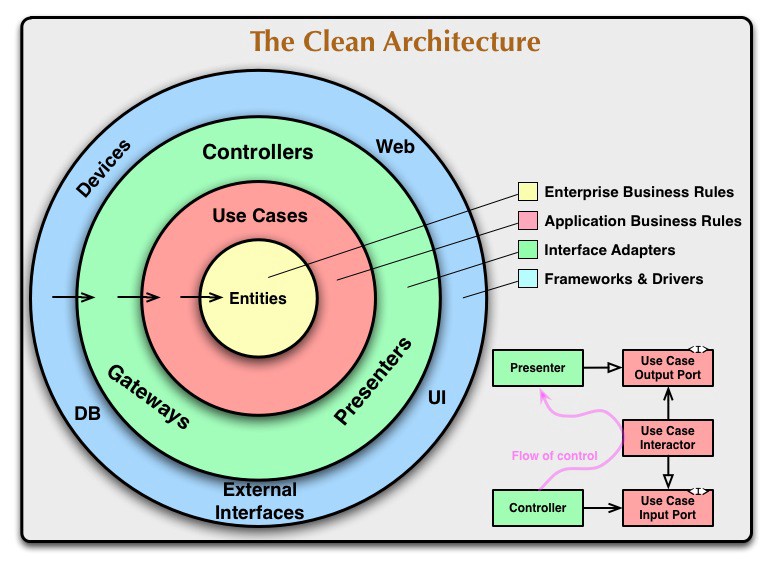
{: refdef}
I have had good results using some of these techniques in my Serverless Books API application. In my case the layers are named slightly differently, with handlers, utilities and adapter layers, but the idea is the same. Each layer encapsulates some bits of information so that the core handler functions don’t need to know exactly how the storage has been implemented.
The core layer handler functions use the addBook, getBook, getAllBooks, updateBook and deleteBook utility functions, passing in the query data, but don’t know any details about how and where the data is stored.
The utility functions, which are the next level out, know only the name of a table passed in via an environment variable. They use the create, get, getAll, delete and update db adapter functions passing in the query data and the table name.
The db adapter functions connect to the backend cloud database to perform the operation, do any necessary post processing to the data and return it through the layers back to the core, which eventually sends the data back to the end user.
Since the db adapter is generic it can be used by any utility function to read and write data to any database table, as long as the utility function passes in the table name.
Changing to a service hosted by another provider is then just a question of implementing a new adapter, the business logic in the core should remain unchanged, and only the storage identifier (i.e. the table name) might have to be updated to work with the new adapter.
Thinking about it logically, the most resilient way to develop applications in this way would be to always start by implementing a version of the service yourself, even if it’s paired down in functionality and scale, and only when you have a basic version running, write an adapter for the hosting provider’s version of the service. That way in the worst case you always have something to fall back on, though there would be some degradation to the performance.
Everyone’s situation is different though, and your circumstances might be such that you don’t have time to go through ultra-cautious route, in which case build out cloud integrations first, and at a later date back track and build your own fallback version of the service. There might even be cases where that approach is quicker overall because you will likely learn a lot about how to build yours by using that of the cloud provider.
Although it’s early days for cloud computing, even large companies such as the British Broadcasting Company (BBC) in the UK are building huge cloud native infrastructures. It’s interesting to read their high level goals and see how cloud technologies align very well with their mission.
From my linkblog 03/01/2021:
Moving BBC Online to the cloud - The engineering team writeup of their recent move from on-premises infrastructure to mostly cloud based where they are using serverless technologies extensively - Very clear articulation of the project high level goals, a description of the layered approach that enables code re-use but also keeps the flexibility to create custom specialised solutions, the re-organisation into teams focussed on page types and common concerns such as development methodology and hosting, interspersed with lots of development principles and guidelines - I have worked on several big projects at the BBC, it’s a staggeringly large organisation, so I am aware of how massive an undertaking this re-architecting of their infrastructure must have been, kudos to all the teams that made it happen medium.com
However remember they are a very big company, so they will have high leverage with their hosting providers and it’s likely that they will have service level agreements giving them preferred access to the hosting provider’s support staff. And of course they might very well be busy building their own fallback services too. Just because large companies go full cloud doesn’t necessarily mean that it’s the right choice for every business, the trade-offs and peculiarities to consider in the decision making process are going to be different in each situation.
Cloud Native is a tremendous leap forward for building applications. You will be able to rapidly build out applications that are performant, robust and that can scale to handle any load. Keep in mind the risks, think about resiliency, try to have contingency plans for events that can affect your business.
The road to building successful web applications is long and windy, and many things can happen over the life of an organisation. You have to make compromises, strategic decisions and there will likely be times when you have to take some risks, but with some thought and planning it’s possible to make that risk more manageable.
Angela Merkel attacks Twitter over Trump ban - Several EU officials have raised concerns about free speech in the US, article also covers the ban of the Parler social media platform by every big tech company, interesting to note that in french ‘parler’ means ‘to speak’ ft.com #
Lucasfilm and Disney revive Lucasfilm Games - I’m not hugely into gaming, my gaming years are long past now, I played video games in my teens, sometimes in arcades, and also consoles, they were fun times, I started tuning out when every game was a first person shooter, which I just find mind numbingly boring, for some reason this announcement seems really interesting to me, perhaps it’s a nice distraction from all the horrible social media the past few days, anything in a galaxy far far away would be miles better slashgear.com #
The Slope Gets More Slippery As You Expect Content Moderation To Happen At The Infrastructure Layer - The last few days have been completely swamped with completely horrible content from pretty much every news outlet, so this piece is very refreshing as it’s a level headed calm analysis that focusses on the technology aspects (rather than the politics) and what all last few days events could mean for the internet techdirt.com #
Rocking 25+Web Design Trends In 2021😎 - Lots of trends, some very interesting, some feel a bit tired, but overall quite inspiring, my favourites were comfortable colors, 3d colors, gradient colour schemes, interactive 3d content, dark mode, hand drawn elements, chat bots, voice user interfaces, VR, micro interactions and animations, text only hero images, white space, full height homepage heros, using videos, blending photos with graphical elements, bold fonts and colors, and asymmetric layouts dev.to #
Introduction to Python - I’ve been going through Flavio’s super streamlined Python course, the language is as I remember it, though after being in javascript for so many years, I’m surprised by how straight forward everything feels flaviocopes.com #
Super insightful Twitter thread from Steven Sinovsky about the launch of the iPhone in 2007 - Steve was President of the Windows Division at Microsoft back then, so he was really plugged into the state of the industry especially mobile, he describes the broad context of what was happening, all the disparate events that were to culminate in what was to be the iPhone, I remember a lot of it exactly as he describes, but I was only seeing it from an end-user perspective, so it’s wonderful to hear the full tech angle on that huge period of change, real life sure is interesting sometimes, I’m glad to have lived through that moment mobile.twitter.com #
Michael Apted director and Seven Up documentarian dies at ages 79 - I really enjoyed watching the the Seven Up documentary series when I was younger, I learnt a lot about what it mean to be british from those pieces, I haven’t seen the last few of these, hopefully I will some day, I think it also turned me onto documentaries which I love watching, I didn’t know he also directed a Bond movie and the Chronicles of Narnia (how cool!), farewell and all the best Mr Apted theguardian.com #
Linus Torvalds rates his own words ‘incoherent ramblings of a crazy old man’ - Bit of a hyperbole title, he was being humorous, it looks like the next release is well on track theregister.com #
Lenovo unveils ThinkReality A3 smartglasses with Snapdragon XR1 - This makes me wonder is VFX artists are going to be really into AR tech, especially all the 3D folks neowin.net #
Nasa's Curiosity rover - 3,000 days on Mars - Great article and very impressed with the clean look of the BBC News site, no annoying popups, page loads fast and text is very readable on mobile devices, using up the entire screen, very pleasant reading experience bbc.com #
🚀 Housekeeping Note: I’ve added a link to the BBC News Science & Environment website to the list of example sites in my blog post - Web design that focusses on text content is the best blog.markjgsmith.com #
Autonomous and Beautiful Home Devices - Matt Mullenweg describes the IoT devices that he would like to have; devices that look good, don’t have an app, can be easily replaced, that easily connect to the network and that you can be confident won’t stop working because of software incompatibility issues later down the line ma.tt #
☹️ Reddit Profile Saga - When I visit the appeal suspension page there is a message saying: “You cannot submit an appeal - Your account is currently neither suspended nor restricted. If you are trying to submit an appeal for another account that is suspended or restricted, please log out and log in to that account.
For other account issues, please visit our Help Center .” - So it seems my account is not in fact suspended, yet it looks exactly like it is suspended, and I can’t find a way to contact the people that run the website reddit.com #
Just wanted to mention that although the individual articles on the BBC News site look great, and are a pleasure to read, the main page has a horrible popup that gets blasted in your face as soon as the site loads, thus accessibility fir the fantastic articles is quite low bbc.com #
An Invisible Tax on the Web - Video Codecs - Looks at the AV1 codec which is being developed by a consortium of companies including Mozilla, Google, Cisco, Amazon, Netflix, AMD, ARM, Intel, NVIDIA, as an alternative to the ubiquitous H264 and it’s successor H265, it’s royalty free and has better compression blog.mozilla.org #
Substack is adding new features in February - Theming to change the look of newsletters, sublists so writers can segment their members into groups, and a multipub tool so writers can have several publications under one account - I like new features but I personally desperately need some automation tools and markdown support; these additions although cool, are mostly just things that would make my life more difficult not easier theverge.com #
Should I introduce an API Gateway in my workplace? - I liked this article because, though it started out pretty much as I had expected, it ended up going down a path that I totally didn’t expect, but that was very insightful danlebrero.com #
Yes, vanilla JS does scale - Looks at some of the misconceptions floating around on tech Twitter, interesting for the purposes of developing some perspective gomakethings.com #
Twitter permanently bans Trump - I totally checked out of reading Trump tweets including any main stream media reporting on Trump tweets over a year ago, as soon as I see them I just continue scrolling, so I don’t have any of the negative associations that I would have, had I continued to read these, because of that this story feels super weird to me, I tried for a while to find the tweets he wrote, can’t find them anywhere, only enormous tidal waves from main stream, and the small snippets I have read here and there, which were always out of context, don’t actually seem all that bad - I hope people are okay and haven’t been hurt in these riots, but this story is freaking weird theverge.com #
ECMAScript 2020 - the final feature set - A list of all the new features added in 2020 with relevant links to the TC39 process which describe the various maturity stages used for developing new features 2ality.com #
Snowpack 2.0 - A build system for the modern web - This was one of the most popular new tools in the javascript ecosystem for 2020, it modernises the developer workflow by only requiring file bundling (webpack/parcel) for production builds, during development you use snowpack which relies on native ES modules, this makes development much much faster, and you only bundle right at the end, before shipping to production snowpack.dev #
Processing is a flexible software sketchbook and a language for learning how to code within the context of the visual arts processing.org #
When Amazon switched from Sun to Linux - Twitter thread from Dan Rose, who was Director of Business Development at Amazon around 2000, describing the impact of the migration, worth noting there is some dispute of how much of a big deal it was in a related HN thread, they were fighting several other fires including a migration away from Oracle as their database provider, but it’s interesting nonetheless mobile.twitter.com #
☹️ Reddit Profile Saga - Hello shadowban bot, what say you? reddit.com #
☹️ Reddit Profile Saga - Possible bug with my account reddit.com #
☹️ Reddit Profile Saga - I’m being disappeared on Reddit, can anyone help or know what’s going on? indiehackers.com #
☹️ Reddit Profile Saga - The Twitter thread where I’ve tried to contact @reddit, no replies from them so far mobile.twitter.com #
Good News in History, January 9 - Trying to offset all the Reddit sad faces with some good news, the thing with real life is that it happens anyway, so best thing you can do is to note the bad stuff and move on to something a bit more cheery, try to find time to fix when you are more able and when there is possibility for change - Turns out of all things on this day in 2007 the iPhone was unveiled by Apple CEO Steve Jobs :) goodnewsnetwork.org #
Painters Tape and Fault Tolerance - I read a lot of blog posts and a lot of those are about programming, this post from Chris Coyier is just so well balanced and encapsulates an idea so well, one of his best css-tricks.com #
The 2 Essential Ingredients of a Brilliant Title - Worth a read if you ever write technical blog posts dzone.com #
GM unveils new logo - Short John Gruber post, he doesn’t like the new logo, ‘lower case letters aren’t serious’, my initial reaction when I loaded the page wasn’t negative, so I don’t dislike it, personally I don’t have an aversion to lower case letters, I don’t think lower case letters have much to do with seriousness, for me lower case letters have an air of creativity, there is something that’s a bit off though, I’m not quite sure, maybe it looks like a logo that you see on a HiFi system, somehow reminds me of audio equipment daringfireball.net #
No Meetings, No Deadlines, No Full-Time Employees - I read this and was really liking their approach, it sounds like the future of work, but then they list the hiring process, step 2 - unpaid project, which means they are just mooching off of others, that’s when I stopped reading, oh but it’s just a few hours you say, everyone is doing just a few hours, if people are working for you, you should be paying them otherwise you are taking advantage of them, and it’s unsustainable because somebody somewhere has to pay for those hours, and it often ends up being freelancers sahillavingia.com #
🚀 Re-post: The coming revolution in freelance web development blog.markjgsmith.com #
Jack Dorsey and Running Two Companies - Matt Mullenweg (Automattic, Wordpress) interviews Jack Dorsey (Twitter, Square), hoping to have some time to listen to this later ma.tt #
Cloud Manager - A New Multicloud PaaS Platform Built on Kubernetes - The ability to run your applications seamlessly across cloud providers is going to be a big trend in the next few years because although so far we have seen costs mostly getting cheaper, that might not always be the case, it’s still relatively early days for cloud technologies, costs will vary over time, companies will get bought and sold, and there will be shifts in power dynamics in the cloud space thenewstack.io #
Gaming Software Pioneer RAD Game Tools Now Part of Epic Games epicgames.com #
Building better new cities in Southeast Asia - I am a bit hesitant to link to this article because at first glance it seems very critical of the region, and I’ve been here for a while now and I see that life is damn difficult for so many, they are having to build all these new developments in an unimaginable realm of chaos, they have to make a lot of compromises and progress is hard and slow, but it’s happening, and a lot of it is amazing - I’ve met the author of the article James Clark and he’s a nice bloke who’s been in the region much longer than me, and any comments he’s making are from a place of tremendous affection he has for all the places mentioned and their people, and his articles are heavily researched, with a lot of thought and effort going into them, so I think that some of what he’s saying is worth considering - I also think it's fantadtic because it puts the word out that progress is happening, and it’s interesting and it’s real life livinginasia.co #
The nodejs/next-10 group are working collaboratively on the strategic direction of NodeJS, here’s an interesting retrospective board that displays the wants of the various constituencies, i.e. end-users, application operators, application developers, library/package authors, organisations with investments in NodeJS, and NodeJS code maintainers github.com #
🚀 Housekeeping note: I’ve added links to some of the NodeJS working group repos to my blog post - Reasons to use NodeJS for developing your backend systems blog.markjgsmith.com #
Facebook and Instagram ban Trump for 24 hours - Apparently he posted messages he shouldn’t have, I’d like to see what he posted, can’t find any sites that have copies of the tweets, it’s timely for me because the past few days I’ve been fighting a apparent ban (though no way for me to find out for sure) on Reddit, they banned my account before I ever posted a single post! theverge.com #
slowly falling in love with notion - Brad Frost reviews Notion, it’s a really well though out and nice bit of writing, I’ve been hearing and reading about Notion all over the place recently, in podcasts and on blogs, sounds like a great productivity tool bradfrost.com #
Guide on Collecting Feedback for your Newsletter newslettercrew.com #
Amazon buys 4 jets from WestJet and 7 from Delta to expand cargo fleet - It currently rents planes and uses UPS and FedEx for moving packages across long distances, looks like it’s a good time to buy planes at the minute cbc.ca #
Asahi Linux aims to bring you a polished Linux experience on Apple Silicon Macs asahilinux.org #
Some Recent Videos About Websites That Are Pretty Good - Chris Coyier’s roundup of some dev videos he’s been watching, including why the web is a mess, recreating the Didcord sidebar, progressive enhancement, a look at modern javascript and a cssbattle - I haven’t watched any of these yet but Chris has great taste when it comes to frontend development and I wanted to add some frontend links, plus based on his descriptions they look interesting css-tricks.com #
This avocado armchair could be the future of AI Trained on images+captions from the internet rather than curated data sets, two new GPT-3 based AI models, DALL-E which draws images from imputed text and another called CLIP which selects generated images that best match inputted text are used together to create interesting artwork, could lead to AI with better understanding of every day concepts technologyreview.com #
Apple Watch can double as a vlogging viewfinder theverge.com #
Challenges Concerning IoT - Highlights a bunch of important challenges, the most interesting that I hadn’t considered is the issue of bandwidth allocation that will arise later down the line when billions of devices are all operating based on a client/server architecture, basic activities like authentication might start to cause network congestion problems dzone.com #
Create a tag cloud with HTML and CSS - I love tag clouds, I have one on the blog and I use it all the time, and this article is a light read with some nice examples dev.to #
Open Source developer David Recordon announced as the Director of Technology for President Biden at the Whitehouse - I wonder if they’ll be running Linux Desktops, wouldn’t that be cool? zdnet.com #
How freelancing will change under President Biden - Would be great if they made some policies that dealt with the awful way the recruitment process in tech is structured, which is a very real problem for freelancers indiehackers.com #
Jack Dorsey says proposed cryptocurrency regulation would create ‘perverse incentives’ theverge.com #
WikiLeaks founder Julian Assange cannot be extradited to the US, British judge rules theverge.com #
An API Is a Promise - Interacting With Valuable Capabilities - I like this perspective, it’s simple to understand, feels like a good mental model dzone.com #
Twitter buys Breaker social podcast app to boost new Spaces slashgear.com #
Amazon wants to train 29 million people to work in the cloud - On the one hand I think this is great, it opens up lots of opportunities for people and small businesses, on the other hand I’ve spent a lot of time, money and considerable effort learning these technologies over the years, and now a huge load of noobs are going to start lapping me while making comments about about my appearance, circle of life? eminetra.com #
Dell’s automatic webcam shutter is genius and every other laptop should steal it - I definitely like the idea of a webcam shutter but I personally think I would prefer a manual shutter than an automatic one slashgear.com #
Linux 5.11 dominated by descriptors for new AMD silicon theregister.com #
It’s the start of the year, so what better way to start the year than to make a list of technologies I’d like to learn and get experience with over the next 12 months:
I might add some more if I think of any in the next few days/weeks. If I do I will post the update to the linkblog which you can follow using the RSS Feed.
Happy new year and I wish you all the best for 2021!
GitHub dark mode - I missed this earlier in the month, I’m testing it out, it’s pretty cool techradar.com #
How the BBC World Service migrated 31 million weekly readers to an isomorphic react app - Pretty great writeup from the engineering team about their migration from a PHP monolith, it’s cool that they are running server rendered React now, they do a lot of great work when it comes to accessibility since their sites are published in so many different languages and are optimised to run in a huge variety of network connectivity conditions, I’d like to know more about the backend the new system is using, something the article doesn’t cover, did they change backend language? They mention it’s running on cloud infra, but where? And are they using serverless? medium.com #
bbc/simorgh - Github repository for the BBC's open source ReactJS single page application - Used across the BBC World Service News websites, with tens of millions of users, these are some of their biggest websites - It's written in javascript and runs in NodeJS! github.com #
Moving BBC Online to the cloud - The engineering team writeup of their recent move from on-premises infrastructure to mostly cloud based where they are using serverless technologies extensively - Very clear articulation of the project high level goals, a description of the layered approach that enables code re-use but also keeps the flexibility to create custom specialised solutions, the re-organisation into teams focussed on page types and common concerns such as development methodology and hosting, interspersed with lots of development principles and guidelines - I have worked on several big projects at the BBC, it’s a staggeringly large organisation, so I am aware of how massive an undertaking this re-architecting of their infrastructure must have been, kudos to all the teams that made it happen medium.com #
🚀 New Blog Post: Web development technologies bucketlist for 2021 - Getting this year’s blogging ball rolling, making a list is a good way to start blog.markjgsmith.com #
After Eight Mint Chocolate Thins - It’s been such a long time since I’ve had one of these en.m.wikipedia.org #
☹️ Reddit Profile Saga - I’ve been trying to get in contact with Reddit support for weeks now, my account is somehow corrupted, looks fine when logged in, but from the outside I don’t exist, I finally decided to post on Twitter, the post didn’t show up in my feed, so I had to ‘pin’ it to my Twitter account to get it to showup, so now until Reddit replies my Twitter account is basically f-ed as well, you see how fragile all this stuff is? mobile.twitter.com #
An Introvert's Personal Guide to Tech Twitter - I don’t currently do a lot of “interacting” on Twitter, though I do read it occasionally, I found it way too distracting, so I mostly just post links and give out hearts these days, I liked this blog post though blog.shook.codes #
A Guide to Securing Node.js Applications - Great roundup of the most effective security best practices for backend NodeJS development, I’ve used most of these techniques and libraries at some stage dev.to #
Top 7 Web Development Trends to Expect in 2021 - I haven’t seen very many 2021 prediction blog posts centred on web development so far, this one lists several of the trends that seem likely to make an impact, but the reasoning and analysis is a bit underwhelming dzone.com #
Cloudflare Introduces a Way to Build and Host Jamstack Sites with Cloudflare Pages - Short and to the point review of Cloudflare’s new Jamstack offering, 500 free builds per month, and integration with Cloudflare Workers with Key-Value Store, I’m wondering if there is a way to deploy from Github Actions, looks pretty cool infoq.com #
Showing the last 195 active days.