markjgsmith

2018/12/31

2018/12/30

2018/12/29

2018/12/28

2018/12/27

2018/12/25

2018/12/24

2018/12/23

2018/12/22

2018/12/21

2018/12/20

2018/12/19

2018/12/18

2018/12/17

2018/12/16

2018/12/15

2018/12/14

2018/12/13

2018/12/12

2018/12/11

2018/12/10

2018/12/09

2018/12/08

2018/12/07

2018/12/06

2018/12/05

2018/12/04

2018/12/03

2018/12/02

2018/12/01

2018/11/30

2018/11/29

2018/11/28

2018/11/27

2018/11/26

2018/11/24

2018/11/23

2018/11/22

2018/11/21

2018/11/20

2018/11/19

2018/11/18

2018/11/17

2018/11/16

2018/11/15

2018/11/14

2018/11/13

2018/11/12

2018/11/11

2018/11/10

2018/11/09

2018/11/08

2018/11/07

2018/11/06

2018/11/05

2018/11/04

2018/11/03

2018/11/02

2018/11/01

2018/10/31

2018/10/29

2018/10/28

2018/10/26

2018/10/25

2018/10/24

2018/10/23

2018/10/22

2018/10/21

2018/10/20

2018/10/19

2018/10/18

2018/10/17

2018/10/16

2018/10/15

2018/10/14

2018/10/13

2018/10/12

2018/10/11

2018/10/10

2018/10/08

2018/10/07

2018/10/06

2018/10/05

2018/10/04

2018/10/03

2018/10/02

2018/10/01

2018/09/30

2018/09/29

2018/09/28

2018/09/27

2018/09/26

2018/09/25

2018/09/24

2018/09/23

2018/09/22

2018/09/20

2018/09/19

2018/09/18

2018/09/17

2018/09/16

2018/09/14

2018/09/13

2018/09/12

2018/09/10

2018/09/08

2018/09/06

2018/09/05

2018/09/04

2018/09/03

2018/09/01

2018/08/31

2018/08/30

2018/08/29

2018/08/28

2018/08/27

2018/08/26

2018/08/25

2018/08/24

2018/08/23

2018/08/22

2018/08/21

2018/08/20

2018/08/18

2018/08/17

2018/08/15

2018/08/14

Linkblog featured on 10words

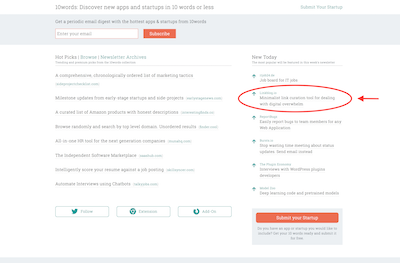
Linkblog is featured today on 10words.io, currently on the homepage and will also go out via their newsletter and twitter!

To all the 10words readers - thanks for stoping by!

{:refdef: style="text-align: center;"}
Linkblog on 10words
{: refdef}

A good example of a linkblog is my linkblog which I also publish using the custom domain feature so that it nicely fits in with my other web presences.

Some other examples of use are posting links to blog posts and finding a video you watched last year and the latest feature addition is the navbar globe icon. Running a linkblog is a great way to build some context around what you are doing.

This blog post wouldn't be complete without a coupon code. If you've read this far then you're at least curious, if you use coupon code 10WORDS at check out get 30% discount on your first year, and it's a 30 day money back guaranty.

2018/08/12

2018/08/11

2018/08/10

2018/08/09

New Linkblog feature: navbar globe icon

The navbar globe icon feature adds a way to link to your other online sites. To set it up, simply update the url form field on your user profile page. Then a globe icon will render in your public linkblog's navbar that loads that url when clicked.

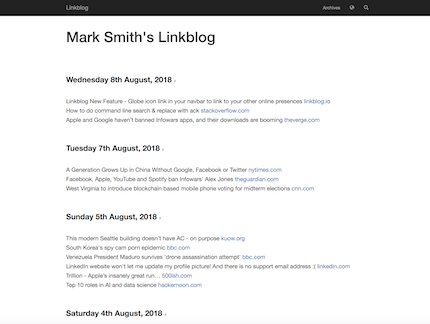
It's a minimalist way to link to your other sites from your linkblog, so visitors can find your other presences online. In the screenshot below notice the globe icon in the top right just next to the search icon, and in my case it links to my homepage, which has links to all my other online sites, so visitors have a way to find among others my blog, twitter, linkedin.

See it in action here.

Linkblog globe icon

2018/08/07

2018/08/05

2018/08/04

2018/08/03

2018/08/02

2018/08/01

2018/07/31

2018/07/28

2018/07/27

2018/07/26

2018/07/25

2018/07/24

2018/07/23

2018/07/22

2018/07/20

2018/07/19

2018/07/18

2018/07/17

2018/07/16

2018/07/14

2018/07/13

2018/07/12

2018/07/11

2018/07/08

2018/07/07

The dead simple todos system

Over the years I've tried a variety of sofware solutions to todo lists but I always find that eventually I end up just opening a empty file and typing a text list. It's just so straight forward. Almost as if writing a list in a notebook, which of course is the ultimate todo list solution.

Anyhow I've been adding quite a lot of aliases to my dotfiles recently and I wondered if I could add just a few that would make the bare essentials of a todo list system. These are the aliases that I came up with:

{% highlight bash %}
alias 'slugd=date +%Y-%m-%d'
alias 'todos=cd $TODOS_DIR'
alias 'tdf=echo $TODOS_DIR/$(ls $TODOS_DIR | tail -n 1)'
alias 'tdt=echo $TODOS_DIR/$(slugd).txt'
alias 'tde=e $(tdf)'
alias 'tdd=echo "### $(date "+%A %d %B, %Y") ###"'
alias 'tda=cat $(tdf); echo'
alias 'tdc=cat $(tdf) | grep "[x]"'
alias 'tdi=cat $(tdf) | grep "[ ]"'
alias 'tdn=TODOS=$(tdi); ! test -f $(tdt) && tdd > $TODOS_DIR/$(slugd).txt && echo >> $(tdf) && echo "$TODOS" >> $(tdf) && tda'
{% endhighlight %}

It's all very standard shell scripting, the aliases get loaded from .bash_aliases or similar. The only complicated one is tdn which only creates the new todos file if one doesn't already exist for the current day to avoid accidentally overwritting an existing list.

  • slugd - create slug using date
  • todos - fast navigation to $TODO_DIR
  • tdf - (file) prints latest existing todo file path
  • tdt - (today) prints file path using todays date
  • tde - (edit) opens latest todo file in editor
  • tdd - (date) prints todays date nicely formated
  • tda - (all) prints all todos from latest todo file
  • tdc - (complete) prints all completed todos from latest todo file
  • tdi - (incomplete) prints all incomplete todos from latest todo file
  • tdn - (new) new todo file extracting all incomplete from previous

In practive the only aliases you actually use are tdn, tda and tde.
That's it just 3 aliases to remember and it's pretty close to using a notebook. The only configuration necessary is to set TODOS_DIR environment variable somewhere that gets loaded by the shell automically like your shell's .bashrc file.

Here is what a todo list file looks like:

{% highlight bash %}
~ $ tda

Saturday 07 July, 2018

[ ] Install new theme on blog
[ ] Deploy live keys to payments pages
[ ] Troubleshoot failed mail deliveries
[ ] Add links to freelancer github repo on payment pages
[x] Troubleshoot github remotes issue on markjgsmith.com
[x] Troubleshoot freelancer left pane image centering issue
[ ] Re-organise dotfiles and dotfiles local
[x] Add todo aliases to dotfiles
[ ] New blog post: The dead simple todos system

~ $
{% endhighlight %}

The real test of course is tomorrow morning when I create a new todo list.

2018/07/06

2018/07/05

Ruby jargon to Nodejs jargon translation

I've been making quite a lot of modifications to the blog recently. The blog is generated by Jekyll a tool written in the ruby programming language. I have been seeing a lot of warning messages about ruby versions during builds, so it's time to try to figure out what's going on.

Everytime I've ventured into this area it's been full of confusing articles and definitions that don't seem to quite match up. I found an article comparing the rvm and rbenv ruby version managers, which along with my browsing various ruby sites and blogs and quite a lot of head scratching resulted in the followng translation which might be of use to other nodejs developers:

  • ruby === node
  • rubbies === versions of node
  • RubyGems.org === npmjs.com
  • gems === node modules (packages hosted on npmjs.com)
  • gemsets === node_modules folders (there can be many)
  • Gemfile === package.json
  • gem === npm
  • bundler === yarn
  • rvm === nvm
  • rbenv === simpler rvm

Something to be aware of is that rvm apparently also overides the system cd command to automatically set ruby on directory change which might not be desirable.

I don't claim that the list of correct, it's just what I've come up with so far. Email me with any corrections.

Commands I ran to install rbenv and upgrade ruby versions

I was able to upgrade ruby versions. These are the commands I had to run. I will spare you the error messages and detours.

{% highlight bash %}
~ $ ruby -v
ruby 2.3.0p0 (2015-12-25 revision 53290) [x86_64-darwin14]

Commands to install rbenv and latest ruby

brew doctor
brew update
brew install rbenv
echo export PATH=$HOME/.rbenv/shims:$PATH >> $HOME/.bashrc
brew upgrade ruby-build
rbenv install --list
rbenv install 2.5.1
echo 2.5.1 > ~/.rbenv/version
rbenv rehash
rbenv versions
gem env
gem install bundler

~ $ ruby -v
ruby 2.5.1p57 (2018-03-29 revision 63029) [x86_64-darwin15]

Re-install the gems in the blog installation directory

bundle install
bundle show jekyll
bundle exec jekyll serve
{% endhighlight %}

These are essentially the commands I ran, roughly in that order but it got a bit confusing somewhere in the middle.

I decided not to run rbenv init, the only mandatory thing it does is add the shims folder to the PATH. So I just did that myself.

2018/07/04

Description of my freelance NodeJS and automation software services

Update - This is the blog post that constituted the original services description, it is no longer being updated and has been replaced by the services page.

The consultancy service is very straight forward, it covers any aspect of building cloud web applications and is delivered via Skype call. It is customizable to the clients needs but generally covers architecture, building and deployment as well as things like efficient setup of developer environments.

The infrastructure service deliverable is a running cloud based system ready for web application deployment. There are lot of tweaks necessary over and above the vanilla Ubuntu install that your cloud provider offers, such as machine access, cloud provider environment setup, firewall rules, logs, 3rd party applications installation and configuration, user accounts, aliases, SSL certificates, cron jobs to name a few. This services covers all these and does it at 3 complexity levels depending on the size of your installation.

The maintenance service is aimed at maintenance and support of a web application infrastructure. It should be used for upgrades, improvements and customizations to an existing infrastructure.

The development service covers the development of NodeJS based web applications and could cover any type of application. It also covers the development of software based automation and workflows. I recommend doing some consultancy services sessions first to determine the application specifics before starting a development services engagement.

The custom training service covers the creation and delivery of custom training on web development and automation/workflow design and implementation. These can be made according to customer needs, could involve a systems discovery and consulting phase, and delivered either onsite or remotely via video conferencing tools. Other training topics might be possible.

The writing service is aimed at internet publications that wish to create content for their websites. It could cover any aspects of web development, and might be in the form of a tutorial or perhaps an essay expressing an opinion on a particular aspect of modern technology. The details could be fleshed out via a short consultancy service.

The pricing page has the full list of the packages for each service. If you would like to purchase some software services or products visit the payments page.

2018/07/03

2018/07/02

2018/06/30

How I use my linkblog - finding a git tutorial I watched last year

Situation:

I need to commit some changes to my dotfiles, when I do a git diff I see that there are two distinct changes that have been made because I must have forgotten to check the previous change in, no doubt I was distracted by something much more impotant at the time. The world is like that sometimes. Other people are just so me me me sometimes. :)

I could check these commits in one commit, it's no big deal, they are my dotfiles in any case, it won't matter really. On the other hand I know there is a git command just for this called patch, but I don't use it very often and I don't remember the flow. However I do remember that I watched a tutorial on youtube but it was a long time ago, at least a year. I did post a link to it on my linkblog because it was quite a good video. Might as well learn it now, plus I can write a how to blog post.

Solution:

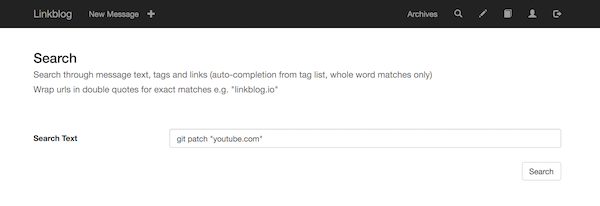
So I open up my linkblog on the search page. I search for: git patch "youtube.com"

Linkblog search

Adding the url in quotes returns exact matches for the url. I hit the search button and receive a load of results. I use the browser in page search by doing ctr-f and type 'patch' in the browser search box window that opens in the top right of the browser. I hit enter and all occurrances of patch are highlighted in yellow. Hitting enter a few more times and the focus jumps down the page and BAM there is the tutorial: "Intro to git patch mode tutorial". As an added bonus I notice that there is another video I posted about git patch right above it. Cool!

Linkblog search results

I click the cmd-click the domain at the end of the line and a new browser window tab opens up loading the youtube video. Oh so THAT's how to git patch!

Here is a link to that day in my linkblog timeline. The video was by a chap named John Karey. Thanks for the video John.

How I use my linkblog - posting a link to my latest blog post

Situation:

Earlier I wrote a how to blog post. It would be nice to add it to my linkblog timeline in case anyone stumbles across my linkblog. Then they might get a better idea of how a linkblog might be useful. It might also be interesting to others that are building software and writing documentation to see my flow.

Solution:

I open the post in my web browser, load the blog post I just wrote and click the bookmarklet in my browser bookmarks bar. I added the popup bookmarklet to my browser bookmarks bar when I setup my linkblog account.

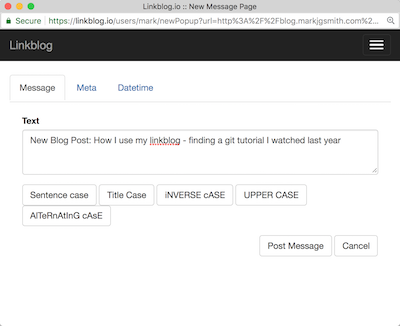
Linkblog popup bookmarklet

The popup window appears and I add the text "New Post:" to the start of the message text. When I am linking to a blog post I wrote, I always add this prefix so that I can easily search for them later, and it also draws a bit of attention to the link for people that might read my linkblog.

Linkblog popup bookmarklet edit message text

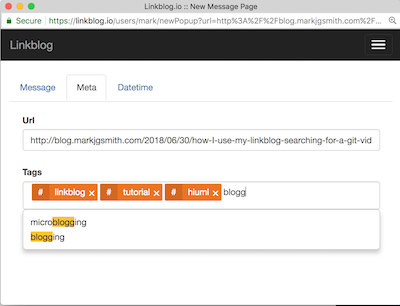
I click on the 'Meta' tab and add some tags. While typing the tags, a drop down appears under the tag box to suggest tags that I have previously used in posts. I click the tag in the drop down and it autocompletes the tag in the tag boz or just continue typing and hit enter when I am done typing the tag. Tags can have spaces in them but no underscores.

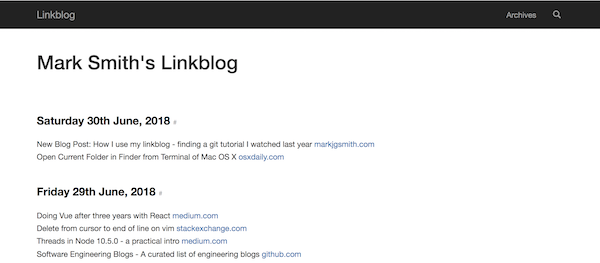
I jump back to the main tab and click the "Post Message" button. The window disappears as if it was never there. I open my linkblog and find that a new item has been posted linking to the blog post.

Linkblog popup bookmarklet add tags

2018/06/29

2018/06/28

2018/06/27

2018/06/26

Launch on Indie Hackers

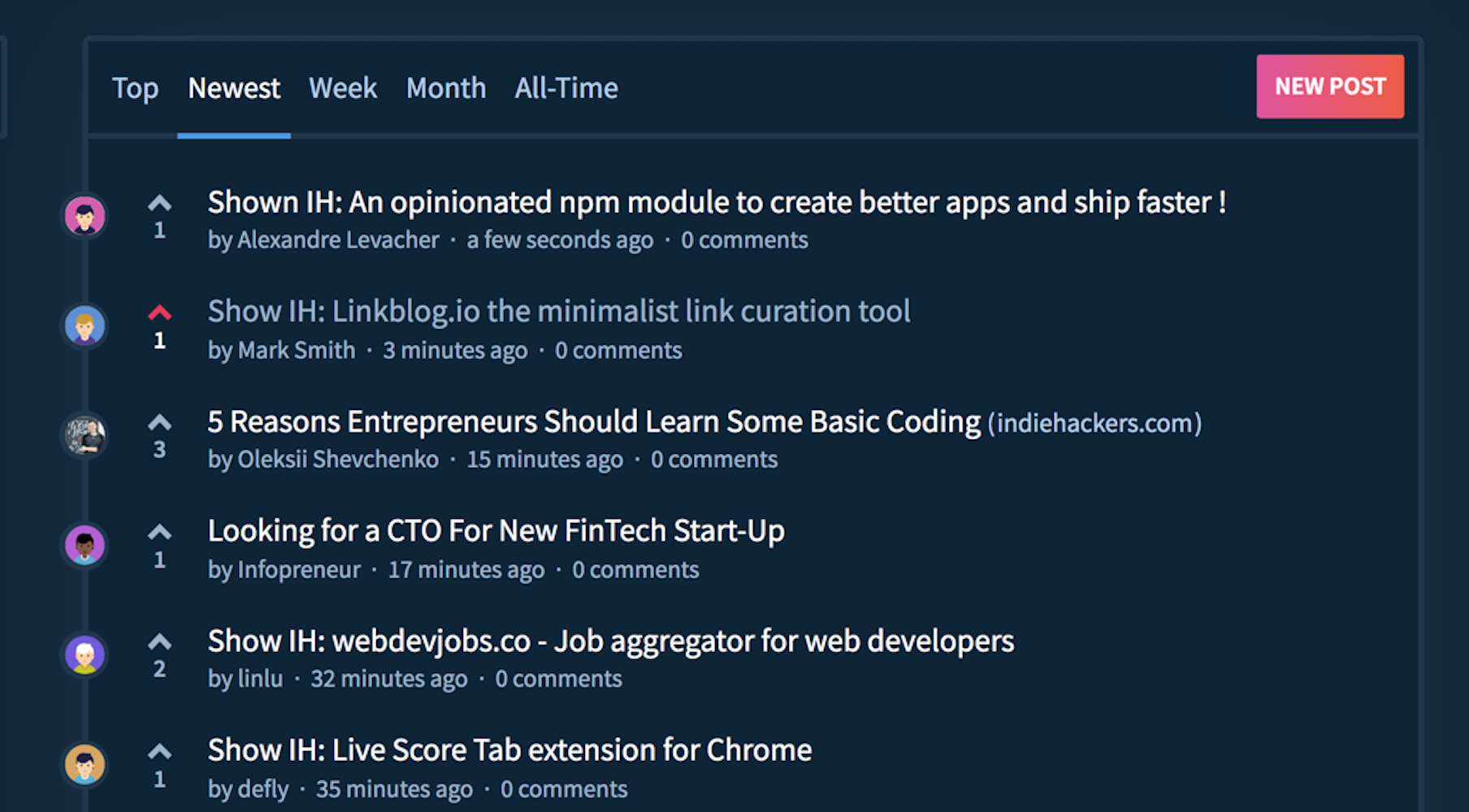
I unnoficially launched Linkblog.io yesterday on Indie Hackers. It's been a long road with a seemingly endless onslaught of showstoppers, but the site is up and running and it's built with a strong architecture, and running on a stable infrastructure with the possibility to scale if necessary.

Linkblog on Indie Hackers

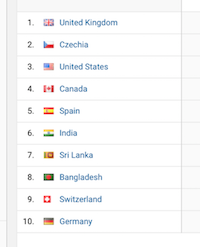
There was modest amount of hits from around the globe and I even got a comment, which was at least partially positive. After a few hours I realised that I had no way to differentiate between server-side side and client-side analytics. Oh noes!

Linkblog seen from around the world

So today I setup some new views and filters using custom dimensions to show each type of data. Things are looking much better now. :)

If you're intersted in signing up, there is a promo code on the indie hackers post, your entire first year for the price of a few cups of coffee.

Things I learnt as a solo developer building Linkblog.io

Building a web application as a solo developer ain't easy. There are an insane amount of things that need to be done and an almost unimaginable amount of decisions that need to be made...but it's possible.

I wanted to take a few minutes to reflect on some of the things that I've learnt along the way:

  • selecting the right technologies
  • setting up consistent development environment
  • using unix/linux tools effectively
  • building a deployment pipeline
  • architecting the app
  • building a scaleable infrastructure
  • testing, linting, logging, debugging
  • securing components
  • scripting and automation
  • setting up server side and client side analytics

If you are a solo developer / small team just starting out on your building journey, feel free to get in touch tell me a bit about yourself. All these things are very fresh in my mind right now, and I am available for consulting gigs! Investing a bit of time and money now might save you weeks if not months of headaches later down the line.

2018/06/25

2018/06/22

2018/06/21

2018/06/20

2018/06/19

2018/06/14

2018/06/12

2018/06/11

2018/06/10

How to get an old jekyll blog active again

It was actually pretty straight forward. Check that the git remote is still configured, install the jekyll software, follow the instructions in the error messages. I had the dev version of the site back up within a few minutes.

{% highlight bash %}
$ cd $WEBSITES_DIR/blog.markjgsmith.com
$ git status
On branch master
Your branch is up-to-date with 'origin/master'.
nothing to commit, working tree clean
$ cat .git/config | grep -A 2 remote\ "origin"
[remote "origin"]
url = https://github.com/mjgs/mjgs.github.io.git
fetch = +refs/heads/:refs/remotes/origin/
$ which jekyl
$ gem install jekyll bundler
$ bundle exec jekyll serve
Could not find RedCloth-4.2.9 in any of the sources
Run bundle install to install missing gems.
$ bundle install
$ bundle exec jekyll serve
Configuration file: [WEBSITES_DIR]/blog.markjgsmith.com/_config.yml
No post given to analyze. Try with -h
Source: [WEBSITES_DIR]/blog.markjgsmith.com
Destination: [WEBSITES_DIR]/blog.markjgsmith.com/_site
Generating...
done.
Auto-regeneration: enabled for '[WEBSITES_DIR]/blog.markjgsmith.com'
Configuration file: [WEBSITES_DIR]/blog.markjgsmith.com/_config.yml
Server address: http://0.0.0.0:4000/
Server running... press ctrl-c to stop.
{% endhighlight %}

I'm still a little fuzy on how to add posts. I tried to login to prose.io but the site wanted full access to all my repos on Github...a little excessive. Oh well editing in vim is good enough.

Last but not least push the changes to github...

{% highlight bash %}
git add *
git commit -m "New post: How to get an old jekyll blog active again"
git push
{% endhighlight %}

2018/06/09

2018/06/08

2018/06/06

2018/06/02

2018/06/01

2018/05/31

2018/05/30

2018/05/27

2018/05/26

2018/05/25

2018/05/15

2018/05/09

2018/05/08

2018/05/06

2018/05/02

2018/05/01

2018/04/29

2018/04/26

2018/04/25

2018/04/23

2018/04/22

2018/04/19

2018/04/18

2018/04/17

2018/04/16

2018/04/14

2018/04/12

2018/04/08

2018/04/07

2018/04/06

2018/04/04

2018/04/03

2018/04/02

2018/03/30

2018/03/29

2018/03/26

2018/03/25

2018/03/24

2018/03/23

2018/03/22

2018/03/21

2018/03/20

2018/03/19

2018/03/18

2018/03/17

2018/03/16

2018/03/15

2018/03/14

2018/03/13

2018/03/12

2018/03/11

2018/03/09

2018/03/08

2018/03/07

2018/03/06

2018/03/05

2018/03/03

2018/03/02

2018/02/28

2018/02/25

2018/02/21

2018/02/20

2018/02/19

2018/02/18

2018/02/17

2018/02/15

2018/02/09

2018/02/08

2018/02/07

2018/02/04

2018/02/03

2018/02/01

2018/01/30

2018/01/29

2018/01/25

2018/01/24

2018/01/23

2018/01/22

2018/01/21

2018/01/18

2018/01/16

2018/01/15

2018/01/14

2018/01/12

2018/01/10

2018/01/08

2018/01/07

2018/01/06

2018/01/05

2018/01/04

2018/01/02

2018/01/01