markjgsmith

2026/07/21

AT protocol back in the headlines

I‘ve been seeing AT protocol mentioned in several places in the past few weeks. It‘s one of the bunch of social media protocols that emerged a few years ago. I wrote about it at the time, as I read through most of the big hitters. I remember quite liking AT proto, it felt very well put together, well thought out.

Dan Abramov was on Shop Talk Show EP#724 talking about it. He does a really good job of painting the AT Proto picture. I like that it‘s all ultimately just files, that you can look underneath and see what is going on. I get the impression that it wouldn‘t be too difficult to debug AT Proto app code, and I thought the notion that you get your own personal Dropbox folder in the cloud that any app can read and write to, was very compelling. Worth a listen.

2026/07/20

The issue I have with the IndieWeb is it just feels too complicated. Great write up by Andros Fenollosa of his experiences. He really likes it. I didn't realise they were overloading CSS classes. Just seems like a really bad idea to overload CSS classes to do social web stuff imho. When you are starting out writing HTML/CSS/Javascript things get complicated enough pretty quickly. #

2026/07/19

Being a software developer

A day in the life of a software developer:

  • A: We have problem!
  • B: OK lets fix the problem.
  • A: The problem is fixed!
  • B: Ok awesome full steam ahead!
  • A: The fix has highlighted a deeper problem.
  • B: Oh shit we have to pause the steam ship! Save everything! Let’s fix the deeper problem.
  • A: The deeper problem is fixed! We are fucking exhausted!
  • B: I think we can see light at the end of the tunnel! Resurrect the steam ship!
  • A: It’s a fucking mess but we have boosters now.
  • B: I am still quite confused.
  • A: How many times have we been through this loop?
  • B: Life is loop.
  • A: We still have boosters.
  • B: I fucking love boosters, just wish it wasn’t so fucking messy so we could actually use them.
  • A: We are cleaning up the mess!
  • A: You are never going to guess what just happened while we were cleaning!

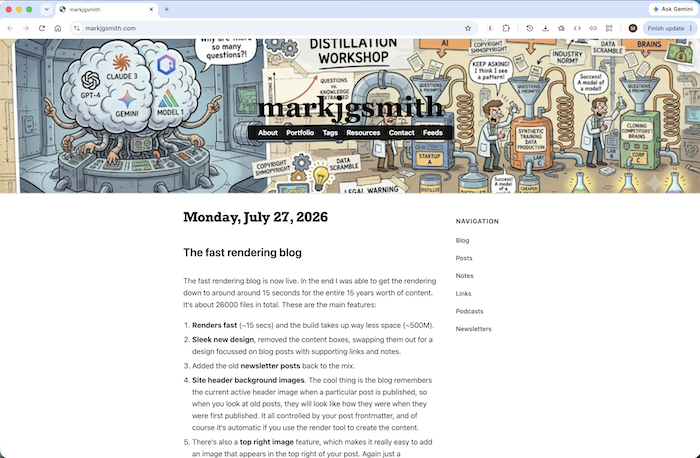
I‘m still trying to get my head around all the things that I‘ve been through in the past few days trying to optimise the rendering of the website. The difficulty I had writing this blog post is an indication of that for sure. But I do know that I don‘t often get an opportunity like this to use the HTML details tag, so...

Remember, when I started optimising it was taking 45 minutes to render the last 10 years of content.

How long does it now take to render the entire 10 years of the blog? Fast Render

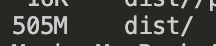
And also remember it was taking up 5GB of space.

How much space does the render now take up? Light Render

It‘s still kind of a mess. There are some small things that need fixing. I have to figure out how to resurrect the steam ship.

Porting the new rendering pipeline to the live blog isn‘t completely straight forward, but luckily the new themes feature will make that a lot easier. The old theme was a hardcoded internal theme, but as part of this whole endeavour I turned the theme system into a full blown real feature. You can now install themes as npm packages, and the new optimised website rendering configuration is the first real external theme.

Definite progress, even if it‘s slow going at times.

2026/07/15

Slowing down to speed up

When I got the recent website redesign working and was able to finally get it deployed live, I had been working on the serverside of my new publishing tool for a while, and the static site renderer had been ticking along very nicely without any real issues. However when I switched back to the rendering and finally tried to build my whole website, with over 10 years worth of content, I had a bit of an unpleasant surprise.

The old system was consistently taking about 4-5 minutes to build and deploy, but the new system when I first ran it, took 45 minutes just to do the render. And in fact things would get even worse before they got better. I later discovered that the Github Actions runner had started failing with out of space issues. When I looked into it and ran the build locally it was taking up about 15GB of space. I undid the change I had just made and got it back down to 5GB, and the deploy started completing again, but it was clear I had both render time issues and space utilisation issues.

As you can imagine my heart sank considerably. Had I missed something important in my architecture? Did I overlook something fundamental that invalidated my whole approach? Not a great situation. I worked on optimising the rendering for several days. Got the times down to 30 minutes, then 15 minutes, and then 6-7 minutes. At which point I knew that things were back in the right general region, but I could tell there were some big improvements that could be made.

Well I‘ve spent another few days on it, and I‘ve made some really huge speed improvements and with it stability and much better HTML and CSS structure. Feeling pretty good about it.

2026/07/10

All you need is templates and an LLM. #

I just overhauled the bash aliases I have configured for all the git commands I use most often. I was thinking wouldn‘t it be nice if it were easier to edit my dotfiles and wouldn‘t you know it, I found a bash function called dotedit I had created the last time I refactored my dotfiles, but then totally forgot I had written it. I need to remember to use dotedit! #

One of the odd things about LLMs is they can both get you out of a tangled mess, and cause you to fall into one, and often at the same time. #

Just use templates

I've been refactoring the RSS feeds on the blog the past few days. I now generate the feeds without any feed libraries. It's just plain old templates. Total freedom. No more fighting against other people's vision of reality. I needed to add some custom namespaces, and just updated the template and my static site generator handles all the data preparation. Easy.

Over the years I've gotten into some pickles using various RSS libraries. But you don't need them!

I've added the <source:markdown> and <source:linkFull> namespaces. Here's some docs on the source namespace.

I've also added the podcasts back to the blog, and with a little help from an LLM it was super eady to whip up an RSS 2.0 feed with all the things you need to have it work in itunes. With LLMs and templates you can do most things :)

An untangling algorithm

Sometimes when you get into a tangle a tried and tested way to proceed is to step back, list the tangles as best you can, step back again, look at your tangle description as if you were looking at an expensive piece of art in an art gallery.

Take a break.

Take another peek, don't get scared or overwhelmed.

Think about how you could isolate the different tangles, which no doubt all affect each other. They often do. Then create a minimal example. After which you will be several steps closer to your goal.

You might need to create several of these.

2026/07/09

Previously on the blog, notes and posts appeared in the order they were written. In the new blog I‘m trying something different. The notes always appear above the blog posts, and the links as usual appear at the bottom. I want to make "small thoughts" the first order of the day. #

2026/07/08

The new blog is live

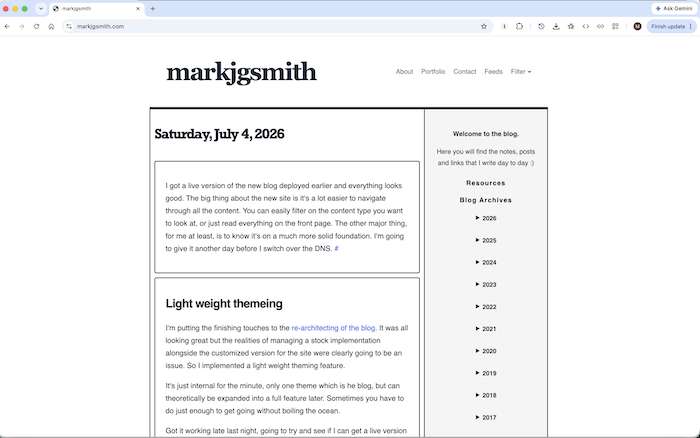
If you have been visiting the blog over the past few days you might have noticed that it has changed somewhat. I deployed the latest version a few days ago, and have been doing various tweeks and fixes. I think things are looking pretty good. The design is a lot more sleek, still minimalist and optimised for reading text. On small screens, the header is smaller to give you maximum screen real estate. It‘s mostly black text on white background, and the titles are bold, there are some black borders around content to keep he focus on the posts. It‘s crisp and clear, and since it‘s a static site, all pre-rendered, it should load really fast.

The other big thing is navigation. In the right sidebar, you will see a list of all the years of content, and you can navigate directly in there to any date and see posts. And in the header you will see a "Filter" dropdown that gives you the possibility to select to just view a specific content type, i.e. notes, posts or links, and it should switch to that content type for the specific date period you are currently looking at. I was able to do away with lots of clutter that was previously in the right sidebar, and now the most important links are in the header: About, Portfolio, Contacts and of course Feeds.

Another small tweek, the year in the footer copyright text at the bottom of the screen is automatically rendered based on the current date, so no more forgetting to manually update it and suddenly it‘s out of date. One less thing to worry about.

The thing that‘s not apparent just from looking at it is that the whole thing is rendered using my new static site generator. That‘s a massive boost in terms of robustness. The code is all in one repo and way way better written, way easier to reason about. It should be much easier to add features, without worrying about breaking things. As much as I loved the old system, and it got me very far, it had some rather rough edges. The new system is inspired by what I learnt the first time around, but it‘s a complete rewrite, with loads of new features, and a much more solid rendering pipeline. And is highly programmable.

There are still some things I need to implement, like for instance tags. You can see the tags on blog posts, but they don't link to pages that contain all posts with those tags just yet. More to write on this in the near future, but for now just happy the migration went quite smoothly, even if it was a lot of work.

This is how it looks:

Blog Redesign 2026

2026/07/04

I got a live version of the new blog deployed earlier and everything looks good. The big thing about the new site is it‘s a lot easier to navigate through all the content. You can easily filter on the content type you want to look at, or just read everything on the front page. The other major thing, for me at least, is to know it‘s on a much more solid foundation. I‘m going to give it another day before I switch over the DNS. #

Light weight themeing

I‘m putting the finishing touches to the re-architecting of the blog. It was all looking great but the realities of managing a stock implementation alongside the customized version for the site were clearly going to be an issue. So I implemented a light weight theming feature.

It‘s just internal for the minute, only one theme which is he blog, but can theoretically be expanded into a full feature later. Sometimes you have to do just enough to get going without boiling the ocean.

Got it working late last night, going to try and see if I can get a live version deployed today.

Happy birthday USA

USA

It‘s been really great to watch on YouTube people from all over the world discover the USA in their travels for the World Cup over the past few weeks. Pretty much everyone is totally in love with what they are finding.

I‘ve travelled quite a bit in the states, having done an east coast to west coast road trip several years ago, so I experienced first hand much of what folks are seeing. The USA really is an amazing place, and the people are super cool too. It‘s very different to what much of the main stream media would have you believe.

And so what a fantastically beautiful thing that it‘s the 250th birthday of the formation of the USA today.

Happy birthday and best wishes to all for the next 250 :)

2026/07/01

Successful first deploy

It‘s really quite mind boggling how many small things there are to fix when you are deploying something for the first time. It feels like it will never end. So many niggly little fixes and things you didn‘t anticipate. It‘s very exhausting.

The good news is that as of a few minutes ago I successfully deployed the new site, fully built using my new rendering tool. I still have a few things to migrate over and I have to rebuild the data to make sure I have the latest, so it‘s not quite ready to show, but the crucial thing is it worked.